
有些人(比如我)可能有这样的需求:不想看到某人发的犇犇,但是也不想取关 TA。因此,这个工具应运而生——
洛谷犇犇屏蔽工具✨
介绍
这个小工具基于 Tampermonkey(篡改猴)开发。安装后,你的洛谷首页下方的犇犇板块将会增加一个按钮。
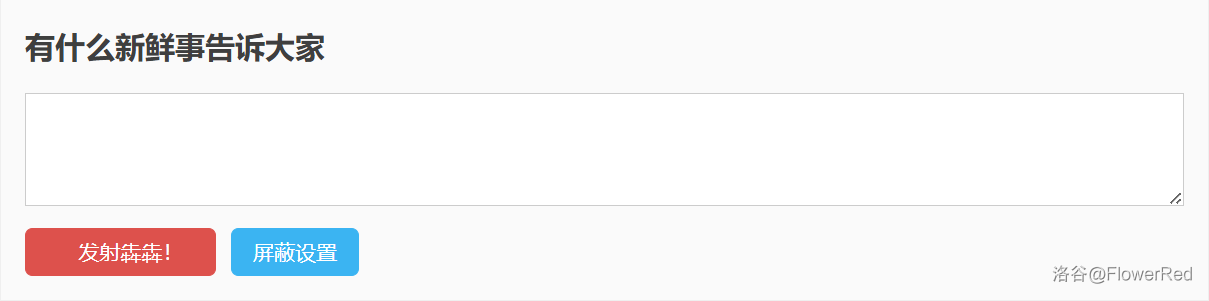
点击后,将会弹出犇犇屏蔽器的设置面板。
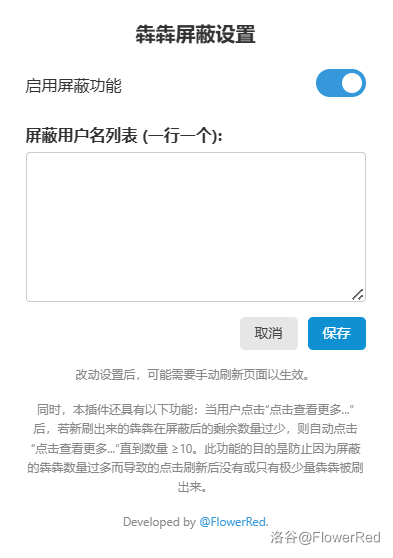
在输入框内输入你想要屏蔽的用户的用户名,点击保存即可。赶快刷新页面看看效果吧!
此外,作者在开发这个小工具的时候,发现当某次点击“点击查看更多…”的时候,由于新加载出来的 条犇犇全部被屏蔽了,看起来就像一条也没有刷新出来一样。因此,为了解决这个问题,作者引入了自动加载更多内容机制——当检测到新刷出来的犇犇数量 时,自动点击“点击查看更多…”直到数量 。因此,当你看到犇犇在自己不停加载,请不要感到诧异哦~
如何安装
首先,你需要给你的浏览器安装一个篡改猴,安装方法请读者自行查询。
安装好后,点击“添加新脚本…”。
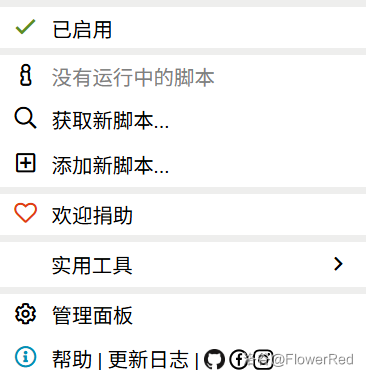
将下面的源代码原封不动复制进去,然后点击左上角文件,点保存,则安装成功。赶快回到洛谷首页刷新页面看看吧~
这是源代码
1.0
最初版本。
// ==UserScript==
// @name 洛谷犇犇屏蔽工具
// @namespace https://www.luogu.com.cn/user/1510406
// @version 1.0
// @description 屏蔽指定用户的犇犇
// @author FlowerRed
// @match *://www.luogu.com.cn/
// @grant GM_addStyle
// @grant GM_setValue
// @grant GM_getValue
// @run-at document-end
// ==/UserScript==
(function() {
'use strict';
const buk = 'luogu_benben_block_list';
const bek = 'luogu_benben_blocker_enabled';
const minb = 10;
let ial = false;
let vbc = 0;
let bbl = 0;
GM_addStyle(`
.lg-benben-blocker-btn { margin-left: 10px; }
.lbb-movl { position: fixed; top: 0; left: 0; width: 100%; height: 100%; background-color: rgba(0, 0, 0, 0.5); z-index: 9999; display: none; justify-content: center; align-items: center; }
.lbb-mcon { background-color: #fff; padding: 20px 30px; border-radius: 8px; width: 400px; box-shadow: 0 4px 15px rgba(0,0,0,0.2); font-family: -apple-system, BlinkMacSystemFont, "Segoe UI", "PingFang SC", "Hiragino Sans GB", "Microsoft YaHei", "Helvetica Neue", Helvetica, Arial, sans-serif; }
.lbb-mcon h2 { margin-top: 0; margin-bottom: 20px; text-align: center; color: #333; }
.lbb-mcon textarea { width: 100%; height: 150px; resize: vertical; margin-bottom: 15px; padding: 8px; box-sizing: border-box; border: 1px solid #ccc; border-radius: 4px; }
.lbb-mcon .srow { display: flex; align-items: center; justify-content: space-between; margin-bottom: 20px; }
.lbb-mcon .disc { font-size: 12px; color: #888; margin-top: 15px; text-align: center; }
.lbb-mcon .mbtns { display: flex; justify-content: flex-end; gap: 10px; }
.switch { position: relative; display: inline-block; width: 50px; height: 28px; }
.switch input { opacity: 0; width: 0; height: 0; }
.slider { position: absolute; cursor: pointer; top: 0; left: 0; right: 0; bottom: 0; background-color: #ccc; transition: .4s; border-radius: 28px; }
.slider:before { position: absolute; content: ""; height: 20px; width: 20px; left: 4px; bottom: 4px; background-color: white; transition: .4s; border-radius: 50%; }
input:checked + .slider { background-color: #3498db; }
input:checked + .slider:before { transform: translateX(22px); }
`);
function bb() {
const on = GM_getValue(bek, true);
if (!on) {
document.querySelectorAll('#feed .feed-li[data-blocked="true"]').forEach(el => {
el.style.display = '';
el.removeAttribute('data-blocked');
});
return;
}
const ul = GM_getValue(buk, []);
if (ul.length === 0) return;
const us = new Set(ul);
const its = document.querySelectorAll('#feed .feed-li:not([data-p])');
its.forEach(it => {
it.setAttribute('data-p', '1');
const ue = it.querySelector('.feed-username a:first-child');
if (ue) {
const u = ue.textContent.trim();
if (us.has(u)) {
it.style.display = 'none';
it.setAttribute('data-blocked', 'true');
}
}
});
}
function csm() {
const mo = document.createElement('div');
mo.className = 'lbb-movl';
mo.innerHTML = `
<div class="lbb-mcon">
<h2>犇犇屏蔽设置</h2>
<div class="srow">
<span>启用屏蔽功能</span>
<label class="switch">
<input type="checkbox" id="lbb-tg">
<span class="slider"></span>
</label>
</div>
<label for="lbb-usrs">屏蔽用户名列表 (一行一个):</label>
<textarea id="lbb-usrs"></textarea>
<div class="mbtns">
<button class="am-btn am-btn-default am-btn-sm" id="lbb-cancel">取消</button>
<button class="am-btn am-btn-primary am-btn-sm" id="lbb-save">保存</button>
</div>
<p class="disc">改动设置后,可能需要手动刷新页面以生效。</p>
<p class="disc">同时,本插件还具有以下功能:当用户点击“点击查看更多...”后,若新刷出来的犇犇在屏蔽后的剩余数量过少,则自动点击“点击查看更多...”直到数量 ≥10。此功能的目的是防止因为屏蔽的犇犇数量过多而导致的点击刷新后没有或只有极少量犇犇被刷出来。</p>
<p class="disc">Developed by <a href="https://www.luogu.com.cn/user/1510406">@FlowerRed</a>.</p>
</div>
`;
document.body.appendChild(mo);
const ta = document.getElementById('lbb-usrs');
const tg = document.getElementById('lbb-tg');
const cd = mo.querySelector('.lbb-mcon');
cd.addEventListener('click', e => e.stopPropagation());
mo.addEventListener('click', () => { mo.style.display = 'none'; });
document.getElementById('lbb-cancel').addEventListener('click', () => { mo.style.display = 'none'; });
document.getElementById('lbb-save').addEventListener('click', () => {
const usrs = ta.value.split('\n').map(u => u.trim()).filter(Boolean);
const on = tg.checked;
GM_setValue(buk, usrs);
GM_setValue(bek, on);
mo.style.display = 'none';
bb();
});
return mo;
}
function osm(m) {
const ul = GM_getValue(buk, []);
const on = GM_getValue(bek, true);
document.getElementById('lbb-usrs').value = ul.join('\n');
document.getElementById('lbb-tg').checked = on;
m.style.display = 'flex';
}
function clm() {
if (!ial) return;
const allb = document.querySelectorAll('#feed .feed-li');
const newb = Array.from(allb).slice(bbl);
let nvc = 0;
newb.forEach(b => {
if (b.style.display !== 'none') {
nvc++;
}
});
vbc += nvc;
const lml = document.querySelector('#feed-more a');
const lmb = document.getElementById('feed-more');
if (vbc < minb && lml && lmb && window.getComputedStyle(lmb).display !== 'none' && lml.textContent.includes('点击查看更多')) {
bbl = allb.length;
lml.click();
} else {
ial = false;
}
}
function obf() {
const fe = document.getElementById('feed');
if (!fe) {
setTimeout(obf, 500);
return;
}
ial = true;
vbc = 0;
bbl = 0;
const obs = new MutationObserver((mls) => {
for(const mut of mls) {
if (mut.type === 'childList' && mut.addedNodes.length > 0) {
bb();
clm();
break;
}
}
});
obs.observe(fe, { childList: true });
}
function init() {
const sb = document.getElementById('feed-submit');
if (!sb) {
setTimeout(init, 500);
return;
}
const setb = document.createElement('button');
setb.textContent = '屏蔽设置';
setb.className = 'am-btn am-btn-secondary am-btn-sm lg-benben-blocker-btn';
const m = csm();
setb.addEventListener('click', () => osm(m));
sb.parentNode.insertBefore(setb, sb.nextSibling);
const lmb = document.querySelector('#feed-more');
if (lmb) {
lmb.addEventListener('click', () => {
if (!ial) {
ial = true;
vbc = 0;
bbl = document.querySelectorAll('#feed .feed-li').length;
}
});
}
obf();
}
window.addEventListener('load', init);
})();1.1
修复了网页刚启动时插件不生效的 bug。
// ==UserScript==
// @name 洛谷犇犇屏蔽工具
// @namespace https://www.luogu.com.cn/user/1510406
// @version 1.1
// @description 屏蔽指定用户的犇犇
// @author FlowerRed
// @match *://www.luogu.com.cn/
// @grant GM_addStyle
// @grant GM_setValue
// @grant GM_getValue
// @run-at document-end
// ==/UserScript==
(function() {
'use strict';
const buk = 'luogu_benben_block_list';
const bek = 'luogu_benben_blocker_enabled';
const minb = 10;
let ial = false;
let vbc = 0;
let bbl = 0;
GM_addStyle(`
.lg-benben-blocker-btn { margin-left: 10px; }
.lbb-movl { position: fixed; top: 0; left: 0; width: 100%; height: 100%; background-color: rgba(0, 0, 0, 0.5); z-index: 9999; display: none; justify-content: center; align-items: center; }
.lbb-mcon { background-color: #fff; padding: 20px 30px; border-radius: 8px; width: 400px; box-shadow: 0 4px 15px rgba(0,0,0,0.2); font-family: -apple-system, BlinkMacSystemFont, "Segoe UI", "PingFang SC", "Hiragino Sans GB", "Microsoft YaHei", "Helvetica Neue", Helvetica, Arial, sans-serif; }
.lbb-mcon h2 { margin-top: 0; margin-bottom: 20px; text-align: center; color: #333; }
.lbb-mcon textarea { width: 100%; height: 150px; resize: vertical; margin-bottom: 15px; padding: 8px; box-sizing: border-box; border: 1px solid #ccc; border-radius: 4px; }
.lbb-mcon .srow { display: flex; align-items: center; justify-content: space-between; margin-bottom: 20px; }
.lbb-mcon .disc { font-size: 12px; color: #888; margin-top: 15px; text-align: center; }
.lbb-mcon .mbtns { display: flex; justify-content: flex-end; gap: 10px; }
.switch { position: relative; display: inline-block; width: 50px; height: 28px; }
.switch input { opacity: 0; width: 0; height: 0; }
.slider { position: absolute; cursor: pointer; top: 0; left: 0; right: 0; bottom: 0; background-color: #ccc; transition: .4s; border-radius: 28px; }
.slider:before { position: absolute; content: ""; height: 20px; width: 20px; left: 4px; bottom: 4px; background-color: white; transition: .4s; border-radius: 50%; }
input:checked + .slider { background-color: #3498db; }
input:checked + .slider:before { transform: translateX(22px); }
`);
function bb() {
const on = GM_getValue(bek, true);
if (!on) {
document.querySelectorAll('#feed .feed-li[data-blocked="true"]').forEach(el => {
el.style.display = '';
el.removeAttribute('data-blocked');
});
return;
}
const ul = GM_getValue(buk, []);
if (ul.length === 0) return;
const us = new Set(ul);
const its = document.querySelectorAll('#feed .feed-li:not([data-p])');
its.forEach(it => {
it.setAttribute('data-p', '1');
const ue = it.querySelector('.feed-username a:first-child');
if (ue) {
const u = ue.textContent.trim();
if (us.has(u)) {
it.style.display = 'none';
it.setAttribute('data-blocked', 'true');
}
}
});
}
function csm() {
const mo = document.createElement('div');
mo.className = 'lbb-movl';
mo.innerHTML = `
<div class="lbb-mcon">
<h2>犇犇屏蔽设置</h2>
<div class="srow">
<span>启用屏蔽功能</span>
<label class="switch">
<input type="checkbox" id="lbb-tg">
<span class="slider"></span>
</label>
</div>
<label for="lbb-usrs">屏蔽用户名列表 (一行一个):</label>
<textarea id="lbb-usrs"></textarea>
<div class="mbtns">
<button class="am-btn am-btn-default am-btn-sm" id="lbb-cancel">取消</button>
<button class="am-btn am-btn-primary am-btn-sm" id="lbb-save">保存</button>
</div>
<p class="disc">改动设置后,可能需要手动刷新页面以生效。</p>
<p class="disc">同时,本插件还具有以下功能:当用户点击"点击查看更多..."后,若新刷出来的犇犇在屏蔽后的剩余数量过少,则自动点击"点击查看更多..."直到数量 ≥10。此功能的目的是防止因为屏蔽的犇犇数量过多而导致的点击刷新后没有或只有极少量犇犇被刷出来。</p>
<p class="disc">Developed by <a href="https://www.luogu.com.cn/user/1510406">@FlowerRed</a>.</p>
</div>
`;
document.body.appendChild(mo);
const ta = document.getElementById('lbb-usrs');
const tg = document.getElementById('lbb-tg');
const cd = mo.querySelector('.lbb-mcon');
cd.addEventListener('click', e => e.stopPropagation());
mo.addEventListener('click', () => { mo.style.display = 'none'; });
document.getElementById('lbb-cancel').addEventListener('click', () => { mo.style.display = 'none'; });
document.getElementById('lbb-save').addEventListener('click', () => {
const usrs = ta.value.split('\n').map(u => u.trim()).filter(Boolean);
const on = tg.checked;
GM_setValue(buk, usrs);
GM_setValue(bek, on);
mo.style.display = 'none';
document.querySelectorAll('#feed .feed-li[data-p]').forEach(el => {
el.removeAttribute('data-p');
});
bb();
});
return mo;
}
function osm(m) {
const ul = GM_getValue(buk, []);
const on = GM_getValue(bek, true);
document.getElementById('lbb-usrs').value = ul.join('\n');
document.getElementById('lbb-tg').checked = on;
m.style.display = 'flex';
}
function clm() {
if (!ial) return;
const allb = document.querySelectorAll('#feed .feed-li');
const newb = Array.from(allb).slice(bbl);
let nvc = 0;
newb.forEach(b => {
if (b.style.display !== 'none') {
nvc++;
}
});
vbc += nvc;
const lml = document.querySelector('#feed-more a');
const lmb = document.getElementById('feed-more');
if (vbc < minb && lml && lmb && window.getComputedStyle(lmb).display !== 'none' && lml.textContent.includes('点击查看更多')) {
bbl = allb.length;
lml.click();
} else {
ial = false;
}
}
function obf() {
const fe = document.getElementById('feed');
if (!fe) {
setTimeout(obf, 500);
return;
}
bb();
ial = true;
vbc = document.querySelectorAll('#feed .feed-li:not([style*="display: none"])').length;
bbl = document.querySelectorAll('#feed .feed-li').length;
const obs = new MutationObserver((mls) => {
for(const mut of mls) {
if (mut.type === 'childList' && mut.addedNodes.length > 0) {
bb();
clm();
break;
}
}
});
obs.observe(fe, { childList: true });
}
function init() {
const sb = document.getElementById('feed-submit');
if (!sb) {
setTimeout(init, 500);
return;
}
const setb = document.createElement('button');
setb.textContent = '屏蔽设置';
setb.className = 'am-btn am-btn-secondary am-btn-sm lg-benben-blocker-btn';
const m = csm();
setb.addEventListener('click', () => osm(m));
sb.parentNode.insertBefore(setb, sb.nextSibling);
const lmb = document.querySelector('#feed-more');
if (lmb) {
lmb.addEventListener('click', () => {
if (!ial) {
ial = true;
vbc = 0;
bbl = document.querySelectorAll('#feed .feed-li').length;
}
});
}
obf();
}
if (document.readyState === 'loading') {
document.addEventListener('DOMContentLoaded', init);
} else {
init();
}
})();结语
蒟蒻第一次做插件,经验不足,还望多多包涵!
若在使用过程中遇到什么 bug 或有什么建议,欢迎找 @FlowerRed 反馈!
后续更新,敬请关注本专栏喵!