跳到正文

科技·工程

洛谷私信图片/Bilibili 视频渲染

MineClaw约 31 分钟
原文

这是 2026年5月4日 存档的第 1 版,不是当前版本。查看当前版本

文章信息与版本

文章信息

发布
2026年5月3日
收录
2026年5月4日
更新
2026年11月7日
篇幅
约 31 分钟
获赞
12

版本

  1. v2当前
  2. v1

前言

本文章根据 私信图片渲染 的思路进行创作,

并在内容方面加入了 Bilibili 视频渲染功能,

修复了如“重复点击左侧同一用户的私信图片会消失”,“在点击查看更多消息以后,之前加载出来的图片会寄掉”等诸多Bug。

安装 Tampermonkey(篡改猴)

Tampermonkey(篡改猴) 允许用户自定义并增强您最喜爱的网页的功能。用户脚本是小型 JavaScript 程序,可用于向网页添加新功能或修改现有功能。使用 篡改猴,您可以轻松在任何网站上创建、管理和运行这些用户脚本。
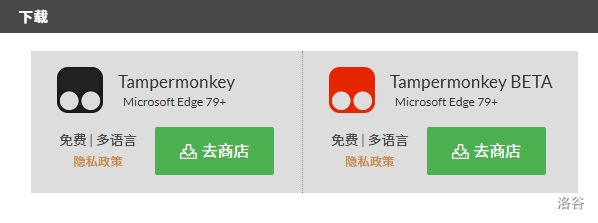
如图,若你为 Microsoft Edge 浏览器,可直接点击“去商店”进行安装。而 Google Chrome 浏览器则需要霍尔沃兹环境,可以利用第三方途径下载 crx 格式插件,打开浏览器插件“开发者选项”,将 crx 格式插件拖入浏览器进行安装。
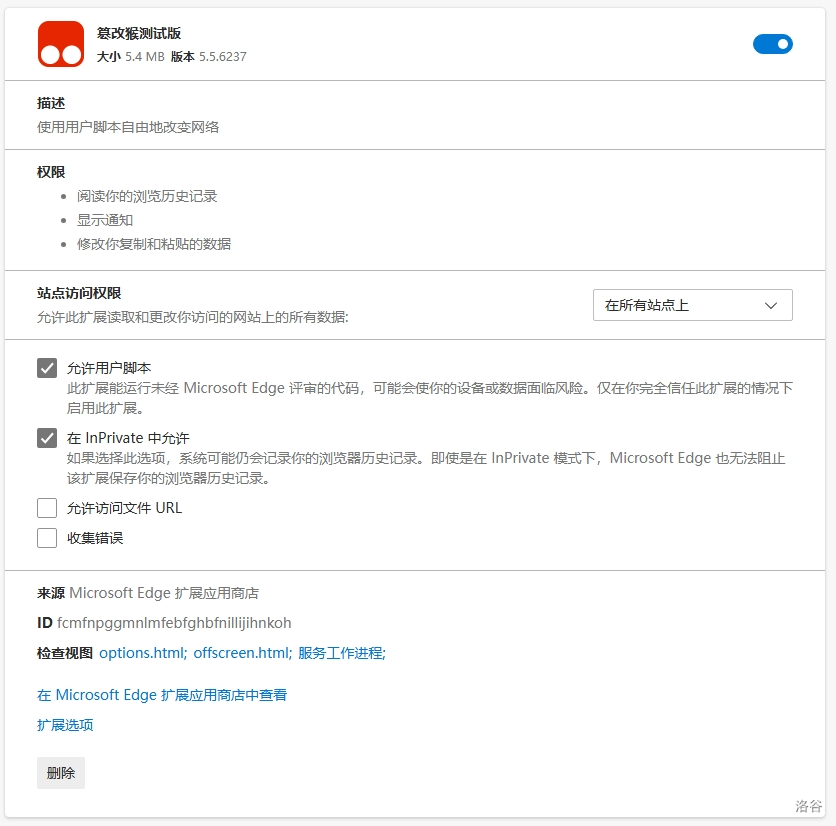
如图,在完成安装后,打开 Tampermonkey(篡改猴) 插件的详情页面,开启“允许用户脚本”选项。

自此, Tampermonkey(篡改猴) 已全部完成。

注:第二幅图中作者使用的为 Tampermonkey BETA(篡改猴测试版) ,但实际安装时可选择 Tampermonkey(篡改猴) (黑色皮肤),官方描述称 “BETA” 版可能会比正常版更新速度快,但可能会有Bug,不能保证使用体验,所以作者建议使用 Tampermonkey(篡改猴) 正常版。

安装脚本

(因为 Greasyfork 在国内因一些不可抗因素无法访问,所以本文使用直接复制代码来进行安装)

复制以下代码,点击拓展列表中的 Tampermonkey(篡改猴) ,点击“添加脚本”,窗口弹出后将代码粘贴,按“ Ctrl + S ”进行保存。

JavaScript
// ==UserScript==
// @name         洛谷私信markdown图片/视频渲染
// @version      1.2
// @description  修复区域选择问题,确保图片和B站视频仅在右侧聊天区域渲染
// @match        https://www.luogu.com.cn/chat$
// @match        https://www.luogu.com.cn/chat/*
// @author       MlkMathew
// @license      MIT
// @grant        none
// @namespace    https://greasyfork.org/users/1068192
// ==/UserScript==

(function() {
    'use strict';

    // ======================== 右侧滑出通知 ========================
    function showNotification(message, duration = 3000) {
        const oldNotify = document.getElementById('luogu-md-notify');
        if (oldNotify) oldNotify.remove();

        const notify = document.createElement('div');
        notify.id = 'luogu-md-notify';
        notify.textContent = message || '✨ 内容渲染完成';
        Object.assign(notify.style, {
            position: 'fixed',
            top: '20px',
            right: '0',
            backgroundColor: 'rgba(255, 255, 255, 0.95)',
            color: '#333',
            padding: '10px 20px',
            borderRadius: '8px 0 0 8px',
            fontSize: '14px',
            fontFamily: 'system-ui, -apple-system, "Segoe UI", Roboto, Helvetica, Arial, sans-serif',
            zIndex: '10000',
            boxShadow: '-2px 2px 8px rgba(0,0,0,0.1)',
            transition: 'transform 0.3s ease-in-out',
            transform: 'translateX(100%)',
            pointerEvents: 'none'
        });
        document.body.appendChild(notify);

        notify.offsetHeight;
        notify.style.transform = 'translateX(0)';

        setTimeout(() => {
            if (notify && notify.parentNode) {
                notify.style.transform = 'translateX(100%)';
                setTimeout(() => {
                    if (notify.parentNode) notify.remove();
                }, 300);
            }
        }, duration);
    }

    // ======================== 获取右侧聊天区域的消息(反向排除法) ========================
    function getChatMessages() {
        // 获取所有可能的候选消息(类名包含 message 的元素)
        const candidates = document.querySelectorAll('.message, .msg-item, [class*="message"]');
        const rightMessages = [];

        for (let el of candidates) {
            // 排除位于侧边栏/左侧区域内的元素
            if (el.closest('.side, aside, .user-list, .chat-user-list, .sidebar')) {
                continue;
            }
            // 确保在 main 区域内(洛谷主体内容区)
            if (!el.closest('main')) {
                continue;
            }
            rightMessages.push(el);
        }

        // 如果上面的方法没找到,降级:直接取 main 下的 .message
        if (rightMessages.length === 0) {
            const mainArea = document.querySelector('main');
            if (mainArea) {
                return Array.from(mainArea.querySelectorAll('.message'));
            }
        }
        return rightMessages;
    }

    // 简化版区域验证(实际上面已经过滤,这里保留以兼容旧逻辑)
    function isInRightChatArea(element) {
        return !element.closest('.side, aside, .user-list, .chat-user-list, .sidebar') && !!element.closest('main');
    }

    // ======================== 媒体渲染核心(与原逻辑一致) ========================
    function text(s) {
        let span = document.createElement('span');
        span.textContent = s;
        return span;
    }

    function image(url) {
        let img = document.createElement('img');
        img.src = url;
        img.className = 'chat-image';
        img.loading = 'lazy';
        img.style.cssText = 'max-width:100%; height:auto; border-radius:4px; cursor:pointer;';
        return img;
    }

    function bilibiliPlayer(raw) {
        let rest = raw.replace(/^bilibili:/i, '').trim();
        if (!rest) return null;

        let query = '';
        let base = rest;
        const qIndex = rest.indexOf('?');
        if (qIndex !== -1) {
            base = rest.substring(0, qIndex);
            query = rest.substring(qIndex + 1);
        }

        let aid = null, bvid = null;
        const avMatch = base.match(/^av(\d+)$/i);
        if (avMatch) {
            aid = avMatch[1];
        } else if (/^\d+$/.test(base)) {
            aid = base;
        } else if (base.toUpperCase().startsWith('BV')) {
            bvid = base;
        } else {
            return null;
        }

        let page = 1;
        let startTime = 0;
        if (query) {
            const params = new URLSearchParams(query);
            if (params.has('page')) page = parseInt(params.get('page'), 10) || 1;
            if (params.has('t')) startTime = parseInt(params.get('t'), 10) || 0;
        }

        let embedUrl;
        if (bvid) {
            embedUrl = `https://player.bilibili.com/player.html?bvid=${bvid}&page=${page}`;
            if (startTime) embedUrl += `&t=${startTime}`;
        } else if (aid) {
            embedUrl = `https://player.bilibili.com/player.html?aid=${aid}&page=${page}`;
            if (startTime) embedUrl += `&t=${startTime}`;
        } else {
            return null;
        }

        const container = document.createElement('div');
        container.className = 'media-container bilibili-player';
        container.style.cssText = 'position:relative; width:100%; max-width:640px; margin:0.5em 0;';

        const iframe = document.createElement('iframe');
        iframe.src = embedUrl;
        iframe.className = 'bilibili-iframe';
        iframe.style.cssText = 'width:100%; min-height:200px; border:none; border-radius:8px; background:#f5f5f5;';
        iframe.setAttribute('allowfullscreen', 'true');
        iframe.setAttribute('allow', 'accelerometer; autoplay; clipboard-write; encrypted-media; gyroscope; picture-in-picture; web-share');
        iframe.setAttribute('referrerpolicy', 'strict-origin-when-cross-origin');
        iframe.setAttribute('sandbox', 'allow-same-origin allow-scripts allow-popups allow-forms allow-presentation');
        container.appendChild(iframe);
        return container;
    }

    function renderMedia(url) {
        if (url.toLowerCase().startsWith('bilibili:')) {
            const player = bilibiliPlayer(url);
            if (player) return player;
            const errSpan = document.createElement('span');
            errSpan.textContent = `[B站视频解析失败: ${url}]`;
            errSpan.style.color = '#999';
            return errSpan;
        } else {
            return image(url);
        }
    }

    function parseMarkdownImages(container, rawText) {
        let p = 0;
        const s = rawText;
        for (let i = 0; i < s.length; i++) {
            if (i + 3 < s.length && s.substr(i, 2) === "![") {
                if (p <= i - 1) {
                    container.appendChild(text(s.substr(p, i - p)));
                    p = i;
                }
                let pos = 0;
                for (let j = i + 2; j < s.length; j++) {
                    if (s[j] === ']' && s[j + 1] === '(') {
                        pos = j;
                        break;
                    }
                }
                if (!pos) continue;
                i = pos;
                pos = 0;
                for (let j = i + 2; j < s.length; j++) {
                    if (s[j] === ')') {
                        pos = j;
                        break;
                    }
                }
                if (!pos) continue;
                p = pos + 1;
                let url = s.substr(i + 2, pos - i - 2);
                container.appendChild(renderMedia(url));
            }
        }
        if (p <= s.length - 1) {
            container.appendChild(text(s.substr(p, s.length - p)));
        }
    }

    // ======================== 处理消息(加入调试日志) ========================
    function processMessage(msgElement) {
        if (!isInRightChatArea(msgElement)) {
            console.debug('[洛谷渲染] 跳过非右侧区域消息', msgElement);
            return false;
        }
        if (msgElement.hasAttribute('data-md-processed')) return false;
        if (msgElement.querySelector('img, iframe')) return false;

        const rawText = msgElement.textContent;
        if (!rawText) return false;

        // 可选:检查是否包含需要渲染的标记(图片或bilibili),可提升性能
        if (!rawText.includes('![') && !rawText.includes('bilibili:')) return false;

        console.log('[洛谷渲染] 处理消息', rawText.substring(0, 50));
        msgElement.textContent = '';
        const wrapper = document.createElement('div');
        parseMarkdownImages(wrapper, rawText);
        msgElement.appendChild(wrapper);
        msgElement.setAttribute('data-md-processed', 'true');
        return true;
    }

    function processAllMessages() {
        const messages = getChatMessages();
        console.log(`[洛谷渲染] 找到 ${messages.length} 条右侧消息`);
        let hasNew = false;
        for (let msg of messages) {
            if (processMessage(msg)) hasNew = true;
        }
        if (hasNew) showNotification('✨ 内容渲染完成');
        return hasNew;
    }

    // ======================== 动态监听(观察 main 区域) ========================
    let observer = null;
    function startObserver() {
        if (observer) observer.disconnect();
        const targetNode = document.querySelector('main');
        if (!targetNode) {
            console.warn('[洛谷渲染] 未找到 main 容器,延迟重试');
            setTimeout(startObserver, 1000);
            return;
        }
        observer = new MutationObserver((mutations) => {
            let needProcess = false;
            for (let mut of mutations) {
                if (mut.addedNodes.length) {
                    needProcess = true;
                    break;
                }
            }
            if (needProcess) {
                setTimeout(processAllMessages, 200);
            }
        });
        observer.observe(targetNode, { childList: true, subtree: true });
        console.log('[洛谷渲染] 已启动 MutationObserver');
    }

    // ======================== 加载更多按钮处理 ========================
    function bindLoadMore() {
        const loadmore = document.querySelector('.load-more');
        if (loadmore && !loadmore.hasAttribute('data-listener')) {
            loadmore.addEventListener('click', () => setTimeout(processAllMessages, 300));
            loadmore.setAttribute('data-listener', 'true');
        }
    }

    // ======================== 左侧用户切换监听 ========================
    function bindSidebarUsers() {
        const sidePanel = document.querySelector("#app > div.main-container > main > div > div.card.wrapper.padding-none > div.side > div.panel-content > div");
        if (sidePanel) {
            const userItems = sidePanel.childNodes;
            for (let item of userItems) {
                item.addEventListener('click', () => setTimeout(processAllMessages, 300));
            }
        }
    }

    // ======================== 图片预览 ========================
    function setupImagePreview() {
        document.body.addEventListener('click', (e) => {
            const img = e.target.closest('.chat-image');
            if (!img) return;
            e.preventDefault();
            e.stopPropagation();
            const src = img.src;
            const modal = document.createElement('div');
            modal.className = 'image-preview-modal';
            modal.style.cssText = 'position:fixed; top:0; left:0; width:100%; height:100%; background:rgba(0,0,0,0.9); display:flex; justify-content:center; align-items:center; z-index:10001; cursor:pointer;';
            const modalImg = document.createElement('img');
            modalImg.src = src;
            modalImg.style.cssText = 'max-width:90%; max-height:90%; object-fit:contain; border-radius:0;';
            modal.appendChild(modalImg);
            document.body.appendChild(modal);
            modal.addEventListener('click', () => modal.remove());
            modalImg.addEventListener('click', (e) => e.stopPropagation());
        });
    }

    // ======================== 注入样式 ========================
    function injectStyles() {
        const style = document.createElement('style');
        style.textContent = `
            .chat-image {
                max-width: 100%;
                height: auto;
                border-radius: 4px;
                cursor: pointer;
                transition: transform 0.2s ease;
            }
            .chat-image:hover {
                transform: scale(1.02);
            }
            .bilibili-iframe {
                width: 100%;
                min-height: 200px;
                border: none;
                border-radius: 8px;
                background-color: #f5f5f5;
            }
            .media-container {
                margin: 5px 0;
            }
            .image-preview-modal {
                position: fixed;
                top: 0;
                left: 0;
                width: 100%;
                height: 100%;
                background-color: rgba(0, 0, 0, 0.9);
                display: flex;
                justify-content: center;
                align-items: center;
                z-index: 10001;
                cursor: pointer;
            }
            .image-preview-modal img {
                max-width: 90%;
                max-height: 90%;
                object-fit: contain;
            }
            @media (max-width: 768px) {
                .bilibili-iframe {
                    min-height: 150px;
                }
            }
        `;
        document.head.appendChild(style);
    }

    // ======================== 初始化 ========================
    function init() {
        injectStyles();
        setupImagePreview();
        startObserver();
        bindLoadMore();
        bindSidebarUsers();
        // 延迟执行确保DOM稳定
        setTimeout(processAllMessages, 800);
        // 路由变化兜底
        let lastUrl = location.href;
        setInterval(() => {
            if (location.href !== lastUrl) {
                lastUrl = location.href;
                setTimeout(processAllMessages, 500);
            }
        }, 2000);
    }

    if (document.readyState === 'loading') {
        document.addEventListener('DOMContentLoaded', init);
    } else {
        init();
    }

    window.lgChatFix = {
        process: processAllMessages,
        version: '1.2'
    };
    console.log('[洛谷渲染] v1.2 已启动,使用反向排除法定位聊天区域');
})();

使用方法

图片使用方法:

代码
![图片介绍(选填)](图片URL(必填))

Bilibili 视频使用方法:

代码
![](bilibili:221107)

![](bilibili:av53851218)

![](bilibili:BV1GJ411x7h7)

![](bilibili:BV1bv411p7U5?page=4&t=82)

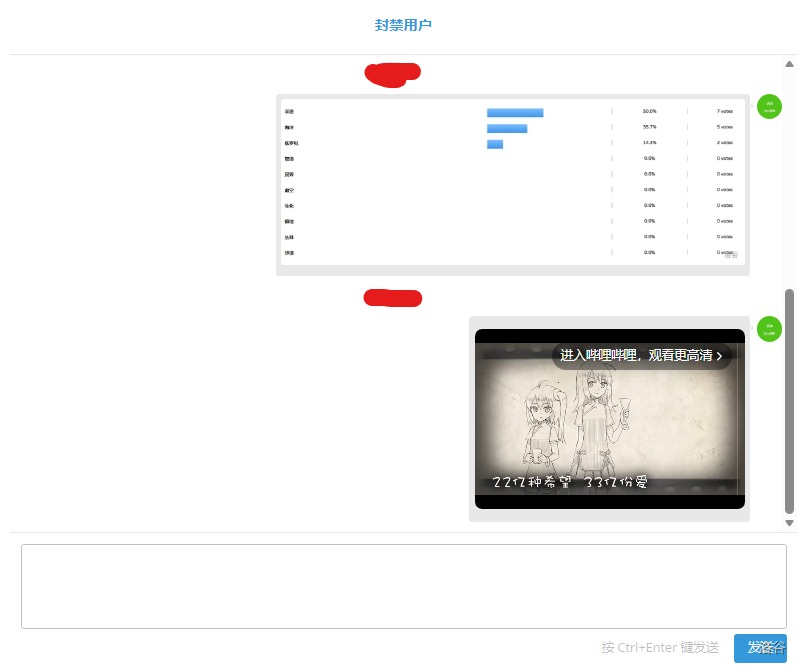
渲染效果:

后记

此代码由 缪凌锴_Mathew\color{#f39c11}\small\text{缪凌锴\_Mathew} 的文章 私信图片渲染 思路进行创作与更改(大家快去关注他)。

此代码并不完善,若有 Bug 或离谱问题,请在讨论区中留言,作者会积极完善 QwQ 。