版本比较
洛谷私信图片/Bilibili 视频渲染

正文
增加 125 行删除 94 行
1234345687891012111213141516171820192022212224232425262728302930313233343635363739383940414239 行未改动8283848587868789909188899091939495969293949596979899100101102103104105106989910010110210710810510610710810911011111210911011111211311411511611711811912011511612212312411711811912012812112212312412571 行未改动1971981992002082012022032042052062072082092102112122132142152122132142152162172172182192202202212222232242242252262272252262272282292302312292322332342352332342352362362372382392402412422392402432442452462472482492442502512462472482492522532512542552562532542572582592602612622632642652662672682692702712562572722732742752762772782792802592602612622632642652812822832842852862872882892902912922932942712722732952962972982752762993003013023033042793053063073083092 行未改动31231331431529029129229331631731831932032132232329729832432532632732832933033133233330533433533633733890 行未改动4294304314324044334064344354364374387 行未改动4464474484494504514524244534544554564574584594604614624634644654664674684694704714728 行未改动481482483484453454485486487# 前言
本文章根据 [私信图片渲染](https://www.luogu.com.cn/article/50h521j2) 的思路进行创作,本文章根据 [私信图片渲染](https://www.luogu.com.cn/article/50h521j2) 的思路进行创作,
并在内容方面加入了 Bilibili 视频渲染功能,
修复了如“重复点击左侧同一用户的私信图片会消失”,“在点击查看更多消息以后,之前加载出来的图片会寄掉”等诸多Bug。 修复了如“重复点击左侧同一用户的私信图片会消失”,“在点击查看更多消息以后,之前加载出来的图片会寄掉”等诸多 Bug。
# 安装 Tampermonkey(篡改猴)
Tampermonkey(篡改猴) 允许用户自定义并增强您最喜爱的网页的功能。用户脚本是小型 JavaScript 程序,可用于向网页添加新功能或修改现有功能。使用 篡改猴,您可以轻松在任何网站上创建、管理和运行这些用户脚本。Tampermonkey(篡改猴)允许用户自定义并增强您最喜爱的网页的功能。用户脚本是小型 JavaScript 程序,可用于向网页添加新功能或修改现有功能。使用 篡改猴,您可以轻松在任何网站上创建、管理和运行这些用户脚本。
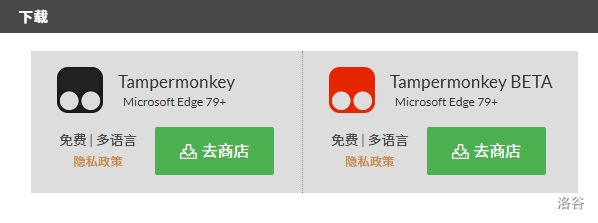
如图,若你为 Microsoft Edge 浏览器,可直接点击“去商店”进行安装。而 Google Chrome 浏览器则需要**霍尔沃兹环境**,可以利用第三方途径下载 crx 格式插件,打开浏览器插件“开发者选项”,将 crx 格式插件拖入浏览器进行安装。
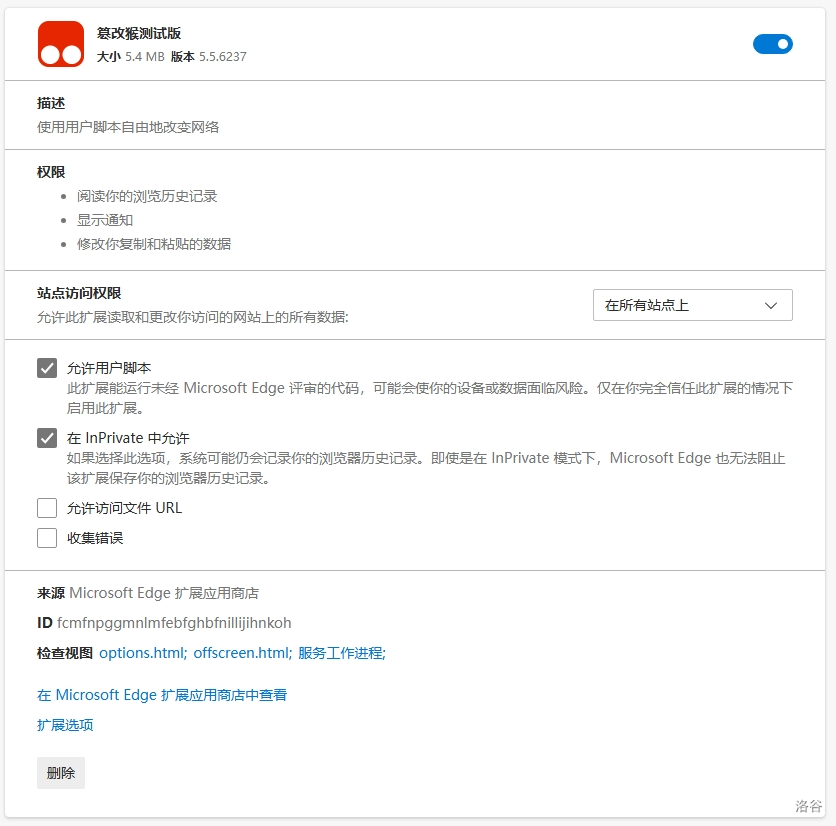
如图,在完成安装后,打开 Tampermonkey(篡改猴) 插件的详情页面,开启“允许用户脚本”选项。如图,在完成安装后,打开 Tampermonkey(篡改猴)插件的详情页面,开启“允许用户脚本”选项。
自此, Tampermonkey(篡改猴) 已全部完成。自此,Tampermonkey(篡改猴)已全部完成。
注:第二幅图中作者使用的为 Tampermonkey BETA(篡改猴测试版) ,但实际安装时可选择 Tampermonkey(篡改猴) (黑色皮肤),官方描述称 “BETA” 版可能会比正常版更新速度快,但可能会有Bug,不能保证使用体验,所以作者建议使用 Tampermonkey(篡改猴) 正常版。注:第二幅图中作者使用的为 Tampermonkey BETA(篡改猴测试版),但实际安装时可选择 Tampermonkey(篡改猴,即黑色皮肤),官方描述称“BETA”版可能会比正常版更新速度快,但可能会有 Bug,不能保证使用体验,所以作者建议使用 Tampermonkey(篡改猴)正常版。
# 安装脚本
(因为 Greasyfork 在国内因一些**不可抗因素**无法访问,所以本文使用直接复制代码来进行安装)
复制以下代码,点击拓展列表中的 Tampermonkey(篡改猴) ,点击“添加脚本”,窗口弹出后将代码粘贴,按“ Ctrl + S ”进行保存。复制以下代码,点击拓展列表中的 Tampermonkey(篡改猴),点击“添加脚本”,窗口弹出后将代码粘贴,按“ Ctrl + S ”进行保存。
```javascript// ==UserScript==// @name 洛谷私信markdown图片/视频渲染// @version 1.2// @description 修复区域选择问题,确保图片和B站视频仅在右侧聊天区域渲染// @description hhh// @match https://www.luogu.com.cn/chat$// @match https://www.luogu.com.cn/chat/*// @author MlkMathew// @author MlkMathew (fix by assistant)// @license MIT// @grant none// @namespace https://greasyfork.org/users/1068192// ==/UserScript==39 行未改动 } }, duration); }
// ======================== 获取右侧聊天区域的消息(反向排除法) ======================== // ======================== 获取正确的聊天消息(带区域排除) ======================== function getChatMessages() { // 获取所有可能的候选消息(类名包含 message 的元素) const candidates = document.querySelectorAll('.message, .msg-item, [class*="message"]'); const rightMessages = []; // 选择洛谷聊天区域中典型的消息容器 const mainArea = document.querySelector('main'); if (!mainArea) return [];
for (let el of candidates) { // 排除位于侧边栏/左侧区域内的元素 if (el.closest('.side, aside, .user-list, .chat-user-list, .sidebar')) { continue; // 尝试多种可能的消息选择器 const selectors = [ '.message', '.msg-item', '[class*="message"]', '.chat-message', '[data-message-id]' ]; const allMessages = []; for (const sel of selectors) { const found = mainArea.querySelectorAll(sel); if (found.length) { allMessages.push(...found); break; // 取第一个有效的 } // 确保在 main 区域内(洛谷主体内容区) if (!el.closest('main')) { continue; } rightMessages.push(el); }
// 如果上面的方法没找到,降级:直接取 main 下的 .message if (rightMessages.length === 0) { const mainArea = document.querySelector('main'); if (mainArea) { return Array.from(mainArea.querySelectorAll('.message')); } } return rightMessages; // 过滤掉侧边栏内的元素 return Array.from(allMessages).filter(el => { return !el.closest('.side, aside, .user-list, .chat-user-list, .sidebar, .left-panel'); }); }
// 简化版区域验证(实际上面已经过滤,这里保留以兼容旧逻辑) function isInRightChatArea(element) { return !element.closest('.side, aside, .user-list, .chat-user-list, .sidebar') && !!element.closest('main'); }
// ======================== 媒体渲染核心(与原逻辑一致) ======================== // ======================== 媒体渲染核心 ======================== function text(s) { let span = document.createElement('span'); span.textContent = s; return span; return document.createTextNode(s); }
function image(url) { let img = document.createElement('img'); const img = document.createElement('img'); img.src = url; img.className = 'chat-image'; img.loading = 'lazy'; img.style.cssText = 'max-width:100%; height:auto; border-radius:4px; cursor:pointer;';71 行未改动 return image(url); } }
function parseMarkdownImages(container, rawText) { // ======================== 安全解析(只替换纯文本中的标记) ======================== function processTextNode(textNode) { const rawText = textNode.textContent; if (!rawText) return null; // 快速判断是否包含需要处理的标记 if (!rawText.includes('![') && !rawText.includes('bilibili:')) return null;
const fragment = document.createDocumentFragment(); let p = 0; const s = rawText; for (let i = 0; i < s.length; i++) { if (i + 3 < s.length && s.substr(i, 2) === " { if (s[j] === ']' && s[j + 1] === '(') { pos = j; closeBracket = j; break; } } if (!pos) continue; i = pos; pos = 0; for (let j = i + 2; j < s.length; j++) { if (closeBracket === -1) continue; i = closeBracket; // 位置在 ']' // 查找 ) let openParen = i + 2; // '(' 后一位 let closeParen = -1; for (let j = openParen; j < s.length; j++) { if (s[j] === ')') { pos = j; closeParen = j; break; } } if (!pos) continue; p = pos + 1; let url = s.substr(i + 2, pos - i - 2); container.appendChild(renderMedia(url)); if (closeParen === -1) continue; const url = s.substring(openParen, closeParen); fragment.appendChild(renderMedia(url)); p = closeParen + 1; i = p - 1; // 循环会 i++,所以定位到下一个起始 } } if (p <= s.length - 1) { container.appendChild(text(s.substr(p, s.length - p))); // 剩余文本 if (p < s.length) { fragment.appendChild(text(s.substr(p))); } return fragment; }
// ======================== 处理消息(加入调试日志) ======================== // ======================== 处理单条消息(保留原有结构) ======================== function processMessage(msgElement) { if (!isInRightChatArea(msgElement)) { console.debug('[洛谷渲染] 跳过非右侧区域消息', msgElement); return false; } // 避免重复处理 if (msgElement.hasAttribute('data-md-processed')) return false; if (msgElement.querySelector('img, iframe')) return false; // 检查是否在右侧聊天区域(已通过 getChatMessages 过滤,这里再保险) if (msgElement.closest('.side, aside, .user-list, .chat-user-list, .sidebar, .left-panel')) return false;
const rawText = msgElement.textContent; if (!rawText) return false; try { // 只遍历纯文本节点,不处理子元素(如已经存在的图片、链接) let modified = false; const walker = document.createTreeWalker( msgElement, NodeFilter.SHOW_TEXT, null, false ); const textNodes = []; let node; while (node = walker.nextNode()) { textNodes.push(node); }
// 可选:检查是否包含需要渲染的标记(图片或bilibili),可提升性能 if (!rawText.includes('```
Bilibili 视频使用方法:
```
8 行未改动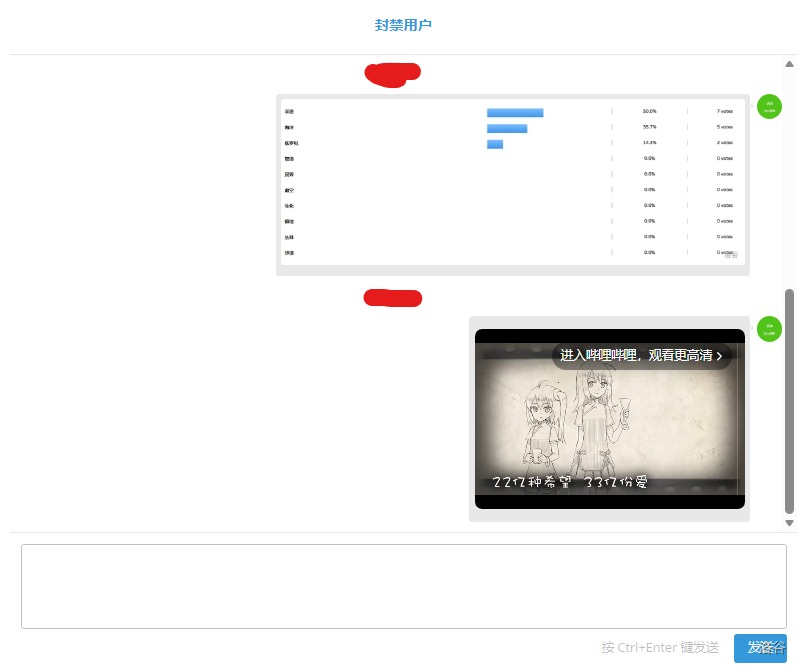
# 后记
此代码由 [$\color{#f39c11}\small\text{缪凌锴\_Mathew}$](https://www.luogu.com.cn/user/372409) 的文章 [私信图片渲染](https://www.luogu.com.cn/article/50h521j2) 思路进行创作与更改(大家快去关注他)。此代码由 [$\color{#f39c11}\small\text{缪凌锴\_Mathew}$](https://www.luogu.com.cn/user/372409) 的文章 [私信图片渲染](https://www.luogu.com.cn/article/50h521j2) 思路进行创作与更改(大家快去关注他)。
此代码并不完善,若有 Bug 或离谱问题,请在讨论区中留言,作者会积极完善 QwQ 。