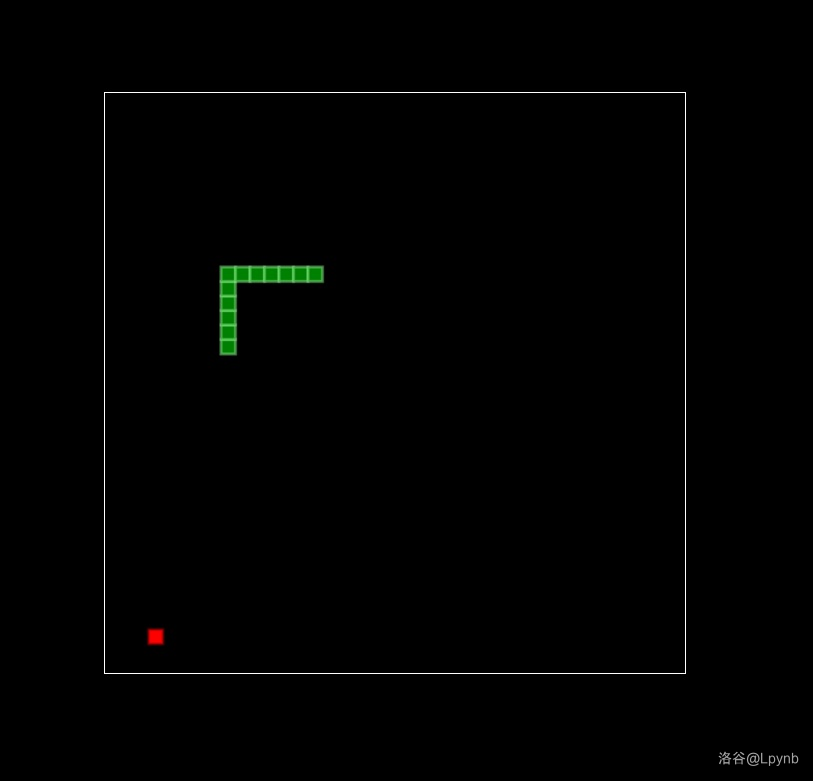
用AI生成了一个HTML贪吃蛇小游戏:
代码
<!DOCTYPE html>
<html lang="zh-CN">
<head>
<meta charset="UTF-8">
<meta name="viewport" content="width=device-width, initial-scale=1.0">
<title>贪吃蛇游戏</title>
<style>
  body {
    display: flex;
    justify-content: center;
    align-items: center;
    height: 100vh;
    margin: 0;
    background-color: #000;
  }
  canvas {
    border: 1px solid #fff;
  }
</style>
</head>
<body>
<canvas id="gameCanvas" width="400" height="400"></canvas>

<script>
const canvas = document.getElementById('gameCanvas');
const ctx = canvas.getContext('2d');
let snake = [{x: 200, y: 200}, {x: 190, y: 200}, {x: 180, y: 200}];
let dx = 10;
let dy = 0;
let food = {
  x: 300,
  y: 300
};
const gridSize = 10;
const tileCount = canvas.width / gridSize;

function drawSnake() {
  snake.forEach(drawSnakePart);
}

function drawSnakePart(snakePart) {
  ctx.fillStyle = 'green';
  ctx.strokeStyle = 'lightgreen';
  ctx.fillRect(snakePart.x, snakePart.y, gridSize, gridSize);
  ctx.strokeRect(snakePart.x, snakePart.y, gridSize, gridSize);
}

function drawFood() {
  ctx.fillStyle = 'red';
  ctx.strokeStyle = 'darkred';
  ctx.fillRect(food.x, food.y, gridSize, gridSize);
  ctx.strokeRect(food.x, food.y, gridSize, gridSize);
}

function advanceSnake() {
  const head = {x: snake[0].x + dx, y: snake[0].y + dy};
  snake.unshift(head);
  const didEatFood = snake[0].x === food.x && snake[0].y === food.y;
  if (didEatFood) {
    placeFood();
  } else {
    snake.pop();
  }
}

function placeFood() {
  food.x = Math.floor(Math.random() * tileCount) * gridSize;
  food.y = Math.floor(Math.random() * tileCount) * gridSize;
}

function gameLoop() {
  ctx.clearRect(0, 0, canvas.width, canvas.height);
  drawFood();
  drawSnake();
  advanceSnake();
  checkCollision();
  setTimeout(gameLoop, 75);
}

function changeDirection(event) {
  const keyPressed = event.keyCode;
  const goingUp = dy === -gridSize;
  const goingDown = dy === gridSize;
  const goingRight = dx === gridSize;
  const goingLeft = dx === -gridSize;

  if (keyPressed === 37 && !goingRight) {
    dx = -gridSize;
    dy = 0;
  }
  if (keyPressed === 38 && !goingDown) {
    dx = 0;
    dy = -gridSize;
  }
  if (keyPressed === 39 && !goingLeft) {
    dx = gridSize;
    dy = 0;
  }
  if (keyPressed === 40 && !goingUp) {
    dx = 0;
    dy = gridSize;
  }
}

function checkCollision() {
  const head = snake[0];
  if (head.x < 0 || head.x >= canvas.width || head.y < 0 || head.y >= canvas.height) {
    resetGame();
    return;
  }

  for (let i = 4; i < snake.length; i++) {
    if (snake[i].x === head.x && snake[i].y === head.y) {
      //resetGame();
      return;
    }
  }
}

function resetGame() {
  snake = [{x: 200, y: 200}, {x: 190, y: 200}, {x: 180, y: 200}];
  dx = 10;
  dy = 0;
}

document.addEventListener('keydown', changeDirection);
gameLoop();
</script>
</body>
</html>
用方向键操作
效果图