c++ 制作图形界面游戏模板
大部分是抄的
上一次更新:2024.02.14
/*
编译命令加上
-lgdiplus -mwindows
*/

#include<bits/stdc++.h>
#include<windows.h>
#include<gdiplus.h>
#pragma GCC optimize(3,"Ofast","inline")
#pragma G++ optimize(3,"Ofast","inline")
using namespace std;
// 高 DPI 感知
#if _WIN32_WINNT < 0x0600
#undef _WIN32_WINNT
#define _WIN32_WINNT 0x0600
#endif
class __HIGH_DPI {
		double dpi;
	public:
		__HIGH_DPI() {
			SetProcessDPIAware();
			dpi = double(GetDeviceCaps(GetDC(0),LOGPIXELSX)+GetDeviceCaps(GetDC(0),LOGPIXELSY))/192.0;
		}
		operator double() {
			return dpi;
		}
} DPI;
const char* name = "Game"; // *窗口名字
const int width = 1000*DPI;
const int height = 562.5*DPI;
int sys_width = GetSystemMetrics(SM_CXSCREEN);
int sys_height = GetSystemMetrics(SM_CYSCREEN);
HWND hwnd;
#define Pos(id,x,y)SetWindowPos(id,NULL,(x)*DPI,(y)*DPI,0,0,SWP_NOSIZE|SWP_NOZORDER)
#define Setwh(id,w,h)SetWindowPos(id,NULL,0,0,(w)*DPI,(h)*DPI,SWP_NOMOVE|SWP_NOZORDER)
#define Text(x,y,text)TextOut(hdc,(x)*DPI,(y)*DPI,text,strlen(text))
#define InputBox(x,y,width,height,text,id,edit)CreateWindow("EDIT",text,WS_VISIBLE|WS_CHILD|ES_AUTOVSCROLL|((edit)?WS_BORDER:ES_READONLY)|ES_MULTILINE,(x)*DPI,(y)*DPI,(width)*DPI,(height)*DPI,hwnd,HMENU(id),NULL,NULL)
#define Button(x,y,width,height,text,id)CreateWindow("BUTTON",text,WS_TABSTOP|WS_VISIBLE|WS_CHILD|BS_DEFPUSHBUTTON,(x)*DPI,(y)*DPI,(width)*DPI,(height)*DPI,hwnd,HMENU(int(id)),(HINSTANCE)GetWindowLong(hwnd,GWLP_HINSTANCE),NULL)
#define Message(mes)PostMessage(hwnd,mes,0,0)
void Fontimpl(HDC hdc, int size, const char* font) {
	HFONT hFont=CreateFont(size*DPI,0,0,0,FW_LIGHT,FALSE,FALSE,FALSE,DEFAULT_CHARSET,OUT_DEFAULT_PRECIS,CLIP_DEFAULT_PRECIS,DEFAULT_QUALITY,DEFAULT_PITCH|FF_DONTCARE,font);
	SelectObject(hdc,hFont);
}
#define Font(size,font)Fontimpl(hdc,size,font)
void ButtonFont(HWND but,int size, const char* font) {
	HFONT hFont=CreateFont(size*DPI,0,0,0,FW_NORMAL,FALSE,FALSE,FALSE,DEFAULT_CHARSET,OUT_DEFAULT_PRECIS,CLIP_DEFAULT_PRECIS,DEFAULT_QUALITY,DEFAULT_PITCH|FF_DONTCARE,font);
	SendMessage(but,WM_SETFONT,(WPARAM)hFont,TRUE);
}
void HIDHDPI_Polygon(HDC hdc, POINT* pt, int size) {
	POINT pt2[size];
	for(int i=0; i<size; i++) pt2[i].x=pt[i].x*DPI, pt2[i].y=pt[i].y*DPI;
	Polygon(hdc, pt2, size);
}
#define Polygon HIDHDPI_Polygon
void HIDHDPI_Polyline(HDC hdc, POINT* pt, int size) {
	POINT pt2[size];
	for(int i=0; i<size; i++) pt2[i].x=pt[i].x*DPI, pt2[i].y=pt[i].y*DPI;
	Polyline(hdc, pt2, size);
}
#define Polyline HIDHDPI_Polyline
LRESULT CALLBACK WndProc(HWND __hwnd, UINT msg, WPARAM wParam, LPARAM lParam) {
	hwnd = __hwnd;
	static HBITMAP hbmMem=NULL, hbmOld; // bitmap 是内存缓冲区,先把图形画在上面,再一次性拷贝,减少闪烁
	static HBRUSH EmptyBrush;
	/*
	Text 显示文本(不可复制)
	Font 设置文本大小和字体
	InputBox 创建文本框元素(可复制)
	Button 创建按钮元素
	ButtonFont 设置元素字体
	*/
	static HWND start;
//  static HWND ;         *更多按钮句柄......
	switch (msg) {
		case WM_CREATE: {
			// 创建绘图缓冲区
			start = Button(10,10,150,40,"开始游戏",1);
			EmptyBrush=CreateSolidBrush(RGB(255,255,255));

			// 创建元素
			ButtonFont(start,30,"楷体");
			InputBox(10,170,100,100,"我是文本框",0,1);
			InputBox(10,300,100,100,"我是只读文本框",0,0);
			/*
			ShowWindow(start, SW_HIDE);     // 隐藏

			ShowWindow(start, SW_SHOW);     // 显示
			*/
			return 0;
		}
		case WM_CTLCOLORSTATIC: {
			SetBkColor((HDC)wParam, RGB(255, 255, 255));
			return (INT_PTR)CreateSolidBrush(RGB(255, 255, 255));
		}
		case WM_PAINT: {
			PAINTSTRUCT ps;
			HDC window_hdc=BeginPaint(hwnd, &ps), hdc=CreateCompatibleDC(window_hdc);

			RECT rect;
			// 获取客户区域的尺寸
			GetClientRect(hwnd, &rect);
			// 创建临时位图
			if(hbmMem == NULL)
				hbmMem=CreateCompatibleBitmap(window_hdc,rect.right,rect.bottom), hbmOld=(HBITMAP)SelectObject(hdc, hbmMem);
			FillRect(hdc,&rect,EmptyBrush);

			// *渲染游戏代码
			Font(20,"楷体"), Text(10,100,"我是文字");

			// 画多边形
			POINT points[5];
			points[0].x = 150,  points[0].y = 150;
			points[1].x = 150,  points[1].y = 200;
			points[2].x = 200, points[2].y = 200;
			points[3].x = 200, points[3].y = 150;
			points[4].x = 150, points[4].y = 150;
			Polygon(hdc, points, 5);

			// 结束绘图
			BitBlt(window_hdc,0,0,rect.right,rect.bottom,hdc,0,0,SRCCOPY), EndPaint(hwnd,&ps);
			return 0;
		}
		case WM_KEYDOWN: { // 处理键盘按下事件
			int keyCode = (int)wParam;
			// *进行相应的处理
			return 0;
		}
		case WM_KEYUP: { // 处理键盘松开事件
			int keyCode = (int)wParam;
			// *进行相应的处理
			return 0;
		}
		case WM_COMMAND: { // 处理按钮点击事件
			if (LOWORD(wParam) == 1) {
				// *进行相应的处理
			} else if (LOWORD(wParam) == 2) {
				// *进行相应的处理
			}
			// *更多按钮......
			return 0;
		}
		case WM_TIMER:
			InvalidateRect(hwnd, NULL, TRUE);
			return 0;
		case WM_CLOSE:
			DestroyWindow(hwnd);
			return 0;
		case WM_DESTROY:
			PostQuitMessage(0);
			return 0;
	}
	return DefWindowProc(hwnd, msg, wParam, lParam);
}
int WINAPI WinMain(HINSTANCE hInstance, HINSTANCE hPrevInstance, LPSTR lpCmdLine, int nCmdShow) {
	{
		// 初始化 Gdiplus
		Gdiplus::GdiplusStartupInput gdiplusStartupInput;
		ULONG_PTR gdiplusToken;
		Gdiplus::GdiplusStartup(&gdiplusToken, &gdiplusStartupInput, NULL);
	}
	const char* CLASS_NAME = "MyWindowClass";
	WNDCLASS wc= {};
	wc.lpfnWndProc=WndProc, wc.hInstance=hInstance, wc.lpszClassName=CLASS_NAME;
	RegisterClass(&wc);
	HWND hwnd = CreateWindowEx(0,CLASS_NAME,name,WS_OVERLAPPEDWINDOW,CW_USEDEFAULT,CW_USEDEFAULT,width,height,NULL,NULL,hInstance,NULL);
	if (hwnd == NULL) return 0;
	SetTimer(hwnd, 1, 1000/60, NULL); // 计时器,一秒刷新 60 次
	SetWindowLong(hwnd, GWL_STYLE, GetWindowLong(hwnd, GWL_STYLE) & ~(WS_SIZEBOX)); // 禁止改变窗口大小
	ShowWindow(hwnd, nCmdShow);
	MSG msg = {};
	while (GetMessage(&msg,NULL,0,0)) TranslateMessage(&msg), DispatchMessage(&msg);
	return msg.wParam;
}
注意
使用 Input、Button 宏创建的元素,一定要用 HWND 类型的句柄变量保存返回值。以后想要显示、隐藏、读取信息、修改信息都要用到。创建元素后,建议使用 ButtonFont 宏立即设置合适的字体,以保证美观。
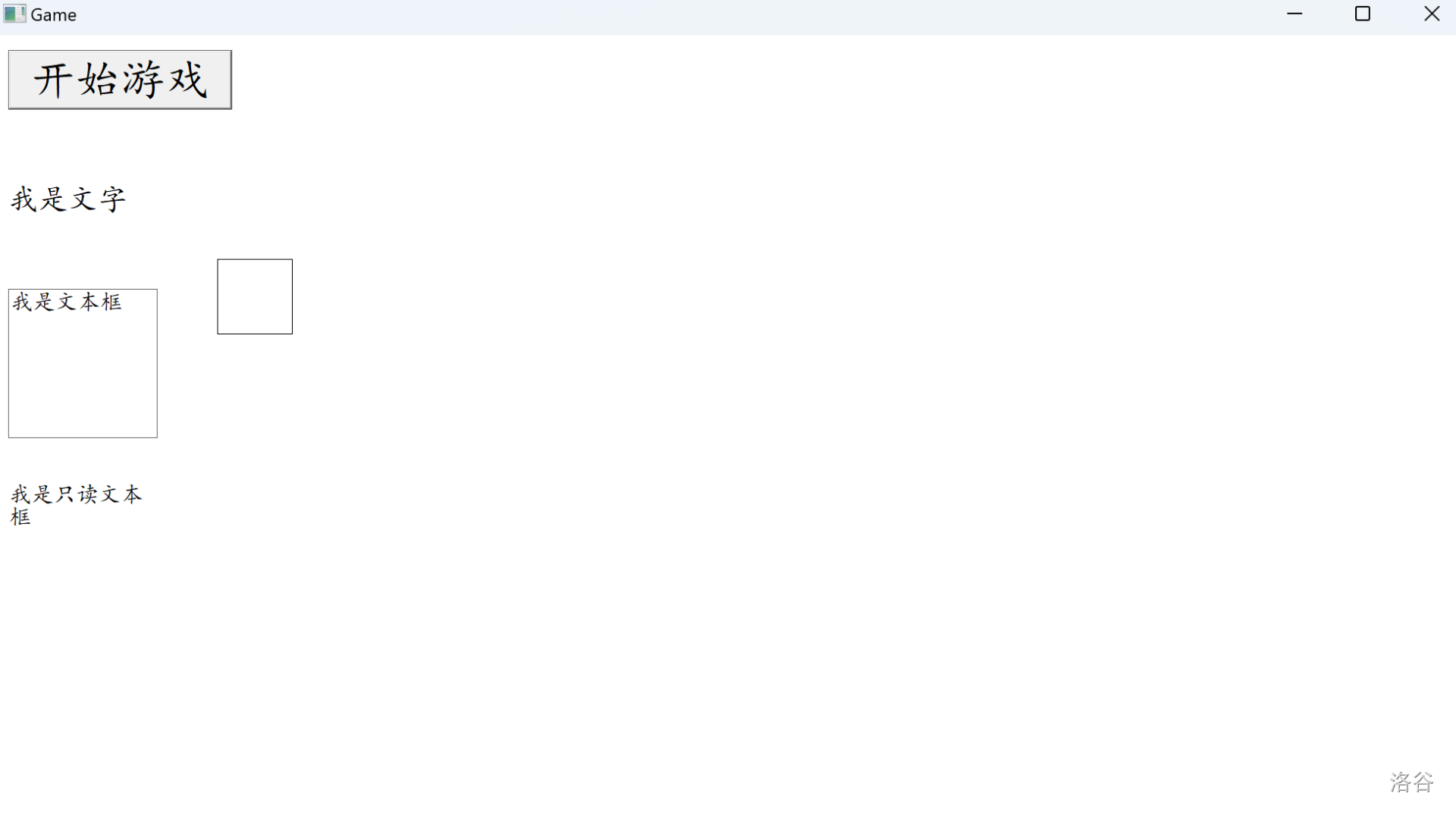
示例代码效果: