
如果你经常在洛谷刷题,可能用过一款叫“梦回考场”的脚本——它把洛谷的题目页面重建成类似 PDF 考卷的样子。但前一阵子,它寄了。
既然等不到原作者更新,我就决定自己造一个。现在的成果是这个,不仅能完全还原原脚本的体验,还顺手修了一堆陈年老 Bug。
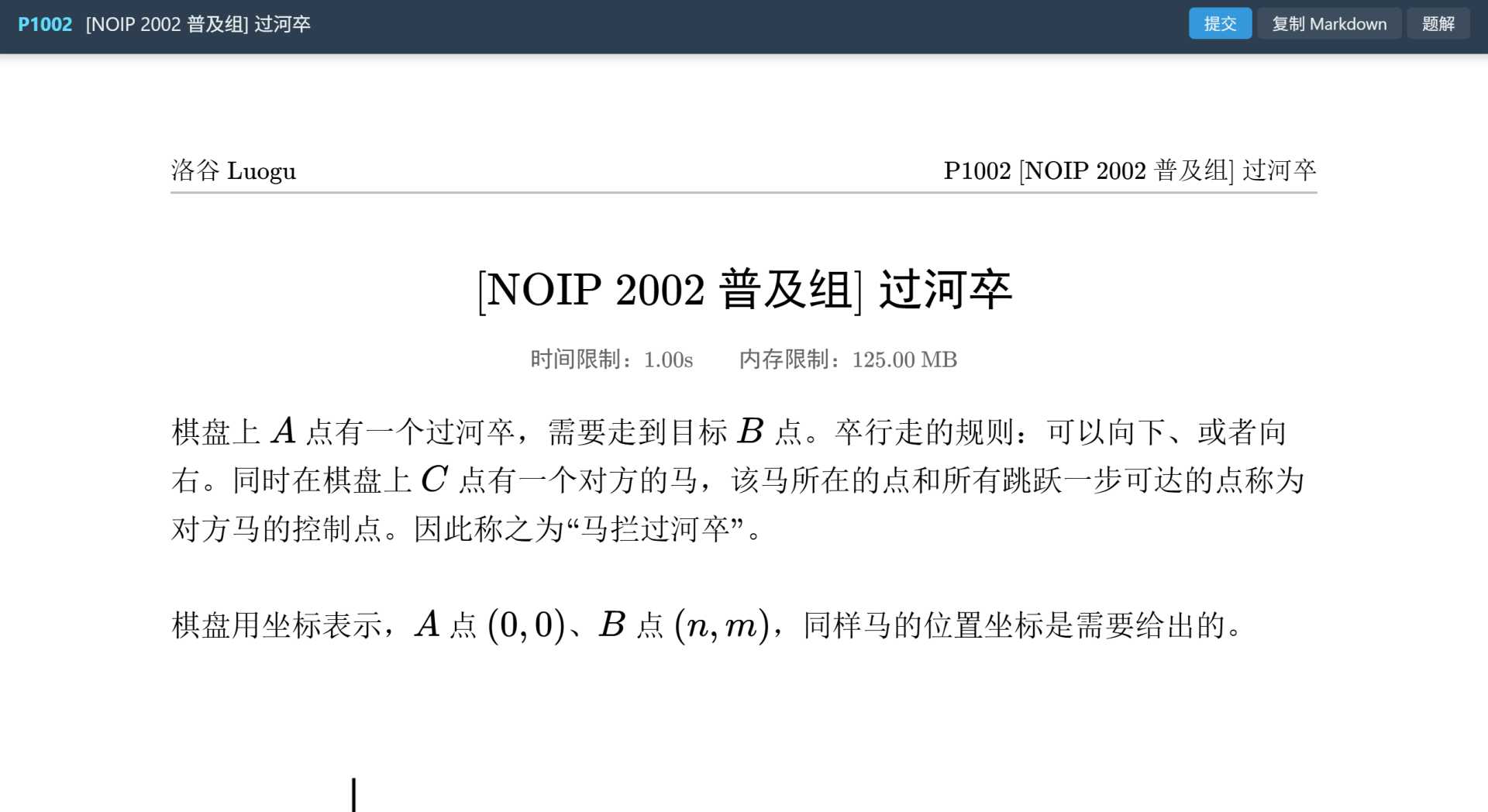
它到底能干什么?
-
从零重建题目页面
原来的脚本依赖页面 DOM 元素,洛谷一改版就崩。我直接读取洛谷埋藏在页面里的 JSON 数据(#lentille-context),完全自己画页面,再也不怕改版。 -
LaTeX 公式完美显示
通过 Tampermonkey 的@require预加载 KaTeX,自动渲染所有$...$和$$...$$公式。彻底告别满屏的$\sum$源码。 -
Markdown 语法全支持
题目描述里常见的粗体、斜体、列表、链接、行内代码,统统帮你转为 HTML。并且我做了一层“公式保护”——先用占位符把公式藏起来,等 Markdown 转换完再放回去,保证公式里的_和*不会被错误转成斜体/粗体。 -
时间和内存限制回归
原版“梦回考场”会把侧栏杀得一干二净,导致时间限制(比如1.00s)、内存限制(128.00 MB)也消失了。我从 JSON 里提取了limits字段,哪怕数据是数组(每个子任务一个值),也自动取第一个并转换单位,然后优雅地显示在题目标题下方。 -
段落缩进一致
强迫症福音——现在所有<p>段落都保持首行缩进两个字符,再也不会出现“第二段突然顶格写”的窒息情况。 -
保留原版功能按钮
提交、复制 Markdown、题解这三个按钮被“偷梁换柱”移到了顶部工具栏,功能与原版完全一致。
代码
// ==UserScript==
// @name         洛谷题目转 PDF
// @namespace    http://tampermonkey.net/
// @version      3.9
// @description  从JSON重建页面,渲染Markdown和LaTeX,正确缩进每段
// @match        https://www.luogu.com.cn/problem/*
// @require      https://cdn.jsdelivr.net/npm/katex@0.16.9/dist/katex.min.js
// @require      https://cdn.jsdelivr.net/npm/katex@0.16.9/dist/contrib/auto-render.min.js
// @grant        GM_addStyle
// ==/UserScript==

(function () {
    "use strict";

    if (typeof renderMathInElement === 'undefined') {
        console.error('[Luogu-RER] 致命错误:KaTeX auto-render 未加载');
        return;
    }

    window.addEventListener('load', () => {
        setTimeout(MainScript, 500);
    });

    function MainScript() {
        const path = window.location.pathname;
        if (!/^\/problem\/[PBCFSPATU]/.test(path)) return;

        console.log("[Luogu-RER] 开始...");

        // ---------- 1. 提取原始按钮 ----------
        let submitBtn = null;
        let copyBtn = null;
        let solutionBtn = null;

        const sidebar = document.querySelector('.sidebar-container .side');
        if (sidebar) {
            sidebar.querySelectorAll('button, a').forEach(el => {
                const text = el.textContent.trim();
                if (text === '提交') submitBtn = el;
                else if (text.includes('题解')) solutionBtn = el;
            });
        }

        if (!submitBtn) {
            document.querySelectorAll('button, a').forEach(el => {
                if (el.textContent.trim() === '提交') submitBtn = el;
            });
        }

        const actionContainer = document.querySelector('.problem-block-actions');
        if (actionContainer) {
            actionContainer.querySelectorAll('button, a').forEach(btn => {
                if (btn.textContent.trim().includes('复制 Markdown')) copyBtn = btn;
            });
        }

        console.log('[Luogu-RER] 按钮:提交=' + !!submitBtn + ' 复制=' + !!copyBtn + ' 题解=' + !!solutionBtn);

        // ---------- 2. 读取题目数据 ----------
        const contextScript = document.querySelector('#lentille-context');
        if (!contextScript) { console.error("[Luogu-RER] 找不到题目数据"); return; }
        let problemData;
        try {
            problemData = JSON.parse(contextScript.textContent).data.problem;
        } catch (e) { console.error("[Luogu-RER] JSON解析失败", e); return; }

        const pid = problemData.pid;
        const name = problemData.name;
        const content = problemData.content || {};
        const desc = content.description || '';
        const fmtIn = content.formatI || '';
        const fmtOut = content.formatO || '';
        const hint = content.hint || '';
        const samples = problemData.samples || [];
        const limits = problemData.limits || {};

        // 处理时间/内存限制
        function getFirstValid(raw) {
            return Array.isArray(raw) ? raw[0] : raw;
        }
        function formatTime(raw) {
            const val = getFirstValid(raw);
            if (val === undefined || val === null || val === '') return '';
            const num = Number(val);
            if (!isNaN(num) && num > 0) return (num / 1000).toFixed(2) + 's';
            return String(val);
        }
        function formatMemory(raw) {
            const val = getFirstValid(raw);
            if (val === undefined || val === null || val === '') return '';
            const num = Number(val);
            if (!isNaN(num) && num > 0) {
                return num > 1024 ? (num / 1024).toFixed(2) + ' MB' : num.toFixed(2) + ' MB';
            }
            return String(val);
        }
        const timeLimit = formatTime(limits.time);
        const memoryLimit = formatMemory(limits.memory);

        // ---------- 3. 清空并重建 ----------
        const mainContainer = document.querySelector('#app > .main-container');
        if (!mainContainer) return;

        const hidden = document.createElement('div');
        hidden.id = 'hidden-btns';
        hidden.style.display = 'none';
        document.body.appendChild(hidden);
        if (submitBtn) hidden.appendChild(submitBtn);
        if (copyBtn) hidden.appendChild(copyBtn);
        if (solutionBtn) hidden.appendChild(solutionBtn);

        document.querySelector('#app > nav')?.remove();
        document.querySelector('#app > .top-bar')?.remove();
        document.querySelector('#app > .page-loading')?.remove();
        document.querySelector('.sidebar-container')?.remove();
        if (actionContainer) actionContainer.remove();

        mainContainer.innerHTML = '';
        mainContainer.style.cssText = 'margin:12px auto;width:100%;max-width:1191px;padding:0;';

        BuildPage(mainContainer, { pid, name, desc, fmtIn, fmtOut, hint, samples, hidden, timeLimit, memoryLimit });
    }

    function BuildPage(container, data) {
        // ---- 顶部工具栏 ----
        const toolbar = document.createElement('div');
        toolbar.id = 'Custom-toolbar';
        toolbar.style.cssText = `
            position:sticky;top:0;z-index:1000;background:#2c3e50;color:#fff;
            display:flex;align-items:center;justify-content:space-between;
            padding:0 20px;height:48px;box-shadow:0 2px 8px rgba(0,0,0,0.2);
            font-family:-apple-system,BlinkMacSystemFont,"Segoe UI",Roboto,sans-serif;
            flex-wrap:wrap;gap:6px;
        `;

        const leftDiv = document.createElement('div');
        leftDiv.style.cssText = 'display:flex;align-items:center;gap:10px;font-size:15px;';
        leftDiv.innerHTML = `<span style="font-weight:700;color:#61dafb">${data.pid}</span>
                             <span style="color:#ecf0f1;max-width:300px;overflow:hidden;text-overflow:ellipsis;white-space:nowrap">${data.name}</span>`;

        const rightDiv = document.createElement('div');
        rightDiv.style.cssText = 'display:flex;align-items:center;gap:4px;flex-wrap:wrap;';

        const hiddenBtns = data.hidden.querySelectorAll('button, a');
        let hSubmit = null, hCopy = null, hSolution = null;
        hiddenBtns.forEach(el => {
            const t = el.textContent.trim();
            if (t === '提交') hSubmit = el;
            else if (t.includes('复制 Markdown')) hCopy = el;
            else if (t.includes('题解')) hSolution = el;
        });

        const mkBtn = (label, hiddenBtn, cls) => {
            const b = document.createElement('button');
            b.textContent = label;
            b.className = 'tb-btn' + (cls ? ' ' + cls : '');
            b.style.cssText = `
                display:inline-flex;align-items:center;gap:4px;padding:5px 12px;
                border-radius:4px;border:none;font-size:13px;cursor:pointer;
                background:rgba(255,255,255,0.08);color:#ecf0f1;
                transition:0.2s;white-space:nowrap;
            `;
            if (cls === 'tb-submit') b.style.background='#3498db';
            b.onclick = e => {
                e.preventDefault();
                if (hiddenBtn) hiddenBtn.click();
                else window.location.hash = label==='提交'?'submit':'solution';
            };
            return b;
        };

        rightDiv.appendChild(mkBtn('提交', hSubmit, 'tb-submit'));
        rightDiv.appendChild(mkBtn('复制 Markdown', hCopy));
        rightDiv.appendChild(mkBtn('题解', hSolution));

        toolbar.appendChild(leftDiv);
        toolbar.appendChild(rightDiv);
        container.appendChild(toolbar);

        // ---- 题目内容区 ----
        const problemDiv = document.createElement('div');
        problemDiv.id = 'Problem-element';
        problemDiv.style.cssText = `
            color:#000;background:#fff;padding:77px 141px 156px;box-shadow:0 1px 10px rgba(0,0,0,0.1);
            font-family:KaTeX_Main,SimSun,serif;font-size:24px;line-height:1.6;max-width:1191px;margin:0 auto;
        `;
        container.appendChild(problemDiv);

        // 头部
        const hdr = document.createElement('header');
        hdr.style.cssText = 'font-size:20px;display:flex;flex-wrap:wrap;margin-bottom:48px;font-family:KaTeX_Main,SimSun,serif;';
        hdr.innerHTML = `<div style="margin-right:auto">洛谷 Luogu</div><div>${data.pid} ${data.name}</div><hr style="flex-basis:100%;border:1px solid #bfbfbf;margin:0">`;
        problemDiv.appendChild(hdr);

        const title = document.createElement('h1');
        title.textContent = data.name;
        title.style.cssText = 'text-align:center;font-size:36px;margin:37px 0 12px 0;font-weight:normal;font-family:KaTeX_Main,SimHei,sans-serif';
        problemDiv.appendChild(title);

        // 时间/内存限制
        if (data.timeLimit || data.memoryLimit) {
            const limitsDiv = document.createElement('div');
            limitsDiv.style.cssText = 'text-align:center;font-size:18px;color:#666;margin-bottom:24px;font-family:KaTeX_Main,SimHei,sans-serif;';
            let parts = [];
            if (data.timeLimit) parts.push('时间限制:' + data.timeLimit);
            if (data.memoryLimit) parts.push('内存限制:' + data.memoryLimit);
            limitsDiv.textContent = parts.join('  ');
            problemDiv.appendChild(limitsDiv);
        }

        // 辅助函数:解析Markdown并插入,同时为所有<p>设置缩进
        function appendMarkdown(md) {
            if (!md) return;
            const html = renderMarkdown(md);
            const div = document.createElement('div');
            div.innerHTML = html;
            // 为所有<p>标签添加缩进
            div.querySelectorAll('p').forEach(p => {
                p.style.textIndent = '2em';
            });
            problemDiv.appendChild(div);
        }

        // 添加各部分
        appendMarkdown(data.desc);

        if (data.fmtIn) {
            problemDiv.appendChild(createH2('【输入格式】'));
            appendMarkdown(data.fmtIn);
        }
        if (data.fmtOut) {
            problemDiv.appendChild(createH2('【输出格式】'));
            appendMarkdown(data.fmtOut);
        }

        // 样例
        data.samples.forEach((s, i) => {
            problemDiv.appendChild(createH2('【样例 ' + (i+1) + '】'));
            const inp = document.createElement('p');
            inp.textContent = '输入 #' + (i+1);
            inp.style.fontWeight = 'bold';
            problemDiv.appendChild(inp);
            const preIn = document.createElement('pre');
            preIn.textContent = s[0] || '';
            preIn.style.cssText = 'margin:5px 0 20px;padding:10px;border:1px solid blue;font-family:Consolas,monospace;font-size:20px;line-height:1.5;background:#f8f8f8';
            problemDiv.appendChild(preIn);
            const outp = document.createElement('p');
            outp.textContent = '输出 #' + (i+1);
            outp.style.fontWeight = 'bold';
            problemDiv.appendChild(outp);
            const preOut = document.createElement('pre');
            preOut.textContent = s[1] || '';
            preOut.style.cssText = 'margin:5px 0 20px;padding:10px;border:1px solid blue;font-family:Consolas,monospace;font-size:20px;line-height:1.5;background:#f8f8f8';
            problemDiv.appendChild(preOut);
        });

        if (data.hint) {
            problemDiv.appendChild(createH2('【提示与说明】'));
            appendMarkdown(data.hint);
        }

        function createH2(text) {
            const h2 = document.createElement('h2');
            h2.textContent = text;
            h2.style.cssText = 'margin-top:43px;margin-bottom:18px;font-size:26px;font-weight:normal;font-family:KaTeX_Main,SimHei,sans-serif;text-indent:1em';
            return h2;
        }

        // 全局样式
        applyStyles();

        // KaTeX 渲染
        console.log('[Luogu-RER] 调用 KaTeX 自动渲染...');
        try {
            renderMathInElement(problemDiv, {
                delimiters: [
                    {left: '$$', right: '$$', display: true},
                    {left: '$', right: '$', display: false},
                    {left: '\\(', right: '\\)', display: false},
                    {left: '\\[', right: '\\]', display: true}
                ],
                throwOnError: false
            });
            console.log('[Luogu-RER] KaTeX 渲染完成');
        } catch (e) {
            console.error('[Luogu-RER] 渲染出错', e);
        }
    }

    // Markdown 解析(保护公式)
    function renderMarkdown(text) {
        const formulas = [];
        let protectedText = text.replace(/(\$\$[\s\S]*?\$\$|\$[^$]+\$)/g, (match) => {
            formulas.push(match);
            return `%%FORMULA${formulas.length - 1}%%`;
        });

        let html = protectedText;

        // 图片
        html = html.replace(/!\[([^\]]*)\]\(([^)]+)\)/g, '<img src="$2" alt="$1" style="max-width:100%;display:block;margin:10px auto;">');
        // 行内代码
        html = html.replace(/`([^`]+)`/g, '<code style="font-family:Consolas,monospace;background:#f0f0f0;padding:2px 6px;border-radius:3px;">$1</code>');
        // 粗体
        html = html.replace(/\*\*([^*]+)\*\*/g, '<strong>$1</strong>');
        html = html.replace(/__([^_]+)__/g, '<strong>$1</strong>');
        // 斜体
        html = html.replace(/(?<!\*)\*([^*]+)\*(?!\*)/g, '<em>$1</em>');
        html = html.replace(/(?<!_)_([^_]+)_(?!_)/g, '<em>$1</em>');
        // 无序列表
        html = html.replace(/^[\-\*] (.+)$/gm, '<li>$1</li>');
        html = html.replace(/((?:<li>.*<\/li>\s*)+)/g, '<ul>$1</ul>');
        // 有序列表
        html = html.replace(/^\d+\. (.+)$/gm, '<li>$1</li>');
        // 链接
        html = html.replace(/\[([^\]]+)\]\(([^)]+)\)/g, '<a href="$2" target="_blank">$1</a>');
        // 换行(保留段落,但双换行会变成两个<br>,这会导致段落间距不够,可以稍后再优化)
        html = html.replace(/\n/g, '<br>');

        // 恢复公式
        html = html.replace(/%%FORMULA(\d+)%%/g, (_, idx) => formulas[parseInt(idx)]);
        return html;
    }

    function applyStyles() {
        GM_addStyle(`
            @media (prefers-color-scheme: light) { body { background-color: #e6e6e6; } }
            @media (prefers-color-scheme: dark) { body { background-color: #333333; } #Problem-element { background: #f5f5f5; } }
            #Problem-element p { margin: 0.5em 0; text-indent: 2em; }
            #Problem-element strong { font-family: KaTeX_Main, SimHei, sans-serif; font-weight: bold; }
            #Problem-element em { font-style: italic; }
            #Problem-element ul, #Problem-element ol { padding-left: 2em; }
            #Problem-element li { margin: 0.2em 0; }
            #Problem-element a { color: #3498db; text-decoration: none; }
            #Problem-element a:hover { text-decoration: underline; }
            #Problem-element img { max-width: 100%; height: auto; }
            #Problem-element code { font-family: Consolas, monospace; background: #f0f0f0; padding: 2px 6px; border-radius: 3px; }
            #Problem-element ::selection { background-color: #99c1da; mix-blend-mode: multiply; color: inherit; }
            #Custom-toolbar .tb-btn:hover { background: rgba(255,255,255,0.18) !important; color: white !important; }
            #Custom-toolbar .tb-submit:hover { background: #2980b9 !important; }
            @media (max-width: 768px) {
                #Custom-toolbar { height: auto !important; padding: 6px 12px !important; }
                #Custom-toolbar > div:first-child { font-size: 13px !important; width: 100% !important; }
                .tb-btn { font-size: 12px !important; padding: 4px 8px !important; }
                #Problem-element { padding: 20px 16px !important; }
            }
            @media (max-width: 480px) {
                #Custom-toolbar > div:last-child { width: 100% !important; justify-content: flex-start !important; }
            }
        `);
    }
})();
(本文脚本版本:v3.9,最后更新于 2026年7月)
本文使用了大语言模型进行润色。