
🎮 LMAC - 洛谷 MC 成就系统(脚本发布)
与 @cyx_20131003 共同开发。
我们为洛谷做了一个超酷的油猴脚本 —— LMAC (Luogu MC Achievements)!它能把经典的 Minecraft 成就弹窗带入洛谷。目前首发支持“AC 题目成就”,未来将逐步拓展更多趣味成就。
效果预览
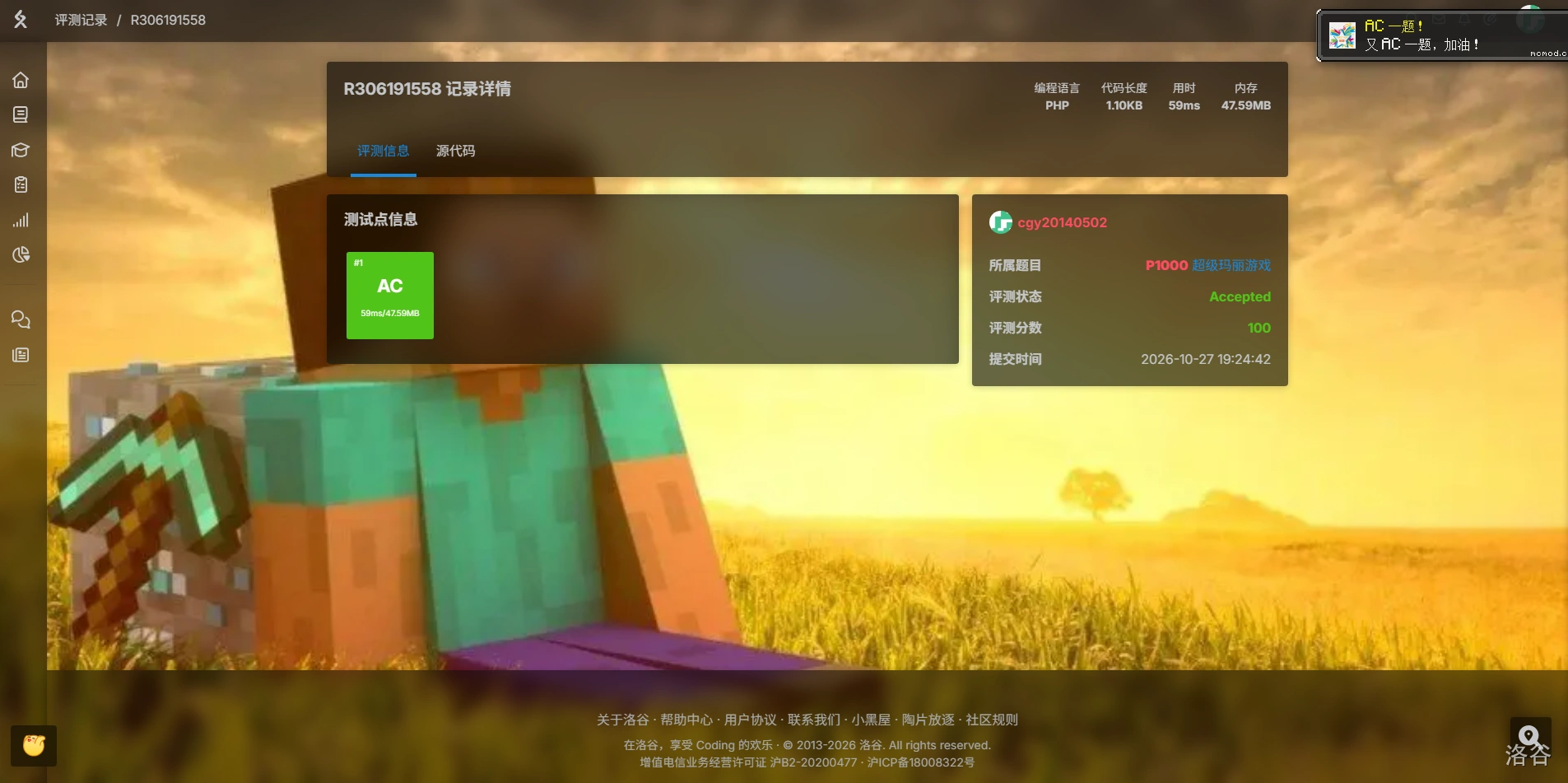
注:效果图使用了“氩洛谷”美化插件,实际显示效果可能因你的页面主题而异。
✨ 功能亮点
- AC 成就弹窗:在洛谷判定 AC 时,自动滑出 Minecraft 风格的成就提示图。
- 精准匹配防误判:精准锁定
record/数字页面,且严格拦截Unaccepted和部分分。无论题目满分是多少,全对才会弹窗。 - 永久防重机制:内置
localStorage本地永久记忆,只要弹过一次的记录(ID),哪怕关掉浏览器重新打开,也绝不重复弹窗。 - 极速测速官网:提供独立的下载页面,自动并发测速各大 CDN 节点,为你优选最快线路进行安装。
- 自定义图片:如果你有更喜欢的图片,支持在代码中轻松替换。
默认的成就弹窗图片如下:

其它成就(如首次提交、Unaccepted、深夜打卡等)正在开发中,敬请期待。
🚀 获取与安装
方法一:官网测速安装(推荐)
前往我们的官网,系统会自动检测并为你选择当前网络环境下最快的 CDN 节点,支持一键唤起篡改猴安装: 👉 LMAC - 极速安装
方法二:脚本猫安装(国内极速)
前往 脚本猫 (ScriptCat) 页面,点击“安装脚本”即可。
方法三:手动安装
- 确保你的浏览器已安装 Tampermonkey(篡改猴)或 Violentmonkey 扩展。
- 复制下方“脚本代码”区域的全部内容。
- 在 Tampermonkey 中点击“添加新脚本”,粘贴代码并保存(
Ctrl+S)。 - 刷新洛谷页面即可生效。
开源地址
- GitHub 仓库:cgy6666/luogu-mc-cj (好用的话给项目点个 Star 呗 awa)
💻 脚本代码 (v1.3.1)
点击展开查看完整源码
// ==UserScript==
// @name         LMAC - 洛谷 MC 成就系统
// @namespace    https://github.com/cgy6666/luogu-mc-cj
// @version      1.3.1
// @author       cgy20140502&cyx20131003
// @description  在洛谷触发成就时弹出 Minecraft 风格的成就提示(当前支持 AC 成就)
// @match        https://www.luogu.com.cn/*
// @grant        none
// @run-at       document-start
// @license      MIT
// @icon         https://cdn.xqyhcc.qzz.io/img/luogumc.png
// @updateURL    https://fastly.jsdelivr.net/gh/cgy6666/luogu-mc-cj@main/luogu-mc-cj.user.js
// @downloadURL  https://fastly.jsdelivr.net/gh/cgy6666/luogu-mc-cj@main/luogu-mc-cj.user.js
// ==/UserScript==

(function () {
    'use strict';

    // 在这里替换为你自定义的成就图片
    const IMG_URL = 'https://www.mcmod.cn/pages/tools/achievements/images/achievements/0_QpjUsXuG.png';

    const imgPreload = new Image();
    imgPreload.src = IMG_URL;

    const style = document.createElement('style');
    style.textContent = `
        #mc-achv {
            position: fixed !important;
            top: 16px !important;
            right: 16px !important;
            z-index: 2147483647 !important;
            width: 320px !important;
            margin: 0 !important;
            padding: 0 !important;
            transform: translateX(360px) !important;
            opacity: 0 !important;
            transition: transform 0.25s cubic-bezier(0.22,1,0.36,1), opacity 0.25s cubic-bezier(0.22,1,0.36,1) !important;
            pointer-events: none !important;
            box-sizing: border-box !important;
            background-color: #ffffff !important;
            border-radius: 6px !important;
            overflow: hidden !important;
            box-shadow: 0 4px 12px rgba(0,0,0,0.5) !important;
        }
        #mc-achv.show {
            transform: translateX(0) !important;
            opacity: 1 !important;
        }
        #mc-achv.hide {
            transition: transform 0.15s ease-in, opacity 0.15s ease-in !important;
            transform: translateX(400px) !important;
            opacity: 0 !important;
        }
        #mc-achv img {
            display: block !important;
            width: 100% !important;
            height: auto !important;
            max-width: none !important;
            max-height: none !important;
            image-rendering: pixelated !important;
        }
    `;
    (document.head || document.documentElement).appendChild(style);

    let currentUrl = location.href;

    function showToast() {
        const el = document.createElement('div');
        el.id = 'mc-achv';
        el.innerHTML = `<img src="${IMG_URL}" alt="AC">`;
        document.documentElement.appendChild(el);

        void el.offsetWidth;
        el.classList.add('show');

        setTimeout(() => {
            el.classList.remove('show');
            el.classList.add('hide');
            setTimeout(() => el.remove(), 150);
        }, 5000);
    }

    function checkAC() {
        // 严格匹配记录详情页
        if (!/^\/record\/\d+\/?$/.test(window.location.pathname)) return;
        if (!document.body) return;

        const recordId = window.location.pathname.split('/')[2];

        // 本地永久防重机制
        if (localStorage.getItem('lmac_shown_' + recordId)) {
            return;
        }

        const text = document.body.innerText || '';

        // 状态拦截
        if (text.includes('Unaccepted') || text.includes('Partially Correct') || text.includes('Pretests')) {
            return;
        }
        if (!/\bAccepted\b/.test(text)) return;

        // 时间校验放宽至 1 小时,防止评测机排队漏弹
        const timeMatch = text.match(/(\d{4}-\d{2}-\d{2} \d{2}:\d{2}:\d{2})/);
        if (timeMatch) {
            const submitTimeStr = timeMatch[1].replace(/-/g, '/');
            const submitTime = new Date(submitTimeStr).getTime();
            const now = Date.now();

            if (now - submitTime <= 3600000) {
                showToast();
                localStorage.setItem('lmac_shown_' + recordId, 'true');
            }
        }
    }

    let throttleTimer = null;
    const observer = new MutationObserver(() => {
        if (location.href !== currentUrl) {
            currentUrl = location.href;
            const oldEl = document.getElementById('mc-achv');
            if (oldEl) oldEl.remove();
        }

        if (!throttleTimer) {
            throttleTimer = setTimeout(() => {
                checkAC();
                throttleTimer = null;
            }, 50);
        }
    });

    if (document.body) {
        observer.observe(document.body, { childList: true, subtree: true, characterData: true });
    } else {
        const initObserver = new MutationObserver(() => {
            if (document.body) {
                observer.observe(document.body, { childList: true, subtree: true, characterData: true });
                initObserver.disconnect();
                checkAC();
            }
        });
        initObserver.observe(document.documentElement, { childList: true, subtree: true });
    }
})();
📝 更新日志
- 2026.10.29 (v1.3.1):
- 🐛 防重机制终极修复:升级为
localStorage浏览器永久缓存,彻底解决关闭浏览器标签页后,重新打开历史记录会再次误弹的问题。
- 🐛 防重机制终极修复:升级为
- 2026.10.29 (v1.3.0):
- 🐛 解决漏判 Bug:时间校验放宽至 1 小时,并引入按记录 ID 防重机制,应对洛谷评测机排队。
- ✨ 规范化:引入
@license MIT与@icon专属图标。
- 2026.10.29 (v1.2.0):
- 🐛 严重修复:彻底解决
Unaccepted(部分分)误弹窗问题。移除“满分必须为 100 分”的死板限制,改为精准匹配独立单词。
- 🐛 严重修复:彻底解决
- 2026.10.27 (v1.1.0):
- 🚀 项目首发:实现基于
MutationObserver的监听与 AC 成就弹窗渲染。
- 🚀 项目首发:实现基于
本脚本及本文均使用 DeepSeek 辅助编写,保证本人贡献大于 AI 贡献。