
如果你想拥有更华丽的 tooltip 提示框,你可以试试这款 TamperMonkey 代码。
代码
UserScript(点击看代码)
// ==UserScript==
// @name         Custom Tooltip
// @version      2025-11-30
// @description  自定义悬浮菜单,将所有含有title的元素转换为自定义悬浮菜单
// @author       fftt52536 (https://luogu.com.cn/user/1399239)
// @match        *://*/*
// @icon         https://cdn.luogu.com.cn/upload/image_hosting/ws2gs6nl.png
// @grant        none
// ==/UserScript==

//将所有含有title的元素转换为自定义悬浮菜单
function addon_tooltip() {
    if (document.getElementById("addon_tooltip")) return; //避免聪明人引用了两次()
    function css(element, styles) {
        for (var style in styles) {
            element.style[style] = styles[style];
        }
    }
    var hovering = document.createElement("div");
    hovering.id = "addon_tooltip";

    document.documentElement.append(hovering);

    css(hovering, {
        position: "fixed",
        zIndex: 9999,
        backgroundColor: "#f9f9f9cc",
        border: "1px solid #ccc",
        padding: "5px",
        display: "none",
        transition: "opacity 0.4s ease-in-out",
        userSelect: "none",
        WebkitUserSelect: "none",
        MozUserSelect: "none",
        msUserSelect: "none",
        cursor: "default",
        borderRadius: "7px",
        boxShadow: "0 0 10px #ccc"
    });

    var hoveringbool = false;
    function replaceAll() {
        Array.from(document.querySelectorAll("[title]")).forEach(function (element) {
            element.setAttribute("data-title", element.getAttribute("title"));
            element.removeAttribute("title");
            if (element.hasAttribute("data-tooltip-ready")) {
                return;
            }
            element.setAttribute("data-tooltip-ready", "true");
            //创建悬浮菜单元素


            element.addEventListener("mousemove", function (e) {
                console.log("enter");
                var title = element.getAttribute("data-title");
                hovering.innerText = title;
                hoveringbool = true;
                css(hovering, {
                    //下面这种写法会亖的,不信自己搜
                    //top: Math.min(e.pageY, window.innerHeight - hovering.offsetHeight - 10) + 20,
                    //left: Math.min(e.pageX, window.innerWidth - hovering.offsetWidth - 10)
                    top: Math.min(e.clientY, window.innerHeight - hovering.offsetHeight - 10) + 20 + "px",
                    left: Math.min(e.clientX, window.innerWidth - hovering.offsetWidth - 10) + "px",
                    display: "block",
                    opacity: 1
                });
            });
            element.addEventListener("mouseleave", function () {
                hoveringbool = false;
                hovering.style.opacity = "0";
                setTimeout(function () {
                    if (!hoveringbool) {
                        hovering.style.display = "none";
                    }
                }, 500);
            });
        });
    }
    //监听DOM变化,实时替换
    var observer = new MutationObserver(function (mutations) {
        replaceAll();
    });
    observer.observe(document.documentElement, { childList: true, subtree: true, attributes: true });
    //初次加载时也执行一次替换
    document.addEventListener("DOMContentLoaded", replaceAll);
};


if (!window.navigator.userAgent.match(/mobile/i)) {
    //仅限桌面端
    addon_tooltip();
}
效果
原版:
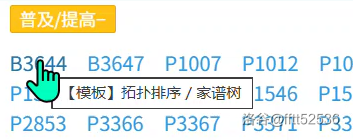
美化后:
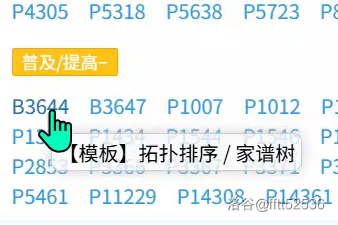
不仅洛谷可以兼容。任何网站(只要有原版提示框)均可使用。
对于普通用户
粘贴代码到 Tampermonkey。
对于开发者
在 HTML 里这样使用:
<script>
  //粘贴一下上文提到的代码
</script>

<... title="hello"> ... </...>你就会看到,当鼠标悬浮在其上时,hello 就会显示。