
众所周知,洛谷换了新前端后依旧不是很好看,于是我叫 deepseek 写了一个美化样式,耗费约 元巨款。
效果
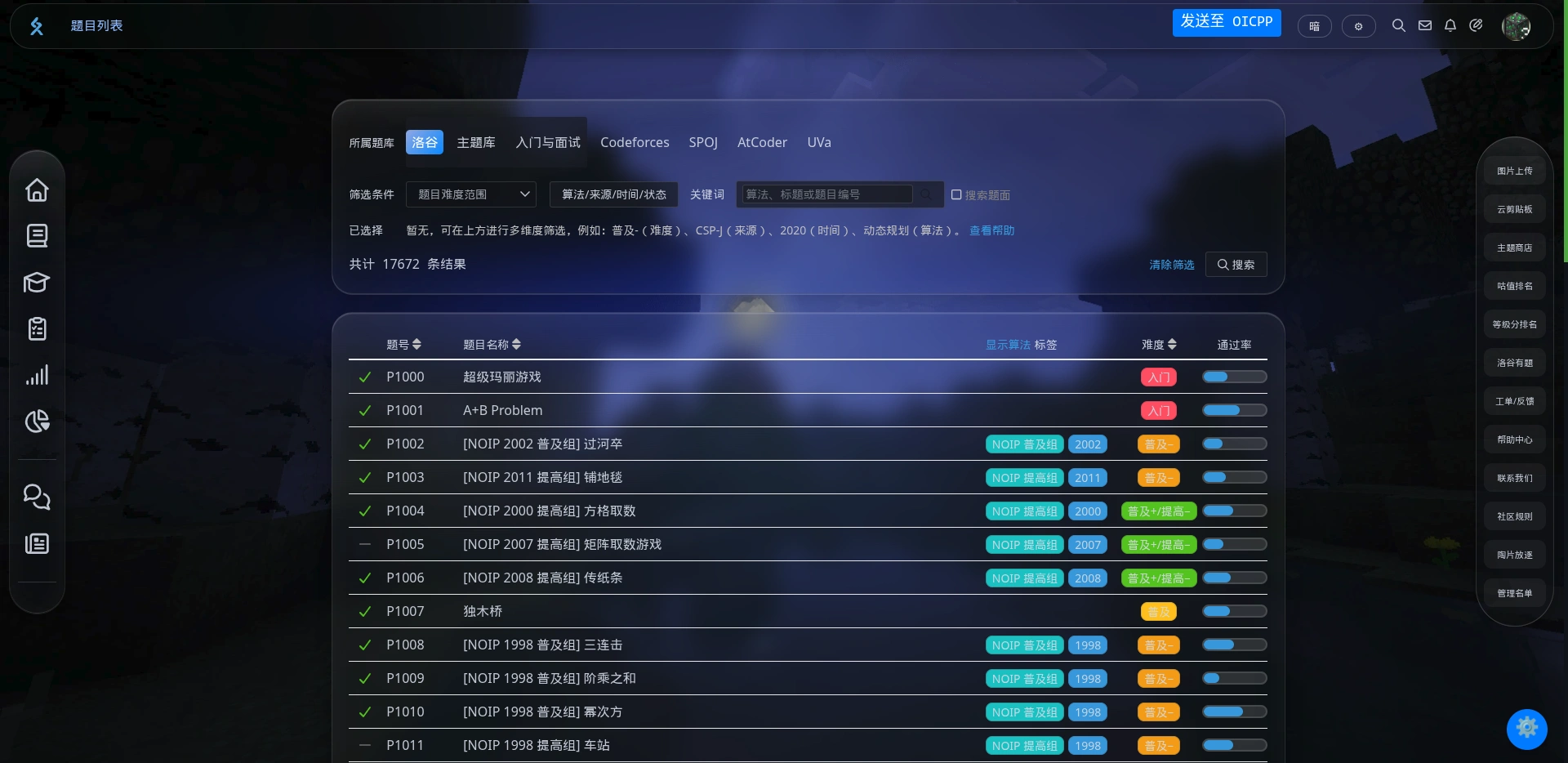
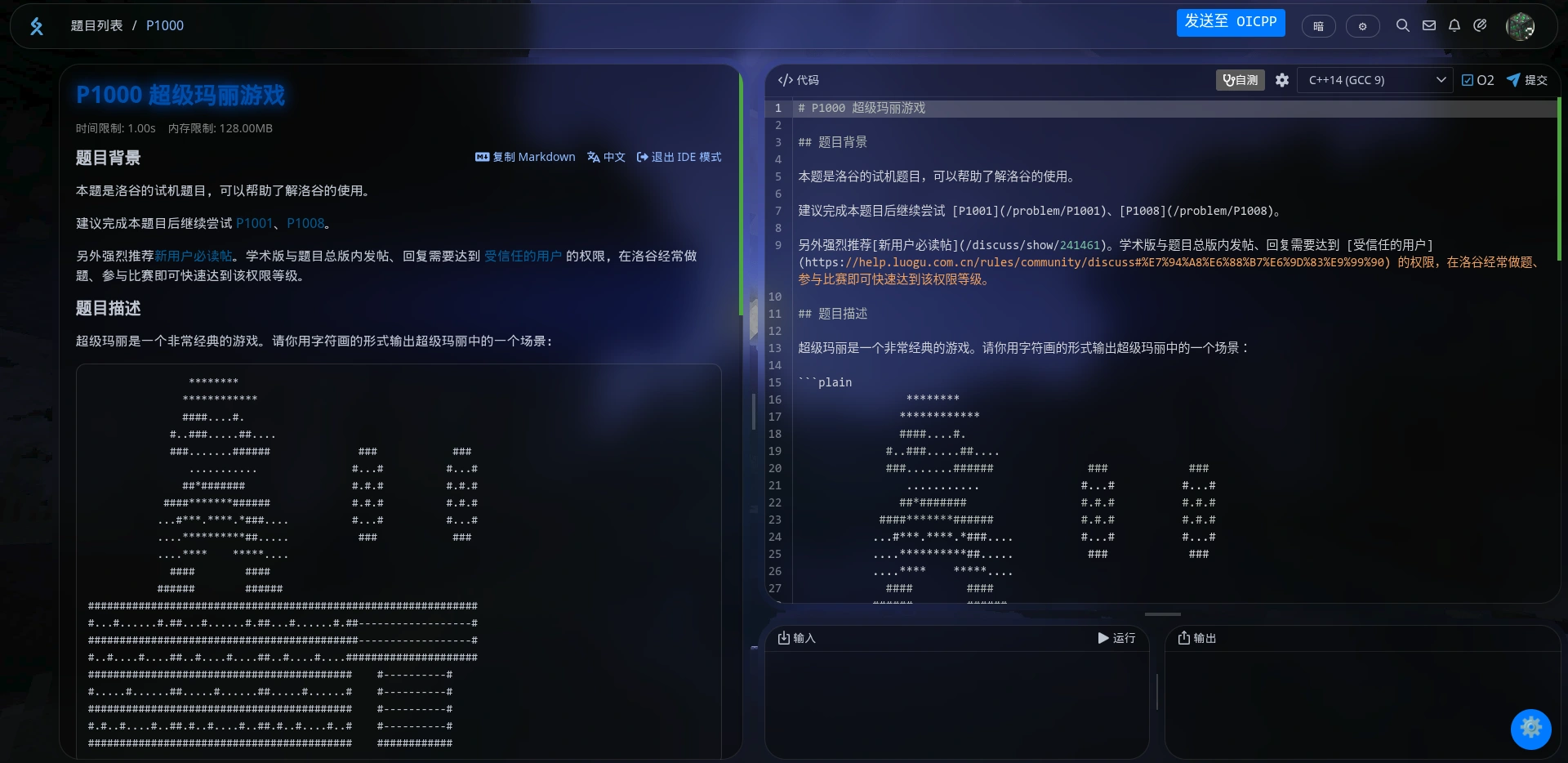
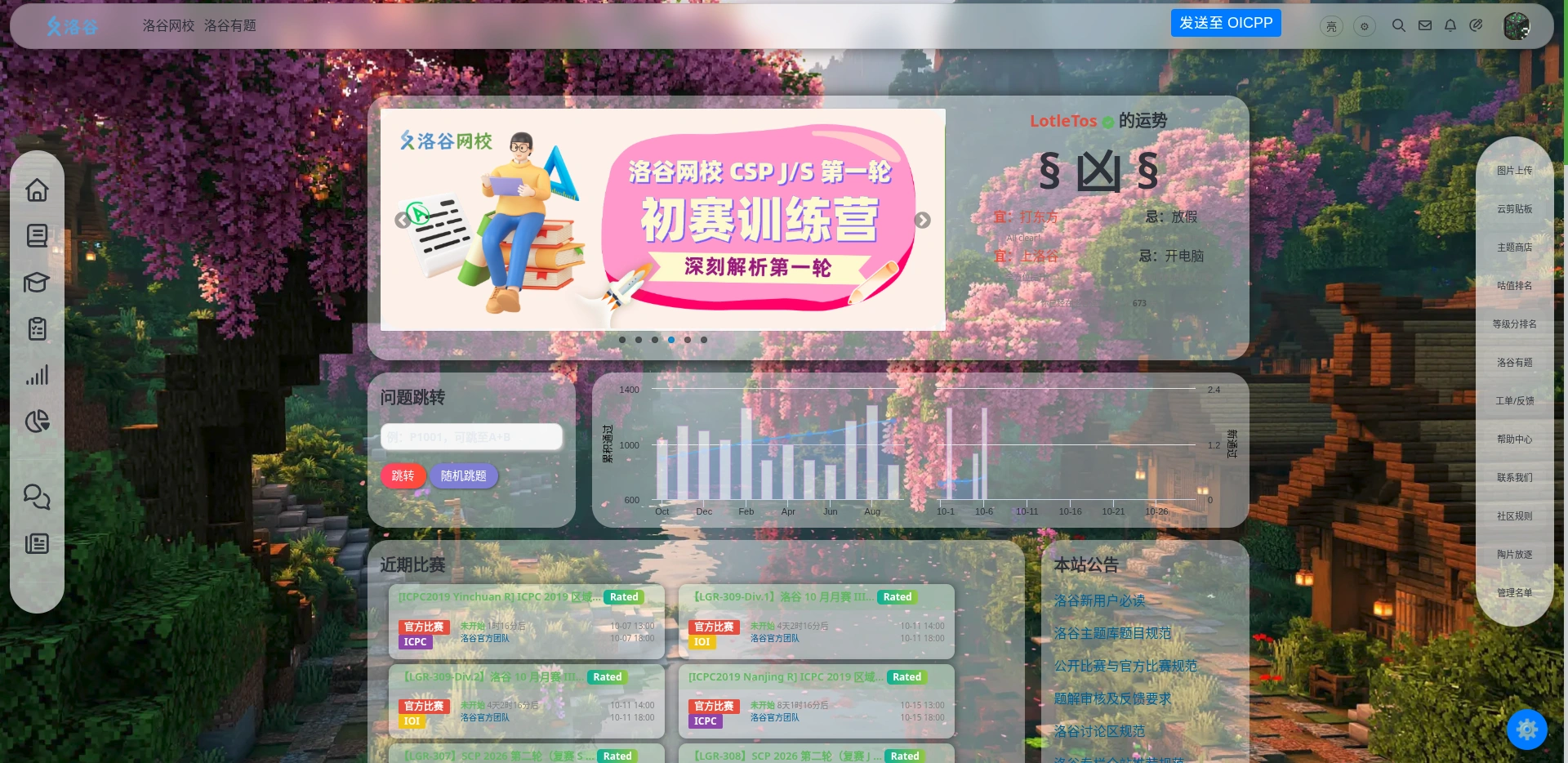
说明
这个只是修改前端,不可能导致封禁。
这个美化可能安装相对麻烦一点点,不过可自定义的程度高。
这个样式把洛谷原来长长的还需要滑动的侧栏分解成里两半放在左右两侧。
配合配套的篡改猴插件使用,可以在站内自定义背景图,切换卡片特效等,并且可以在站内一键切换亮色主题和暗色主题。
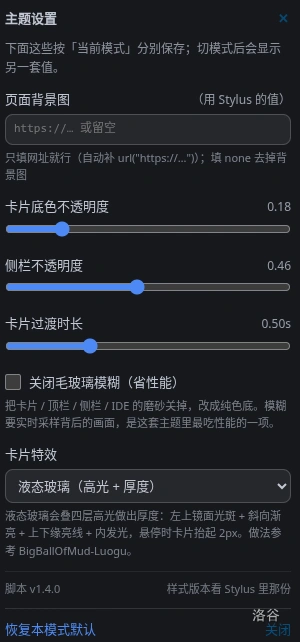
使用
首先你需要准备 Stylus 浏览器拓展,用于安装样式本体,再准备篡改猴拓展用于安装设置的脚本。
准备好 Stylus 后进入这个页面,找到这个按钮。
点击它后会跳转到这样的界面。
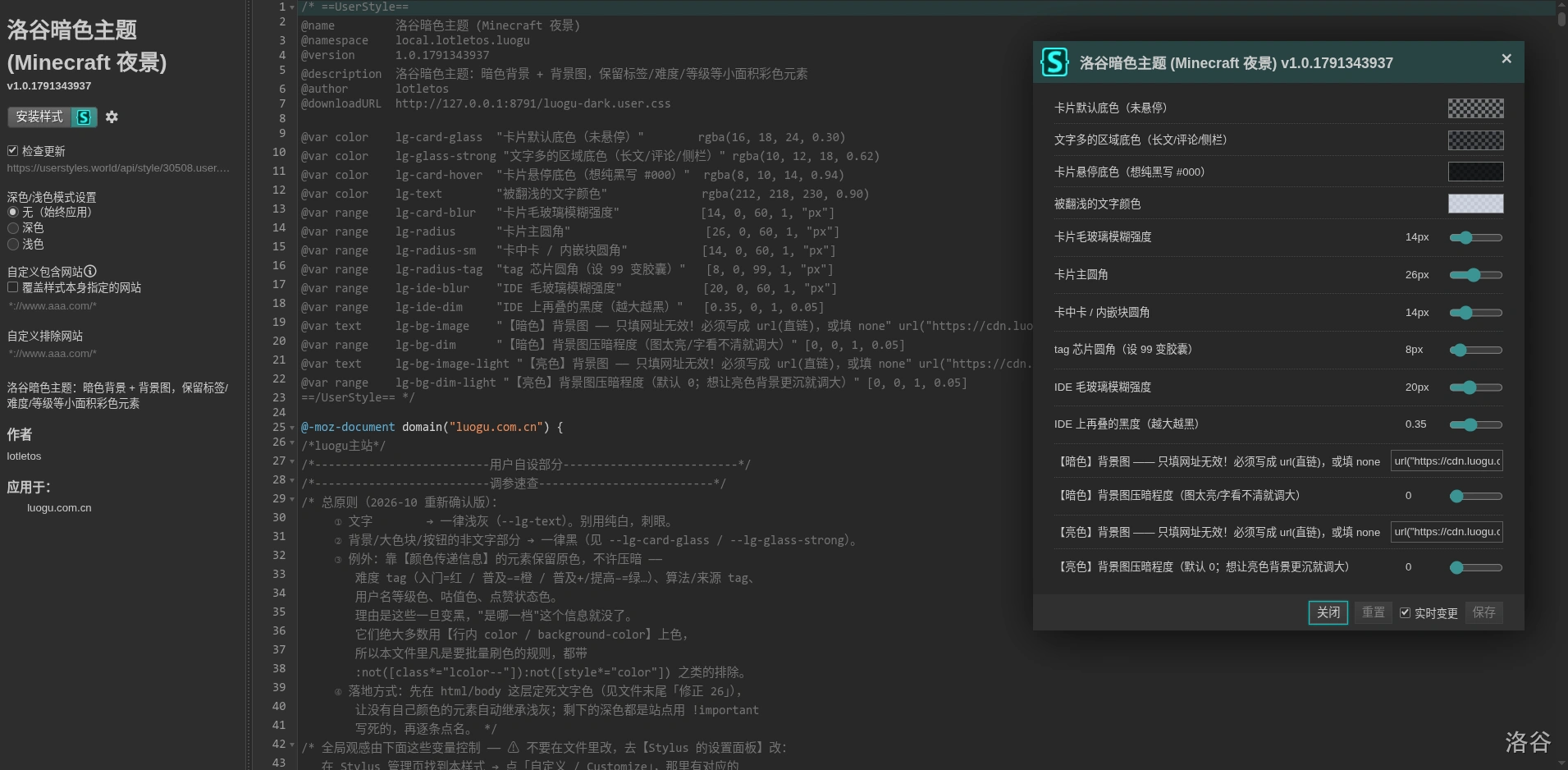 点击左上角的安装样式的按钮。回到洛谷后发现你的界面变了。
接下来打开篡改猴的安装新脚本页面。
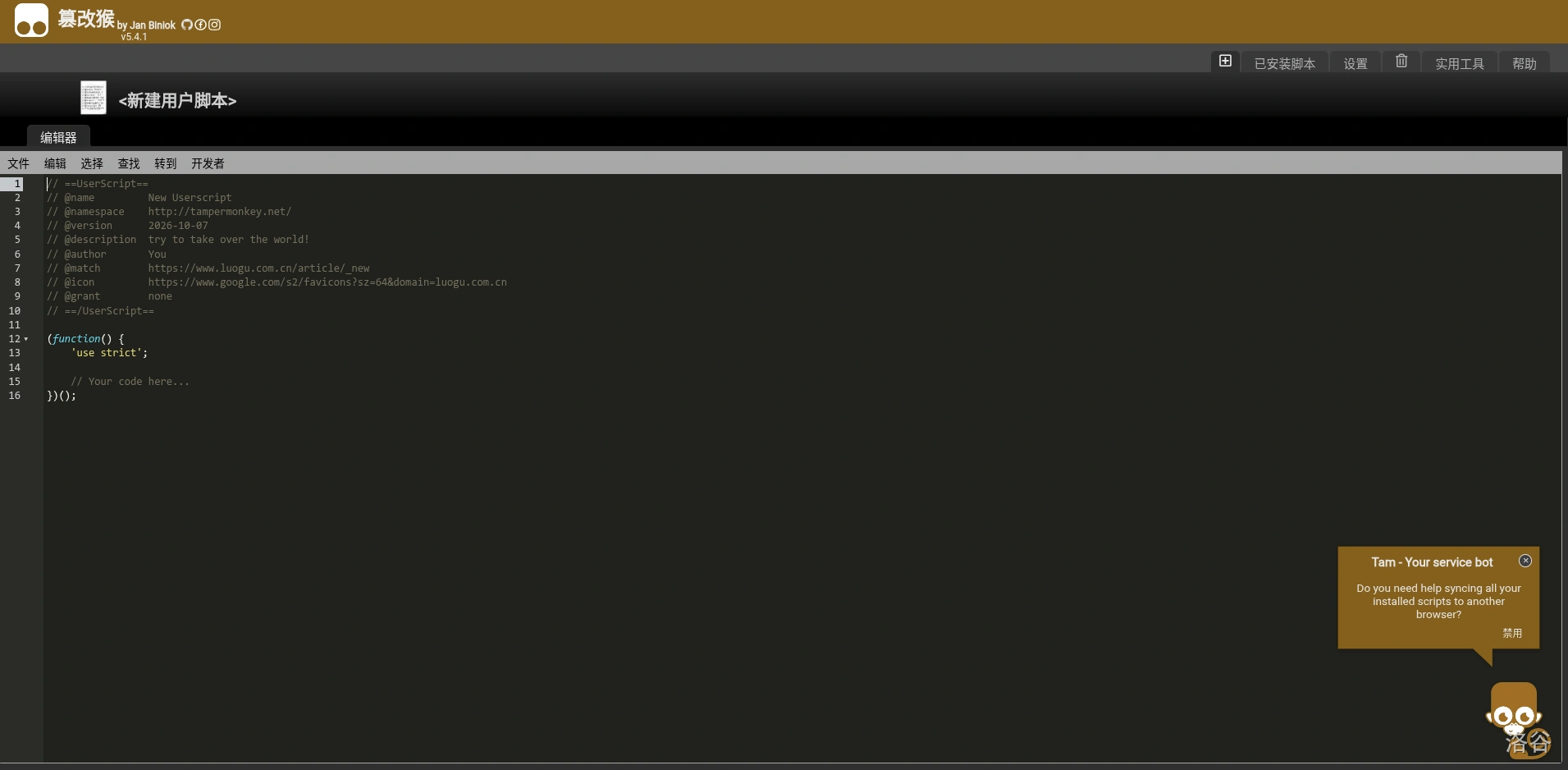
把下面的代码复制进去。
code
// ==UserScript==
// @name         洛谷主题 亮/暗 切换 + 站内设置
// @namespace    local.lotletos.luogu-theme-toggle
// @version      1.0.1792286247
// @description  洛谷主题的亮/暗切换按钮 + 站内设置面板(背景图、卡片/侧栏不透明度、过渡时长)
// @author       lotletos
// @match        https://*.luogu.com.cn/*
// @run-at       document-start
// @grant        GM_getValue
// @grant        GM_setValue
// @updateURL    http://127.0.0.1:8791/luogu-theme-toggle.user.js
// @downloadURL  http://127.0.0.1:8791/luogu-theme-toggle.user.js
// ==/UserScript==

(function () {
  'use strict';

  if (window.__lgThemeScriptLoaded) return;
  window.__lgThemeScriptLoaded = true;

  const KEY_THEME = 'lg-theme';
  const KEY_PREFS = 'lg-prefs';
  const ATTR = 'data-lg-theme';
  const root = document.documentElement;

  const HAS_GM = typeof GM_getValue === 'function' && typeof GM_setValue === 'function';

  function storeGet(key) {
    if (HAS_GM) {
      try {
        const v = GM_getValue(key, null);
        if (v !== null && v !== undefined) return v;
      } catch (e) {  }
    }
    try { return localStorage.getItem(key); } catch (e) { return null; }
  }

  function storeSet(key, value) {
    if (HAS_GM) { try { GM_setValue(key, value); } catch (e) {} }

    try { localStorage.setItem(key, value); } catch (e) {}
  }

  function migrateToGM() {
    if (!HAS_GM) return;
    for (const k of [KEY_THEME, KEY_PREFS]) {
      let gm = null;
      try { gm = GM_getValue(k, null); } catch (e) { continue; }
      if (gm !== null && gm !== undefined && gm !== '') continue;
      let ls = null;
      try { ls = localStorage.getItem(k); } catch (e) {}
      if (ls !== null && ls !== undefined && ls !== '') {
        try { GM_setValue(k, ls); } catch (e) {}
      }
    }
  }
  migrateToGM();

  const VERSION = '1.5.1';

  function detectDuplicates() {
    const n = document.querySelectorAll('[id="lg-theme-toggle"]').length;
    if (n > 1 && !sessionStorage.getItem('lg-dup-warned')) {
      try { sessionStorage.setItem('lg-dup-warned', '1'); } catch (e) {}
      console.warn('[洛谷主题] 检测到 ' + n + ' 个亮/暗按钮。'
        + '说明篡改猴里同时装着【新旧两份】本脚本,请删掉旧的那份(名字里没有「+ 站内设置」的那个)。');
      setTimeout(showDupNotice, 1500);
      return true;
    }
    return false;
  }

  function showDupNotice() {
    if (document.getElementById('lg-dup-notice')) return;
    const d = document.createElement('div');
    d.id = 'lg-dup-notice';
    d.setAttribute('style', [
      'position:fixed', 'z-index:2147483647', 'top:64px', 'left:50%',
      'transform:translateX(-50%)', 'max-width:min(560px,calc(100vw - 32px))',
      'box-sizing:border-box', 'padding:10px 14px', 'border-radius:10px',
      'background:#4a2b1a', 'color:#ffd9b8', 'border:1px solid #b3702f',
      'box-shadow:0 8px 24px rgba(0,0,0,.45)',
      'font:13px/1.6 system-ui,sans-serif',
    ].join(';'));
    d.innerHTML = '<b>顶栏出现了两个亮/暗按钮</b><br>'
      + '篡改猴里同时装着新旧两份本脚本,请打开篡改猴 → 删掉<b>旧的那份</b>'
      + '(名字里<b>没有</b>「+ 站内设置」的那个),然后刷新。'
      + '<span style="display:block;margin-top:6px;opacity:.8">点这里关闭 ×</span>';
    d.addEventListener('click', () => d.remove());
    document.body.appendChild(d);
    setTimeout(() => d.remove(), 20000);
  }

  const FIELDS = [
    { key: 'bg',    css: '--lg-bg-image', kind: 'text',  perTheme: true,
      label: '页面背景图', hint: '只填网址就行(自动补 url("https://…"));填 none 去掉背景图' },
    { key: 'card',  css: '--lg-card-glass', kind: 'range', perTheme: true, color: true,
      label: '卡片底色不透明度', min: 0, max: 1, step: 0.02, fmt: v => v.toFixed(2) },
    { key: 'nav',   css: '--lg-nav', kind: 'range', perTheme: true, color: true,
      label: '侧栏不透明度', min: 0, max: 1, step: 0.02, fmt: v => v.toFixed(2) },
    { key: 'trans', css: '--lg-trans', kind: 'range', perTheme: false,
      label: '卡片过渡时长', min: 0.1, max: 1.5, step: 0.05, unit: 's', fmt: v => v.toFixed(2) + 's' },
    { key: 'noblur', kind: 'check', perTheme: false,
      label: '关闭毛玻璃模糊(省性能)',
      hint: '把卡片 / 顶栏 / 侧栏 / IDE 的磨砂关掉,改成纯色底。'
          + '模糊要实时采样背后的画面,是这套主题里最吃性能的一项。' },
    { key: 'cardfx', kind: 'select', perTheme: false,
      label: '卡片特效',
      options: [
        { v: '',      label: '默认(毛玻璃)' },
        { v: 'glass', label: '液态玻璃(高光 + 厚度)' },
      ],
      hint: '液态玻璃会叠四层高光做出厚度:左上镜面光斑 + 斜向渐亮 + 上下缘亮线 + 内发光,'
          + '悬停时卡片抬起 2px。做法参考 BigBallOfMud-Luogu。' },
    { key: 'sidebar', kind: 'check', perTheme: false,
      label: '默认收起左侧栏',
      hint: '打开后每次进页面,左侧栏默认是收起的(只在左边留一个小圆按钮)。'
          + '页面里那个折叠按钮只影响当前页面,不会被记住 —— 刷新或换页后仍按这里的默认值。' },
  ];

  const MANAGED = FIELDS.filter(f => f.css).map(f => f.css);

  let theme = 'dark';
  try {
    const saved = storeGet(KEY_THEME);
    if (saved === 'light' || saved === 'dark') theme = saved;
  } catch (e) {  }
  root.setAttribute(ATTR, theme);

  let prefs = {};
  try { prefs = JSON.parse(storeGet(KEY_PREFS) || '{}') || {}; } catch (e) { prefs = {}; }

  function savePrefs() {
    try { storeSet(KEY_PREFS, JSON.stringify(prefs)); } catch (e) {}
  }

  function getPref(field) {
    if (field.perTheme) {
      const bucket = prefs[theme] || {};
      return bucket[field.key];
    }
    return prefs[field.key];
  }

  function setPref(field, value) {
    if (field.perTheme) {
      (prefs[theme] || (prefs[theme] = {}))[field.key] = value;
    } else {
      prefs[field.key] = value;
    }
    savePrefs();
  }

  function normalizeBg(v) {
    if (!v) return null;
    v = String(v).trim();
    if (!v) return null;
    if (/^(none|inherit|initial|unset|revert)$/i.test(v)) return v;
    if (/^(repeating-)?(linear|radial|conic)-gradient\(/i.test(v)) return v;
    if (/^(image-set|cross-fade|element|paint)\(/i.test(v)) return v;
    if (/^var\(/i.test(v)) return null;

    const m = /^url\(\s*(['"]?)([\s\S]*?)\1\s*\)$/i.exec(v);
    const inner = (m ? m[2] : v).trim();
    if (!inner) return null;

    if (/^(data:|blob:|[a-z][a-z0-9+.-]*:\/\/|\/\/|\/|#)/i.test(inner)) return m ? null : `url("${inner}")`;
    return 'url("https://' + inner.replace(/"/g, '') + '")';
  }

  function parseColor(v) {
    const m = /rgba?\(\s*([\d.]+)\s*,\s*([\d.]+)\s*,\s*([\d.]+)\s*(?:,\s*([\d.]+)\s*)?\)/i.exec(v || '');
    if (!m) return null;
    return { r: +m[1], g: +m[2], b: +m[3], a: m[4] === undefined ? 1 : +m[4] };
  }

  function withAlpha(rgb, a) {
    return `rgba(${Math.round(rgb.r)}, ${Math.round(rgb.g)}, ${Math.round(rgb.b)}, ${a})`;
  }

  function currentRgb(cssVar) {
    return parseColor(getComputedStyle(root).getPropertyValue(cssVar)) || { r: 128, g: 128, b: 128, a: 1 };
  }

  const NOBLUR_CSS = `
@layer lg-noblur {
  html[data-lg-noblur] :is(
    .l-card, .card, .lg-article, .top-bar, .navbar, .user-nav, .user-header-bottom,
    .nav-group, .panel, .theme-page, .am-comment-main, .reply-item, .header-layout,
    .exlg-window, .exlg-dialog-container, .exlg-dialog-btn, .ide-container
  ),
  html[data-lg-noblur] nav,
  html[data-lg-noblur] header,
  html[data-lg-noblur] footer {
    -webkit-backdrop-filter: none !important;
    backdrop-filter: none !important;
  }
}`;

  function ensureNoblurStyle() {
    if (document.getElementById('lg-noblur-style')) return;
    const s = document.createElement('style');
    s.id = 'lg-noblur-style';
    s.textContent = NOBLUR_CSS;
    (document.head || document.documentElement).appendChild(s);
  }

  // ---------------------------------------------------------------- 左侧栏折叠
  //
  // 行为:侧栏里多一个「«」按钮,点一下把整条侧栏推出屏幕;
  // 屏幕上只在左侧留一个 30px 的「»」小圆按钮,点它还原。
  //
  // ⚠ 状态【不落存储】:用户明确要求"伸缩只在当前页面生效"。
  //   所以折叠标记只挂在 <html data-lg-sidebar> 上,刷新 / 换页就回到默认。
  //   设置面板里的「默认收起左侧栏」才是持久化的,它决定每次进页面时的初始状态。
  //
  // ⚠⚠ 动画只能用 left,【绝对不能用 transform,也不要用 opacity】。
  //   右侧那两组胶囊(.nav-group.on-expand)是 position:fixed 钉在右边的,
  //   但 DOM 上它们是 nav.lside 的【子元素】(实测 x=1327,就在 nav 里面)。
  //   于是:
  //     · transform 会给 fixed 后代重建包含块 → 它们跟着侧栏一起跑到左边,
  //       动画结束 transform 消失才瞬移回右边(用户反馈的正是这个);
  //     · opacity 是乘到整棵子树上的 → 淡出侧栏会把右侧胶囊一起淡掉。
  //   left 两个问题都没有:它不创建包含块,fixed 子元素仍以视口定位,
  //   而且 left 不会向下继承。代价是 left 走布局、每帧重排,
  //   但这里只有一个元素,实测 0.28s 很顺。
  //
  // ⚠ 右侧那两组胶囊也要一起收(用户要的是"两侧一起缩")。
  //   它们是 position:fixed; right:12px,所以用 right 让它们滑出右边即可 ——
  //   同样不创建包含块、不影响别的元素。宽度 96px,给 -110px 保证完全出屏。
  //   两组是上下各一半的胶囊,位移量必须一致,否则接缝会错开。
  const SIDEBAR_CSS = `
@layer lg-sidebar {
  nav.lside, nav.sidebar {
    transition: left .28s ease !important;
  }
  html[data-lg-sidebar="collapsed"] nav.lside,
  html[data-lg-sidebar="collapsed"] nav.sidebar {
    left: -88px !important;
  }
  nav.lside .nav-group.on-expand,
  nav.sidebar .nav-group.on-expand {
    transition: right .28s ease, opacity .22s ease !important;
  }
  html[data-lg-sidebar="collapsed"] .nav-group.on-expand {
    right: -110px !important;
    opacity: 0 !important;
  }
  #lg-sidebar-restore { display: none; }
  html[data-lg-sidebar="collapsed"] #lg-sidebar-restore { display: flex !important; }
}`;

  function ensureSidebarStyle() {
    if (document.getElementById('lg-sidebar-style')) return;
    const s = document.createElement('style');
    s.id = 'lg-sidebar-style';
    s.textContent = SIDEBAR_CSS;
    (document.head || document.documentElement).appendChild(s);
  }

  const ATTR_SIDEBAR = 'data-lg-sidebar';
  let sidebarBtn = null, restoreBtn = null;

  function setSidebarCollapsed(v) {
    if (v) root.setAttribute(ATTR_SIDEBAR, 'collapsed');
    else root.removeAttribute(ATTR_SIDEBAR);
  }

  function makeSidebarButton(id, text, title, fixed) {
    const b = document.createElement('a');
    b.id = id;
    b.href = 'javascript:void 0';
    b.title = title;
    b.textContent = text;
    b.setAttribute('role', 'button');
    const base = [
      'align-items:center', 'justify-content:center', 'cursor:pointer',
      'border-radius:999px', 'font-size:15px', 'line-height:1',
      'color:var(--lg-text, #ddd)', 'text-decoration:none', 'user-select:none',
      'opacity:.8',
    ];
    if (fixed) {
      base.push(
        'position:fixed', 'left:12px', 'top:50%', 'transform:translateY(-50%)',
        'z-index:2147483000', 'width:30px', 'height:30px', 'margin:0', 'padding:0',
        'background:var(--lg-nav, rgba(10,12,18,.82))',
        'border:1px solid var(--lg-line, rgba(128,128,128,.35))',
        'box-shadow:0 4px 14px rgba(0,0,0,.3)'
      );
    } else {
      base.push('display:flex', 'width:100%', 'height:32px', 'margin:2px 0', 'padding:0');
    }
    b.setAttribute('style', base.join(';'));
    b.addEventListener('mouseenter', function () { b.style.opacity = '1'; });
    b.addEventListener('mouseleave', function () { b.style.opacity = '.8'; });
    b.addEventListener('click', function (ev) {
      ev.preventDefault(); ev.stopPropagation();
      setSidebarCollapsed(id === 'lg-sidebar-collapse');
    });
    return b;
  }

  function injectSidebarToggle() {
    const nav = document.querySelector('nav.lside, nav.sidebar');
    if (!nav) return false;
    ensureSidebarStyle();

    if (!sidebarBtn) sidebarBtn = makeSidebarButton('lg-sidebar-collapse', '«', '收起左侧栏', false);
    if (!restoreBtn) restoreBtn = makeSidebarButton('lg-sidebar-restore', '»', '展开左侧栏', true);

    if (!sidebarBtn.isConnected) nav.insertBefore(sidebarBtn, nav.firstChild);
    if (!restoreBtn.isConnected) (document.body || root).appendChild(restoreBtn);
    return true;
  }

  function apply() {

    MANAGED.forEach(k => root.style.removeProperty(k));

    if (prefs.noblur) {
      ensureNoblurStyle();
      root.setAttribute('data-lg-noblur', '');
      root.style.setProperty('--lg-card-blur', '0px');
      root.style.setProperty('--lg-ide-blur', '0px');
    } else {
      root.removeAttribute('data-lg-noblur');

      root.style.removeProperty('--lg-card-blur');
      root.style.removeProperty('--lg-ide-blur');
    }

    if (prefs.cardfx) root.setAttribute('data-lg-cardfx', prefs.cardfx);
    else root.removeAttribute('data-lg-cardfx');

    for (const f of FIELDS) {
      if (!f.css) continue;
      let v = getPref(f);
      if (v === undefined || v === null || v === '') continue;

      if (f.kind === 'text') {
        const norm = normalizeBg(v);
        if (norm === null) continue;
        root.style.setProperty(f.css, norm);
      } else {
        const n = Number(v);
        if (!isFinite(n)) continue;
        if (f.color) {

          root.style.setProperty(f.css, withAlpha(currentRgb(f.css), n));
        } else {
          root.style.setProperty(f.css, f.unit ? n + f.unit : String(n));
        }
      }
    }

    fixStylusBgVars();
  }

  function fixStylusBgVars() {
    const cs = getComputedStyle(root);
    for (const k of ['--lg-bg-image', '--lg-bg-image-light']) {
      if (root.style.getPropertyValue(k)) continue;
      const raw = (cs.getPropertyValue(k) || '').trim();
      if (!raw || /^(url\(|none$)/i.test(raw)) continue;
      if (/^(repeating-)?(linear|radial|conic)-gradient\(/i.test(raw)) continue;
      if (/^var\(/i.test(raw)) continue;
      const norm = normalizeBg(raw);
      if (norm) root.style.setProperty(k, norm);
    }
  }

  let btn = null, gear = null, panel = null;

  function pillButton(id, text, title) {
    const b = document.createElement('a');
    b.id = id;
    b.href = 'javascript:void 0';
    b.title = title;
    b.textContent = text;
    b.setAttribute('role', 'button');
    b.setAttribute('style', [
      'display:inline-flex', 'align-items:center', 'justify-content:center',
      'min-width:26px', 'height:26px', 'padding:0 7px', 'margin:0 6px',
      'cursor:pointer', 'border-radius:13px', 'font-size:13px', 'line-height:1',
      'font-family:inherit', 'text-decoration:none', 'user-select:none', 'flex:0 0 auto',
      'transition:background .15s ease',
    ].join(';'));
    b.addEventListener('mouseenter', function () {
      b.style.background = theme === 'light' ? 'rgba(0,0,0,.08)' : 'rgba(255,255,255,.14)';
    });
    b.addEventListener('mouseleave', function () { b.style.background = 'transparent'; });
    return b;
  }

  function syncButtons() {
    const light = theme === 'light';
    const fg = light ? '#333' : '#ddd';
    const bd = light ? '1px solid rgba(0,0,0,.18)' : '1px solid rgba(255,255,255,.22)';
    for (const b of [btn, gear]) {
      if (!b) continue;
      b.style.color = fg;
      b.style.border = bd;
    }
    if (btn) {
      btn.textContent = light ? '亮' : '暗';
      btn.title = light ? '当前:亮色模式(点击切到暗色)' : '当前:暗色模式(点击切到亮色)';
    }
    if (gear) gear.title = '主题设置(背景图 / 不透明度 / 过渡)';
  }

  function setTheme(next) {
    theme = next;
    root.setAttribute(ATTR, next);
    try { storeSet(KEY_THEME, next); } catch (e) {}
    apply();
    syncButtons();
    syncPanel();
  }

  function panelStyle() {
    return [
      'position:fixed', 'z-index:2147483646', 'top:64px', 'right:16px',
      'width:320px', 'max-width:calc(100vw - 32px)', 'box-sizing:border-box',

      'max-height:calc(100vh - 84px)', 'overflow-y:auto', 'overscroll-behavior:contain',
      'padding:14px 16px', 'border-radius:14px',
      'background:var(--lg-solid, #16181c)', 'color:var(--lg-text, #e6e9ef)',
      'border:1px solid rgba(128,128,128,.35)',
      'box-shadow:0 8px 28px rgba(0,0,0,.45)',
      'font:13px/1.6 system-ui,-apple-system,"Segoe UI",sans-serif',
      'display:none',
    ].join(';');
  }

  function buildPanel() {
    const box = document.createElement('div');
    box.id = 'lg-theme-panel';
    box.setAttribute('style', panelStyle());

    const title = document.createElement('div');
    title.setAttribute('style', 'display:flex;align-items:center;justify-content:space-between;margin-bottom:10px;font-weight:700');
    title.innerHTML = '<span>主题设置</span>';
    const close = document.createElement('a');
    close.href = 'javascript:void 0';
    close.textContent = '✕';
    close.setAttribute('style', 'cursor:pointer;opacity:.7;padding:0 2px');
    close.addEventListener('click', () => togglePanel(false));
    title.appendChild(close);
    box.appendChild(title);

    const note = document.createElement('div');
    note.setAttribute('style', 'opacity:.7;margin-bottom:12px;font-size:12px');
    note.textContent = '下面这些按「当前模式」分别保存;切模式后会显示另一套值。';
    box.appendChild(note);

    for (const f of FIELDS) {

      if (f.kind === 'check') {
        const wrap = document.createElement('label');
        wrap.setAttribute('style',
          'display:flex;align-items:center;gap:8px;margin-bottom:12px;cursor:pointer');
        const box_ = document.createElement('input');
        box_.type = 'checkbox';
        box_.setAttribute('style',
          'width:16px;height:16px;accent-color:#4c8bf5;cursor:pointer;flex:0 0 auto;margin:0');
        const txt = document.createElement('span');
        txt.textContent = f.label;
        wrap.appendChild(box_);
        wrap.appendChild(txt);
        box_.addEventListener('change', function () {
          setPref(f, box_.checked);
          // 「默认收起左侧栏」改完立刻生效一次(之后刷新仍按这个默认值)
          if (f.key === 'sidebar') setSidebarCollapsed(box_.checked);
          apply(); syncPanel();
        });
        box.appendChild(wrap);
        if (f.hint) {
          const h = document.createElement('div');
          h.setAttribute('style', 'opacity:.6;font-size:11px;margin:-8px 0 12px 0');
          h.textContent = f.hint;
          box.appendChild(h);
        }
        f._input = box_;
        f._val = null;

        continue;
      }

      const row = document.createElement('div');
      row.setAttribute('style', 'margin-bottom:12px');

      const head = document.createElement('div');
      head.setAttribute('style', 'display:flex;justify-content:space-between;align-items:baseline;margin-bottom:4px');
      const lab = document.createElement('span');
      lab.textContent = f.label;
      const val = document.createElement('span');
      val.setAttribute('style', 'opacity:.75;font-size:12px;font-variant-numeric:tabular-nums');
      head.appendChild(lab); head.appendChild(val);
      row.appendChild(head);

      let input;
      if (f.kind === 'select') {
        input = document.createElement('select');
        input.setAttribute('style', [
          'width:100%', 'box-sizing:border-box', 'padding:6px 8px',
          'border-radius:8px', 'border:1px solid rgba(128,128,128,.45)',
          'background:rgba(128,128,128,.14)', 'color:inherit', 'font:12px/1.5 inherit',
        ].join(';'));
        (f.options || []).forEach(function (o) {
          const op = document.createElement('option');
          op.value = o.v;
          op.textContent = o.label;

          op.setAttribute('style', 'background:var(--lg-solid, #16181c);color:var(--lg-text, #e6e9ef)');
          input.appendChild(op);
        });
        input.addEventListener('change', function () {
          setPref(f, input.value);
          apply(); syncPanel();
        });
      } else if (f.kind === 'text') {
        input = document.createElement('input');
        input.type = 'text';
        input.placeholder = 'https://… 或留空';
        input.setAttribute('style', [
          'width:100%', 'box-sizing:border-box', 'padding:6px 8px',
          'border-radius:8px', 'border:1px solid rgba(128,128,128,.45)',
          'background:rgba(128,128,128,.14)', 'color:inherit',
          'font:12px/1.4 ui-monospace,monospace',
        ].join(';'));
        input.addEventListener('change', function () {
          const norm = normalizeBg(input.value);
          if (input.value.trim() && norm === null) return;
          setPref(f, input.value.trim());
          input.value = norm && norm !== 'none' ? input.value.trim() : input.value.trim();
          apply(); syncPanel();
        });
      } else {
        input = document.createElement('input');
        input.type = 'range';
        input.min = f.min; input.max = f.max; input.step = f.step;
        input.setAttribute('style', 'width:100%;accent-color:#4c8bf5');
        input.addEventListener('input', function () {
          setPref(f, Number(input.value));
          apply(); syncPanel();
        });
      }
      if (f.kind !== 'check') row.appendChild(input);

      if (f.hint) {
        const h = document.createElement('div');
        h.setAttribute('style', 'opacity:.6;font-size:11px;margin-top:4px');
        h.textContent = f.hint;
        row.appendChild(h);
      }

      f._input = input; f._val = val;
      box.appendChild(row);
    }

    const ver = document.createElement('div');
    ver.setAttribute('style',
      'margin-top:10px;padding-top:8px;border-top:1px solid rgba(128,128,128,.25);'
      + 'opacity:.55;font-size:11px;display:flex;justify-content:space-between');
    ver.innerHTML = '<span>脚本 v' + VERSION + '</span>'
      + '<span>样式版本看 Stylus 里那份</span>';
    box.appendChild(ver);

    const foot = document.createElement('div');
    foot.setAttribute('style', 'display:flex;justify-content:space-between;margin-top:10px;padding-top:10px;border-top:1px solid rgba(128,128,128,.25)');
    const reset = document.createElement('a');
    reset.href = 'javascript:void 0';
    reset.textContent = '恢复本模式默认';
    reset.setAttribute('style', 'cursor:pointer;color:#4c8bf5');
    reset.addEventListener('click', function () {
      if (window.confirm('恢复当前模式的默认设置?(清掉本模式的覆盖值)')) {
        if (prefs[theme]) delete prefs[theme];
        savePrefs(); apply(); syncPanel();
      }
    });
    const closeAll = document.createElement('a');
    closeAll.href = 'javascript:void 0';
    closeAll.textContent = '关闭';
    closeAll.setAttribute('style', 'cursor:pointer;opacity:.8');
    closeAll.addEventListener('click', () => togglePanel(false));
    foot.appendChild(reset); foot.appendChild(closeAll);
    box.appendChild(foot);

    return box;
  }

  function syncPanel() {
    if (!panel) return;
    for (const f of FIELDS) {
      const v = getPref(f);
      if (f.kind === 'check') {
        f._input.checked = !!v;
      } else if (f.kind === 'select') {
        f._input.value = v || '';
        if (f._val) f._val.textContent = '';
      } else if (f.kind === 'text') {
        f._input.value = (v === undefined || v === null) ? '' : String(v);
        f._val.textContent = (v === undefined || v === null || v === '') ? '(用 Stylus 的值)' : '';
      } else {

        let cur = v;
        if (cur === undefined || cur === null) {
          const cs = getComputedStyle(root).getPropertyValue(f.css).trim();
          if (f.color) {
            const c = parseColor(cs);
            cur = c ? c.a : 1;
          } else {
            cur = parseFloat(cs);
          }
          if (!isFinite(cur)) cur = f.min;
        }
        f._input.value = cur;
        f._val.textContent = (f.fmt ? f.fmt(Number(cur)) : cur) + (v === undefined || v === null ? '(默认)' : '');
      }
    }
  }

  function togglePanel(show) {
    if (!panel) { panel = buildPanel(); document.body.appendChild(panel); }
    const want = (show === undefined) ? (panel.style.display === 'none') : show;
    panel.style.display = want ? 'block' : 'none';
    if (want) syncPanel();
  }

  const HOSTS = [
    '.top-bar .user-nav',
    '.top-bar .right',
    '.top-bar .nav-search',
    'header .user-nav',
    '.user-nav.rside',
    '.user-nav',
    '.navbar__items--right',
    'nav.navbar .navbar__inner',
    '.top-bar',
  ];

  function tryInject() {
    if (btn && btn.isConnected && gear && gear.isConnected) return true;
    let host = null;
    for (const sel of HOSTS) {
      const el = document.querySelector(sel);
      if (el && el.offsetParent !== null) { host = el; break; }
    }
    if (!host) return false;

    if (!btn) {
      btn = pillButton('lg-theme-toggle', '暗', '切换 亮色 / 暗色 主题');
      btn.addEventListener('click', function (ev) {
        ev.preventDefault(); ev.stopPropagation();
        setTheme(theme === 'light' ? 'dark' : 'light');
      });
    }
    if (!gear) {
      gear = pillButton('lg-theme-gear', '⚙', '主题设置');
      gear.addEventListener('click', function (ev) {
        ev.preventDefault(); ev.stopPropagation();
        togglePanel();
      });
    }
    syncButtons();
    host.insertBefore(gear, host.firstChild);
    host.insertBefore(btn, host.firstChild);
    return true;
  }

  let timer = null;
  const mo = new MutationObserver(function () {
    if (timer) return;
    timer = setTimeout(function () { timer = null; tryInject(); injectSidebarToggle(); }, 300);
  });

  function boot() {
    apply();
    // 左侧栏:按设置里的默认值决定进页面时的初始折叠状态(不写存储)
    setSidebarCollapsed(!!prefs.sidebar);
    injectSidebarToggle();
    tryInject();
    detectDuplicates();
    mo.observe(document.documentElement, { childList: true, subtree: true });
    let n = 0;
    const iv = setInterval(function () {
      apply();
      // 侧栏是 Vue 渲染的,可能会被重新挂载 —— 每轮都补一次按钮
      injectSidebarToggle();
      if (tryInject() || ++n > 20) clearInterval(iv);
    }, 500);
  }

  if (document.readyState === 'loading') {
    document.addEventListener('DOMContentLoaded', boot);
  } else {
    boot();
  }
})();
点击保存后回到洛谷界面,刷新,顶栏会出现这两个按钮。左边按钮是切换暗色和亮色的,右边是设置。
点击右边这个齿轮,进入设置菜单,然后你就可以设置背景图片等东西了(背景图片用图床链接)注意亮色和暗色模式的设置是独立的。

卡片的模糊每帧都要计算,如果你的设备过于低配,觉得卡的话可以在设置菜单关掉模糊。