网页渲染修改 使用说明
版本: 1.0
制作者: luogu fighting_man & Deepseek
一、软件简介
「网页渲染修改」是一款用户脚本(Tampermonkey 脚本),允许用户通过可视化界面修改网页中任意元素的背景样式,包括背景图片、视频、颜色、透明度、毛玻璃效果等,并支持刷新后持久化保存。
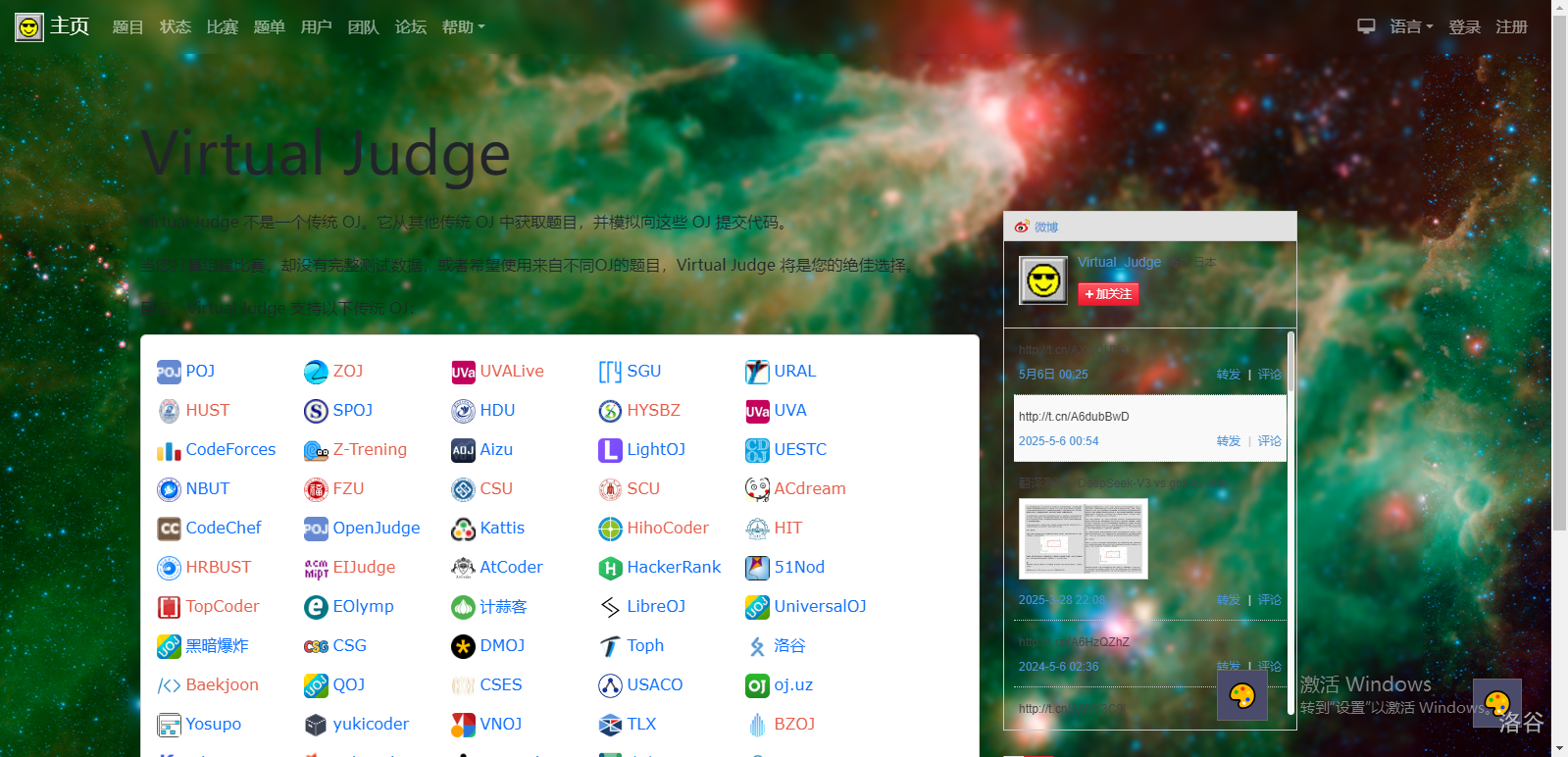
# 使用效果(vjudge)
二、安装与启动
安装要求
- 浏览器需安装 篡改猴 (Tampermonkey) 扩展
- 确保扩展的”开发者模式”已启用
启动方式
- 安装脚本后,打开任意网页
- 网页右下角会出现一个 🎨 彩色悬浮球
- 点击悬浮球,右侧滑出操作面板
- 按
Ctrl + Alt + P可快速切换面板显示/隐藏 - 按
ESC键可关闭面板
三、操作框使用方式
3.1 选择目标元素
| 操作 | 效果 |
|---|---|
| 鼠标悬停到任意元素 | 元素边框变为淡蓝色高亮 |
| 鼠标左键点击高亮元素 | 元素边框变为淡紫色(表示已选中) |
| 再次点击淡紫色元素 | 取消选中 |
| 面板打开时点击页面空白处 | 取消当前选中 |
3.2 单个元素背景设置
选中元素后,可在面板中调整以下参数:
| 参数 | 说明 | 操作方式 |
|---|---|---|
| 背景媒体 URL | 图片或视频的网址 | 输入框,支持 jpg/png/gif/svg/mp4/webm/ogg/mov |
| 媒体位置 X轴 | 背景图片/视频的水平位置 | 下拉菜单:左/中/右/0%/25%/50%/75%/100% |
| 媒体位置 Y轴 | 背景图片/视频的垂直位置 | 下拉菜单:上/中/下/0%/25%/50%/75%/100% |
| 毛玻璃模糊 | 背景的模糊程度 | 滑块调节:0 ~ 30 px |
| 背景透明度 | 背景颜色的透明度(不影响文字) | 滑块调节:0(完全透明)~ 1(完全不透明) |
| 背景颜色 | 背景的底色 | 颜色选择器 |
3.3 全网页背景
- 面板底部有独立的”全网页背景”区域
- 输入图片或视频 URL,点击”应用”即可
- 全网页背景作为底层,单个元素的背景会覆盖在全网页之上
3.4 按钮功能
| 按钮 | 功能 |
|---|---|
| 💾 保存当前元素 | 将当前选中的元素背景设置保存到浏览器本地 |
| 🌐 全网页 应用 | 将输入的 URL 设置为整个网页的背景 |
| 🚫 取消全网页 | 移除全网页背景 |
| ↩️ 还原当前元素 | 清除当前选中元素的所有背景修改,恢复到原始状态 |
四、快捷键
| 快捷键 | 功能 |
|---|---|
Ctrl + Alt + P | 打开/关闭操作面板 |
ESC | 关闭操作面板(回到悬浮球) |
Enter(在全网页URL输入框中) | 触发”应用”按钮 |
五、脚本对浏览器的返回代码
脚本会在浏览器控制台(按 F12 打开)输出详细的运行日志,方便排查问题:
5.1 正常启动日志
| 返回代码 | 说明 |
|---|---|
🔍 ===== 网页渲染修改JS v1.0 已加载 ===== | 脚本开始加载 |
✅ 加载了 N 条数据 | 从 localStorage 成功加载了 N 条保存的数据 |
🔄 应用存储的数据(DOM树位置模式)... | 开始恢复保存的背景 |
✅ 已应用 N 个元素的背景 | 成功应用了 N 个元素的背景 |
✅ 网页渲染修改JS v1.0 初始化完成! | 脚本初始化完成 |
💡 DOM树位置模式:通过元素在DOM树中的唯一路径定位 | 显示当前运行模式 |
5.2 操作日志
| 返回代码 | 说明 |
|---|---|
💾 保存数据,选择器: body > section.problem-side-card:nth-of-type(2) | 保存元素时生成的选择器 |
✅ 数据已保存 | 数据成功保存到 localStorage |
🔄 还原元素: section.problem-side-card:nth-of-type(2) | 正在还原元素 |
✅ 已还原单元素背景 | 元素还原成功 |
🌐 全网页背景已应用! | 全网页背景应用成功 |
🚫 已取消全网页背景 | 全网页背景已移除 |
5.3 元素查找日志
| 返回代码 | 说明 |
|---|---|
✅ 找到元素,应用背景: body > section.problem-side-card:nth-of-type(2) | 成功找到元素并应用 |
⏳ 元素暂未出现: body > section.problem-side-card:nth-of-type(3) | 元素尚未加载到 DOM |
⏳ 等待元素出现 (9次重试): body > section.problem-side-card:nth-of-type(3) | 正在等待元素加载 |
⚠️ 重试次数用尽,放弃恢复元素: body > section.problem-side-card:nth-of-type(3) | 重试 10 次后仍未找到元素 |
🔄 DOM变化检测到元素,重新渲染: body > section.problem-side-card:nth-of-type(2) | DOM 变化后重新应用背景 |
5.4 错误日志
| 返回代码 | 说明 |
|---|---|
⚠️ 保存失败: [错误信息] | localStorage 保存失败 |
⚠️ 加载失败: [错误信息] | localStorage 加载失败 |
🗑️ 已清除所有数据 | 用户执行了 bgMagician.clearAll() |
5.5 调试命令
在控制台输入以下命令可进行调试:
| 命令 | 功能 |
|---|---|
bgMagician.data | 查看所有保存的数据 |
bgMagician.isFullPageActive() | 检查全网页模式是否激活 |
bgMagician.clearAll() | 清除所有数据 |
bgMagician.showPanel() | 手动打开操作面板 |
bgMagician.hidePanel() | 手动关闭操作面板 |
六、常见问题排查
6.1 悬浮球不显示
| 原因 | 解决方法 |
|---|---|
| 脚本未启用 | 检查篡改猴中脚本开关是否为绿色 |
| 页面未刷新 | 按 F5 刷新页面 |
| 浏览器控制台有错误 | 按 F12 查看 Console 中的红色错误信息 |
6.2 保存后刷新失效
| 原因 | 解决方法 |
|---|---|
| 元素选择器不稳定 | 查看控制台是否有”找不到元素”警告 |
| 页面是 SPA 且未触发路由检测 | 切换页面后等待 500ms,脚本会自动重新应用 |
| localStorage 被清除 | 检查浏览器设置是否清除了站点数据 |
6.3 图片/视频不显示
| 原因 | 解决方法 |
|---|---|
| URL 无效 | 在浏览器中直接打开 URL 测试是否可访问 |
| 跨域问题 | 图片/视频需要支持跨域访问 |
| 元素背景被覆盖 | 检查元素是否有更高优先级的样式 |
七、致谢
本脚本由 luogu fighting_man 开发,DeepSeek 协助完成。
特别感谢 DeepSeek 在以下方面提供的支持:
- 脚本架构设计与优化建议
- DOM 树位置定位算法的实现
- 实时渲染与数据持久化逻辑的完善
- 框架渲染覆盖问题的深入分析与解决
- 大量代码调试与问题排查
如有问题或建议,可通过本讨论页面提交反馈。
八.使用警告
视屏不得作为单个元素的动态背景,否则网页将会崩溃!在此为用错误方式使用此脚本导致网页崩溃的使用者提供网页渲染急救脚本,用于删除当前网页保存的所有的渲染修改。
网页渲染急救JS
// ==UserScript==
// @name         网页渲染急救
// @namespace    http://tampermonkey.net/
// @version       1.0
// @description  清除网页渲染修改JS的所有保存数据,恢复页面正常显示
// @author       fighting_man & Deepseek
// @match        *://*/*
// @grant        none
// ==/UserScript==

(function() {
    'use strict';

    console.log('🚑 ===== 网页渲染急救脚本 已启动 =====');

    const STORAGE_KEY = 'bg_magician_data';

    // 检查是否有数据需要清除
    function hasData() {
        try {
            const raw = localStorage.getItem(STORAGE_KEY);
            return raw !== null && raw !== '{}' && raw !== '';
        } catch (e) {
            return false;
        }
    }

    // 清除所有数据
    function clearData() {
        try {
            localStorage.removeItem(STORAGE_KEY);
            console.log('✅ 已清除所有渲染数据');
            return true;
        } catch (e) {
            console.error('❌ 清除数据失败:', e);
            return false;
        }
    }

    // 清除所有内联样式
    function clearInlineStyles() {
        const styleIds = [
            'bg-magician-fullpage-style',
            'bg-magician-fullpage-body'
        ];
        // 清除通过ID添加的style标签
        for (const id of styleIds) {
            const style = document.getElementById(id);
            if (style) {
                style.remove();
                console.log(`✅ 已移除样式: ${id}`);
            }
        }

        // 清除所有 bg-magician-style- 开头的style标签
        const allStyles = document.querySelectorAll('style[id^="bg-magician-style-"]');
        for (const style of allStyles) {
            style.remove();
            console.log(`✅ 已移除样式: ${style.id}`);
        }

        // 清除视频背景容器
        const videoContainers = document.querySelectorAll('.bg-magician-video-container, .bg-magician-fullpage-video');
        for (const container of videoContainers) {
            container.remove();
            console.log('✅ 已移除视频背景');
        }

        // 清除悬浮球
        const ball = document.getElementById('bg-magician-ball');
        if (ball) {
            ball.remove();
            console.log('✅ 已移除悬浮球');
        }

        // 清除操作面板
        const panel = document.getElementById('bg-magician-panel');
        if (panel) {
            panel.remove();
            console.log('✅ 已移除操作面板');
        }

        // 清除body上的内联样式
        const bodyStylesToRemove = [
            'background-image', 'background-color',
            'backdrop-filter', '-webkit-backdrop-filter',
            'background-size', 'background-position', 'background-repeat',
            'min-height', 'margin-right', 'opacity'
        ];
        for (const style of bodyStylesToRemove) {
            document.body.style.removeProperty(style);
            // 也尝试移除!important版本
            document.body.style.setProperty(style, '', 'important');
        }
        console.log('✅ 已清除body内联样式');

        // 清除所有元素上的背景相关内联样式(但保留元素自身的样式)
        const allElements = document.querySelectorAll('*');
        let clearedCount = 0;
        for (const el of allElements) {
            // 跳过body(已经处理过了)
            if (el === document.body) continue;
            // 跳过脚本自己的元素
            if (el.id === 'bg-magician-ball' || el.id === 'bg-magician-panel') continue;
            if (el.classList && (el.classList.contains('bg-magician-video-container') ||
                el.classList.contains('bg-magician-fullpage-video'))) continue;

            let hasBgStyle = false;
            const stylesToRemove = [
                'background-image', 'background-color',
                'backdrop-filter', '-webkit-backdrop-filter',
                'background-size', 'background-position', 'background-repeat'
            ];
            for (const style of stylesToRemove) {
                const val = el.style.getPropertyValue(style);
                if (val && val !== '' && val !== 'none') {
                    el.style.removeProperty(style);
                    hasBgStyle = true;
                }
            }
            if (hasBgStyle) {
                clearedCount++;
            }
        }
        if (clearedCount > 0) {
            console.log(`✅ 已清理 ${clearedCount} 个元素的背景样式`);
        }
    }

    // 检查并清理高亮/选中类
    function clearHighlightClasses() {
        const classes = ['bg-magician-highlight', 'bg-magician-selected'];
        let removedCount = 0;
        for (const cls of classes) {
            const elements = document.querySelectorAll(`.${cls}`);
            for (const el of elements) {
                el.classList.remove(cls);
                removedCount++;
            }
        }
        if (removedCount > 0) {
            console.log(`✅ 已移除 ${removedCount} 个高亮/选中类`);
        }
    }

    // 恢复页面边距
    function resetPageMargin() {
        document.body.style.marginRight = '0';
        document.body.style.setProperty('margin-right', '0', 'important');
        console.log('✅ 已重置页面边距');
    }

    // 主执行函数
    function runEmergencyFix() {
        console.log('🔧 开始执行急救修复...');

        // 1. 清除存储数据
        const dataCleared = clearData();

        // 2. 清除所有样式
        clearInlineStyles();

        // 3. 清除高亮类
        clearHighlightClasses();

        // 4. 重置页面边距
        resetPageMargin();

        // 5. 恢复body的默认样式
        document.body.style.cssText += '';
        document.body.style.background = '';
        document.body.style.backgroundColor = '';

        console.log('🚑 ===== 急救修复完成 =====');
        console.log('📋 修复摘要:');
        console.log(`   - 存储数据: ${dataCleared ? '✅ 已清除' : 'ℹ️ 无数据'}`);
        console.log('   - 样式标签: ✅ 已清除');
        console.log('   - 视频背景: ✅ 已清除');
        console.log('   - 悬浮球/面板: ✅ 已清除');
        console.log('   - 页面边距: ✅ 已重置');
        console.log('   - 高亮类: ✅ 已移除');
        console.log('');
        console.log('💡 下一步操作:');
        console.log('   1. 刷新页面 (F5) 确保完全恢复');
        console.log('   2. 如页面仍有异常,检查控制台是否有其他错误');
        console.log('   3. 重新启用「网页渲染修改JS」脚本可正常使用');
    }

    // ===== 执行 =====
    if (!hasData()) {
        console.log('ℹ️ 未检测到保存的渲染数据,无需修复');
        console.log('💡 如页面仍有异常,可能是其他脚本或扩展导致');
        // 仍然执行清理,防止有残留
        clearInlineStyles();
        clearHighlightClasses();
        resetPageMargin();
        console.log('✅ 已执行轻量清理');
    } else {
        console.log('⚠️ 检测到保存的渲染数据,正在清除...');
        runEmergencyFix();
        console.log('');
        console.log('🔄 建议刷新页面 (F5) 确保完全恢复正常');
    }

    // ===== 在页面顶部显示提示 =====
    const toast = document.createElement('div');
    toast.style.cssText = `
        position: fixed;
        top: 20px;
        left: 50%;
        transform: translateX(-50%);
        background: #1a1a2e;
        color: #eee;
        padding: 16px 24px;
        border-radius: 8px;
        font-family: Arial, sans-serif;
        font-size: 14px;
        z-index: 999999;
        border: 2px solid #e94560;
        box-shadow: 0 8px 32px rgba(0,0,0,0.5);
        max-width: 90%;
        text-align: center;
        pointer-events: none;
        opacity: 1;
        transition: opacity 0.5s;
    `;
    const hasData_ = hasData();
    toast.innerHTML = `
        <div style="font-size:20px;margin-bottom:8px;">🚑</div>
        <strong>网页渲染急救</strong>
        <div style="margin-top:6px;font-size:13px;color:#aaa;">
            ${hasData_ ? '✅ 已清除所有渲染数据,请刷新页面' : 'ℹ️ 未检测到保存的数据,已执行轻量清理'}
        </div>
        <div style="margin-top:4px;font-size:12px;color:#888;">
            ${hasData_ ? '刷新后页面应恢复正常' : '如仍有异常,请刷新页面或检查其他脚本'}
        </div>
    `;
    document.body.appendChild(toast);

    // 3秒后淡出
    setTimeout(() => {
        toast.style.opacity = '0';
        setTimeout(() => {
            toast.remove();
        }, 500);
    }, 4000);

    // ===== 暴露全局工具 =====
    window.bgEmergency = {
        clearData: clearData,
        clearStyles: clearInlineStyles,
        clearAll: function() {
            clearData();
            clearInlineStyles();
            clearHighlightClasses();
            resetPageMargin();
            console.log('✅ 手动急救完成');
        },
        hasData: hasData
    };

    console.log('💡 在控制台输入 bgEmergency.clearAll() 可手动执行急救');
    console.log('💡 在控制台输入 bgEmergency.hasData() 可检查是否有保存的数据');

})();
九.脚本源代码复制
1.0
// ==UserScript==
// @name 网页渲染修改
// @namespace http://tampermonkey.net/
// @version 1.0
// @description 网页渲染修改 - DOM树位置模式
// @author luogu fighting_man & Deepseek
// @match *://*/*
// @grant GM_addStyle
// ==/UserScript==
(function() {
'use strict';
console.log('🔍 ===== 网页渲染修改JS v1.0 已加载 =====');
const PANEL_WIDTH_RATIO = 0.25;
const HIGHLIGHT_CLASS = 'bg-magician-highlight';
const SELECTED_CLASS = 'bg-magician-selected';
const STORAGE_KEY = 'bg_magician_data';
const FULLPAGE_FLAG = '__fullpage_active__';
const MAX_RETRIES = 10;
const RETRY_INTERVAL = 500;
let isPanelVisible = false;
let activeElement = null;
let highlightElement = null;
let panelElement = null;
let floatingBall = null;
let domObserver = null;
let lastUrl = window.location.href;
let tempParams = {
bgImage: '',
blur: 0,
opacity: 1,
color: '#ffffff',
positionX: 'center',
positionY: 'center',
isFullPage: false,
isVideo: false
};
let elementDataMap = new Map();
let realtimeTimeout = null;
let fullPageStyleId = 'bg-magician-fullpage-style';
let fullPageBodyStyleId = 'bg-magician-fullpage-body';
let isFullPageActive = false;
// ===== 工具函数 =====
function hexToRgb(hex) {
const result = /^#?([a-f\d]{2})([a-f\d]{2})([a-f\d]{2})$/i.exec(hex);
return result ? {
r: parseInt(result[1], 16),
g: parseInt(result[2], 16),
b: parseInt(result[3], 16)
} : { r: 255, g: 255, b: 255 };
}
function rgbToRgba(hex, alpha) {
const { r, g, b } = hexToRgb(hex);
if (alpha === 0) return 'transparent';
if (alpha === 1) return hex;
return `rgba(${r}, ${g}, ${b}, ${alpha})`;
}
function getPositionValue(pos) {
if (typeof pos === 'number') return pos + '%';
return pos;
}
// ===== 存储管理 =====
function saveToStorage() {
try {
const data = {};
data[FULLPAGE_FLAG] = isFullPageActive;
for (const [selector, params] of elementDataMap) {
data[selector] = params;
}
localStorage.setItem(STORAGE_KEY, JSON.stringify(data));
console.log('✅ 数据已保存');
} catch (e) {
console.warn('保存失败:', e);
}
}
function loadFromStorage() {
try {
const raw = localStorage.getItem(STORAGE_KEY);
if (!raw) return;
const data = JSON.parse(raw);
if (data[FULLPAGE_FLAG]) {
isFullPageActive = true;
delete data[FULLPAGE_FLAG];
}
elementDataMap = new Map(Object.entries(data));
console.log('✅ 加载了', elementDataMap.size, '条数据');
} catch (e) {
console.warn('加载失败:', e);
}
}
// ===== DOM树位置选择器生成 =====
function getElementSelector(el) {
if (!el) return null;
if (el === document.body) return 'body';
// 1. 有ID直接用ID
if (el.id && el.id.trim() !== '') {
return '#' + el.id;
}
// 2. 使用data-*属性
const dataAttrs = ['data-testid', 'data-id', 'data-key', 'data-name'];
for (const attr of dataAttrs) {
const val = el.getAttribute(attr);
if (val) {
return `[${attr}="${val}"]`;
}
}
// 3. 使用稳定的class组合(过滤动态哈希)
let classSelector = '';
if (el.className && typeof el.className === 'string') {
let classes = el.className.trim().split(/\s+/)
.filter(c => c !== HIGHLIGHT_CLASS && c !== SELECTED_CLASS)
.filter(c => c.length > 0 && !c.startsWith('bg-magician-'))
.filter(c => !/^css-/.test(c))
.filter(c => !/^[a-z0-9]{8,}$/.test(c));
if (classes.length > 0) {
classSelector = el.tagName.toLowerCase() + '.' + classes.join('.');
}
}
// 4. 生成完整路径(从body到元素的路径)
let path = [];
let current = el;
let maxDepth = 15;
while (current && current !== document.body && maxDepth > 0) {
let tag = current.tagName.toLowerCase();
let parent = current.parentElement;
// 尝试用class定位当前层
let layerSelector = tag;
if (current.className && typeof current.className === 'string') {
let classes = current.className.trim().split(/\s+/)
.filter(c => c !== HIGHLIGHT_CLASS && c !== SELECTED_CLASS)
.filter(c => c.length > 0 && !c.startsWith('bg-magician-'))
.filter(c => !/^css-/.test(c))
.filter(c => !/^[a-z0-9]{8,}$/.test(c));
if (classes.length > 0) {
layerSelector = tag + '.' + classes.join('.');
}
}
// 检查同层是否有多个相同标签
if (parent) {
const siblings = parent.querySelectorAll(tag);
if (siblings.length > 1) {
let index = 0;
for (let i = 0; i < siblings.length; i++) {
if (siblings[i] === current) {
index = i + 1;
break;
}
}
layerSelector = layerSelector + ':nth-of-type(' + index + ')';
}
}
path.unshift(layerSelector);
current = parent;
maxDepth--;
}
// 如果路径只有一个元素且是class选择器,直接返回
if (path.length === 1 && classSelector) {
return classSelector;
}
// 返回完整路径
return 'body > ' + path.join(' > ');
}
// ===== 查找元素 =====
function findElementBySelector(selector) {
try {
if (selector === 'body') return document.body;
// 直接查询
let el = document.querySelector(selector);
if (el) return el;
// 如果选择器包含 > ,逐级查找
if (selector.includes(' > ')) {
const parts = selector.split(' > ');
let current = document.body;
let matched = true;
for (let part of parts) {
if (part === 'body') continue;
let found = current.querySelector(part);
if (found) {
current = found;
} else {
// 尝试用标签名匹配
let tag = part.split(':')[0].split('.')[0];
let children = current.children;
let foundChild = null;
for (let child of children) {
if (child.tagName.toLowerCase() === tag) {
foundChild = child;
break;
}
}
if (foundChild) {
current = foundChild;
} else {
matched = false;
break;
}
}
}
if (matched && current !== document.body) {
return current;
}
}
// 兜底
const all = document.querySelectorAll(selector);
if (all.length > 0) return all[0];
return null;
} catch (e) {
return null;
}
}
function findAllElementsBySelector(selector) {
try {
if (selector === 'body') return [document.body];
return document.querySelectorAll(selector);
} catch (e) {
return [];
}
}
// ===== 等待元素出现 =====
function restoreElementWithRetry(selector, params, retries = MAX_RETRIES) {
if (retries <= 0) {
console.warn('⚠️ 重试次数用尽,放弃恢复元素:', selector);
return;
}
const elements = findAllElementsBySelector(selector);
if (elements.length > 0) {
for (const el of elements) {
console.log('✅ 找到元素,应用背景:', selector);
realtimeRender(el, params);
}
return;
}
console.log(`⏳ 等待元素出现 (${retries}次重试): ${selector}`);
setTimeout(() => {
restoreElementWithRetry(selector, params, retries - 1);
}, RETRY_INTERVAL);
}
// ===== 核心:临时渲染 =====
function realtimeRender(el, params) {
if (!el) return;
const { bgImage, blur, opacity, color, positionX, positionY, isVideo } = params;
const posX = getPositionValue(positionX);
const posY = getPositionValue(positionY);
// 处理背景色
let bgColor;
if (opacity === 0) {
bgColor = 'transparent';
} else if (opacity === 1) {
bgColor = color;
} else {
bgColor = rgbToRgba(color, opacity);
}
let styleText = '';
if (bgImage && bgImage.trim() !== '') {
if (isVideo) {
styleText += `background-image: none !important; `;
} else {
styleText += `background-image: url("${bgImage}") !important; `;
}
} else {
styleText += `background-image: none !important; `;
}
styleText += `background-color: ${bgColor} !important; `;
styleText += `background-position: ${posX} ${posY} !important; `;
if (blur > 0) {
styleText += `backdrop-filter: blur(${blur}px) !important; `;
styleText += `-webkit-backdrop-filter: blur(${blur}px) !important; `;
} else {
styleText += `backdrop-filter: none !important; `;
styleText += `-webkit-backdrop-filter: none !important; `;
}
if (!isVideo) {
styleText += `background-size: cover !important; `;
styleText += `background-repeat: no-repeat !important; `;
}
el.style.cssText += styleText;
if (bgImage && bgImage.trim() !== '' && isVideo) {
createVideoBackground(el, bgImage, params);
} else {
removeVideoBackground(el);
}
}
// ===== 视频背景 =====
function createVideoBackground(el, videoUrl, params) {
removeVideoBackground(el);
const { blur, opacity, color, positionX, positionY } = params;
let bgColor;
if (opacity === 0) {
bgColor = 'transparent';
} else if (opacity === 1) {
bgColor = color;
} else {
bgColor = rgbToRgba(color, opacity);
}
const posX = getPositionValue(positionX);
const posY = getPositionValue(positionY);
const container = document.createElement('div');
container.className = 'bg-magician-video-container';
container.style.cssText = `
position: absolute;
top: 0;
left: 0;
width: 100%;
height: 100%;
overflow: hidden;
z-index: -1;
pointer-events: none;
background-color: ${bgColor};
backdrop-filter: ${blur > 0 ? `blur(${blur}px)` : 'none'};
-webkit-backdrop-filter: ${blur > 0 ? `blur(${blur}px)` : 'none'};
`;
const video = document.createElement('video');
video.src = videoUrl;
video.autoplay = true;
video.loop = true;
video.muted = true;
video.playsInline = true;
video.style.cssText = `
position: absolute;
top: 50%;
left: 50%;
min-width: 100%;
min-height: 100%;
width: auto;
height: auto;
transform: translate(-50%, -50%);
object-fit: cover;
`;
const posXMap = { left: '0%', center: '50%', right: '100%' };
const posYMap = { top: '0%', center: '50%', bottom: '100%' };
const finalPosX = posXMap[posX] || posX;
const finalPosY = posYMap[posY] || posY;
video.style.objectPosition = `${finalPosX} ${finalPosY}`;
container.appendChild(video);
if (getComputedStyle(el).position === 'static') {
el.style.position = 'relative';
}
el.appendChild(container);
video.play().catch(e => console.log('视频自动播放失败:', e));
return container;
}
function removeVideoBackground(el) {
const containers = el.querySelectorAll('.bg-magician-video-container');
for (const container of containers) {
container.remove();
}
}
// ===== 全网页背景 =====
function applyFullPageBackground(params) {
const { bgImage, blur, opacity, color, positionX, positionY, isVideo } = params;
let bgColor;
if (opacity === 0) {
bgColor = 'transparent';
} else if (opacity === 1) {
bgColor = color;
} else {
bgColor = rgbToRgba(color, opacity);
}
const posX = getPositionValue(positionX);
const posY = getPositionValue(positionY);
isFullPageActive = true;
saveToStorage();
const oldStyle = document.getElementById(fullPageStyleId);
if (oldStyle) oldStyle.remove();
const oldBodyStyle = document.getElementById(fullPageBodyStyleId);
if (oldBodyStyle) oldBodyStyle.remove();
const oldVideoContainer = document.querySelector('.bg-magician-fullpage-video');
if (oldVideoContainer) oldVideoContainer.remove();
const bodyStyleTag = document.createElement('style');
bodyStyleTag.id = fullPageBodyStyleId;
let bgImageStyle = '';
if (bgImage && bgImage.trim() !== '' && !isVideo) {
bgImageStyle = `background-image: url("${bgImage}") !important;`;
} else {
bgImageStyle = 'background-image: none !important;';
}
bodyStyleTag.textContent = `
body {
${bgImageStyle}
background-color: ${bgColor} !important;
background-position: ${posX} ${posY} !important;
background-size: cover !important;
background-repeat: no-repeat !important;
background-attachment: fixed !important;
min-height: 100vh !important;
}
`;
document.head.appendChild(bodyStyleTag);
if (bgImage && bgImage.trim() !== '' && isVideo) {
const videoContainer = document.createElement('div');
videoContainer.className = 'bg-magician-fullpage-video';
videoContainer.style.cssText = `
position: fixed;
top: 0;
left: 0;
width: 100vw;
height: 100vh;
overflow: hidden;
z-index: -1;
pointer-events: none;
background-color: ${bgColor};
`;
const video = document.createElement('video');
video.src = bgImage;
video.autoplay = true;
video.loop = true;
video.muted = true;
video.playsInline = true;
video.style.cssText = `
position: absolute;
top: 50%;
left: 50%;
min-width: 100%;
min-height: 100%;
width: auto;
height: auto;
transform: translate(-50%, -50%);
object-fit: cover;
`;
const posXMap = { left: '0%', center: '50%', right: '100%' };
const posYMap = { top: '0%', center: '50%', bottom: '100%' };
const finalPosX = posXMap[posX] || posX;
const finalPosY = posYMap[posY] || posY;
video.style.objectPosition = `${finalPosX} ${finalPosY}`;
videoContainer.appendChild(video);
document.body.appendChild(videoContainer);
video.play().catch(e => console.log('视频自动播放失败:', e));
console.log('✅ 全网页视频背景已创建');
}
console.log('✅ 全网页背景已应用');
}
function removeFullPageBackground() {
const style = document.getElementById(fullPageStyleId);
if (style) style.remove();
const bodyStyle = document.getElementById(fullPageBodyStyleId);
if (bodyStyle) bodyStyle.remove();
const videoContainer = document.querySelector('.bg-magician-fullpage-video');
if (videoContainer) videoContainer.remove();
isFullPageActive = false;
saveToStorage();
console.log('✅ 已移除全网页背景样式');
}
// ===== 保存数据(只存数据,不修改DOM) =====
function saveData(el, params) {
if (!el) return;
const selector = getElementSelector(el);
console.log('💾 保存数据,选择器:', selector);
const saveParams = {
bgImage: params.bgImage || '',
blur: params.blur || 0,
opacity: params.opacity !== undefined ? params.opacity : 1,
color: params.color || '#ffffff',
positionX: params.positionX || 'center',
positionY: params.positionY || 'center',
isFullPage: false,
isVideo: params.isVideo || false
};
if (selector) {
// 检查是否已有相同选择器的数据,如果有则覆盖
elementDataMap.set(selector, saveParams);
saveToStorage();
console.log('✅ 数据已保存到 localStorage');
} else {
console.warn('⚠️ 无法生成选择器,数据未保存');
}
}
function getBackgroundInfo(el) {
if (!el) return null;
const selector = getElementSelector(el);
if (selector && elementDataMap.has(selector)) {
return { ...elementDataMap.get(selector) };
}
// 从元素计算样式读取
const computed = getComputedStyle(el);
const bgImage = computed.backgroundImage;
const bgColor = computed.backgroundColor;
const bgBlur = parseFloat(computed.backdropFilter?.match(/blur\(([^)]+)\)/)?.[1]) || 0;
const bgPos = computed.backgroundPosition || 'center center';
const posParts = bgPos.split(' ');
let opacity = 1;
let color = '#ffffff';
if (bgColor && bgColor !== 'rgba(0, 0, 0, 0)' && bgColor !== 'transparent') {
const rgba = bgColor.match(/[\d.]+/g);
if (rgba) {
const r = Math.round(rgba[0]);
const g = Math.round(rgba[1]);
const b = Math.round(rgba[2]);
const a = rgba[3] ? parseFloat(rgba[3]) : 1;
opacity = a;
color = `#${[r, g, b].map(v => v.toString(16).padStart(2, '0')).join('')}`;
}
}
const hasVideo = el.querySelector('.bg-magician-video-container') !== null;
return {
bgImage: bgImage !== 'none' ? bgImage : '',
blur: bgBlur,
opacity: opacity,
color: color,
positionX: posParts[0] || 'center',
positionY: posParts[1] || 'center',
isFullPage: false,
isVideo: hasVideo
};
}
// ===== 应用存储的数据 =====
function applyStoredData() {
console.log('🔄 应用存储的数据(DOM树位置模式)...');
if (isFullPageActive && elementDataMap.has('body')) {
const bodyParams = elementDataMap.get('body');
if (bodyParams && bodyParams.isFullPage) {
applyFullPageBackground(bodyParams);
}
}
let applied = 0;
for (const [selector, params] of elementDataMap) {
if (selector === 'body' && params.isFullPage) continue;
const elements = findAllElementsBySelector(selector);
if (elements.length > 0) {
for (const el of elements) {
realtimeRender(el, params);
applied++;
}
} else {
console.log(`⏳ 元素暂未出现: ${selector}`);
restoreElementWithRetry(selector, params);
}
}
if (applied > 0) {
console.log(`✅ 已应用 ${applied} 个元素的背景`);
}
}
function resetElement(el) {
if (!el) return;
const selector = getElementSelector(el);
console.log('🔄 还原元素:', selector || el.tagName);
if (selector === 'body' && isFullPageActive) {
removeFullPageBackground();
const stylesToRemove = [
'background-image', 'background-color',
'backdrop-filter', '-webkit-backdrop-filter',
'background-size', 'background-position', 'background-repeat'
];
for (const style of stylesToRemove) {
document.body.style.removeProperty(style);
}
removeVideoBackground(document.body);
elementDataMap.delete('body');
saveToStorage();
console.log('✅ 已还原全网页背景');
return;
}
if (selector) {
elementDataMap.delete(selector);
saveToStorage();
}
const stylesToRemove = [
'background-image', 'background-color',
'backdrop-filter', '-webkit-backdrop-filter',
'background-size', 'background-position', 'background-repeat'
];
for (const style of stylesToRemove) {
el.style.removeProperty(style);
}
removeVideoBackground(el);
if (el.getAttribute('style') === '') {
el.removeAttribute('style');
}
console.log('✅ 已还原单元素背景');
}
// ===== 高亮/选择 =====
function clearHighlights() {
document.querySelectorAll(`.${HIGHLIGHT_CLASS}`).forEach(el => el.classList.remove(HIGHLIGHT_CLASS));
highlightElement = null;
}
function clearSelected() {
if (activeElement) {
activeElement.classList.remove(SELECTED_CLASS);
activeElement = null;
}
}
function addHighlight(el) {
clearHighlights();
if (el) {
el.classList.add(HIGHLIGHT_CLASS);
highlightElement = el;
}
}
function toggleSelected(el) {
if (activeElement === el) {
clearSelected();
updatePanelContent(null);
return;
}
clearSelected();
if (el) {
el.classList.add(SELECTED_CLASS);
activeElement = el;
const info = getBackgroundInfo(el);
if (info) {
tempParams = { ...info };
}
updatePanelContent(el);
realtimeRender(el, tempParams);
} else {
updatePanelContent(null);
}
}
// ===== 鼠标事件 =====
function onMouseOver(e) {
if (!isPanelVisible) return;
const target = e.target;
if (panelElement && panelElement.contains(target)) return;
if (floatingBall && floatingBall.contains(target)) return;
addHighlight(target);
}
function onMouseOut(e) {
if (!isPanelVisible) return;
const target = e.target;
if (panelElement && panelElement.contains(target)) return;
if (floatingBall && floatingBall.contains(target)) return;
if (highlightElement === target) {
clearHighlights();
}
}
function onClick(e) {
if (!isPanelVisible) return;
const target = e.target;
if (panelElement && panelElement.contains(target)) return;
if (floatingBall && floatingBall.contains(target)) return;
if (highlightElement === target) {
toggleSelected(target);
e.preventDefault();
e.stopPropagation();
} else {
clearSelected();
clearHighlights();
updatePanelContent(null);
}
}
// ===== SPA路由变化检测 =====
function checkUrlChange() {
const currentUrl = window.location.href;
if (currentUrl !== lastUrl) {
console.log('🔄 检测到URL变化:', currentUrl);
lastUrl = currentUrl;
setTimeout(() => {
applyStoredData();
}, 500);
}
}
// ===== 主操作框UI =====
function createFloatingBall() {
if (floatingBall) return;
floatingBall = document.createElement('div');
floatingBall.id = 'bg-magician-ball';
floatingBall.textContent = '🎨';
floatingBall.title = '打开网页渲染修改JS';
document.body.appendChild(floatingBall);
floatingBall.addEventListener('click', function(e) {
e.stopPropagation();
showPanel();
});
}
function createPanel() {
if (panelElement) return;
GM_addStyle(`
.${HIGHLIGHT_CLASS} {
outline: 3px solid rgba(173, 216, 230, 0.7) !important;
outline-offset: -3px !important;
}
.${SELECTED_CLASS} {
outline: 3px solid rgba(218, 112, 214, 0.8) !important;
outline-offset: -3px !important;
}
#bg-magician-ball {
position: fixed;
bottom: 30px;
right: 30px;
width: 50px;
height: 50px;
background: #4a4a6a;
color: white;
font-size: 24px;
display: flex;
align-items: center;
justify-content: center;
cursor: pointer;
z-index: 2147483647;
user-select: none;
border: 1px solid #666;
}
#bg-magician-ball:hover {
background: #5a5a7a;
}
#bg-magician-panel {
position: fixed;
top: 0;
right: 0;
width: ${PANEL_WIDTH_RATIO * 100}%;
height: 100%;
background: #2a2a2a;
color: #ddd;
font-family: Arial, sans-serif;
font-size: 13px;
z-index: 2147483646;
display: flex;
flex-direction: column;
padding: 15px 20px;
box-sizing: border-box;
overflow-y: auto;
border-left: 1px solid #444;
transition: transform 0.3s ease;
transform: translateX(100%);
pointer-events: none;
}
#bg-magician-panel.visible {
transform: translateX(0);
pointer-events: auto;
}
#bg-magician-panel .panel-header {
display: flex;
justify-content: space-between;
align-items: center;
border-bottom: 1px solid #444;
padding-bottom: 8px;
margin-bottom: 15px;
}
#bg-magician-panel .panel-header h2 {
margin: 0;
color: #ccc;
font-size: 18px;
font-weight: normal;
}
#bg-magician-panel .panel-close {
background: none;
border: none;
color: #888;
font-size: 22px;
cursor: pointer;
padding: 0 4px;
line-height: 1;
}
#bg-magician-panel .panel-close:hover {
color: #ff6b6b;
}
#bg-magician-panel .param-group {
margin-bottom: 12px;
}
#bg-magician-panel label {
display: block;
margin-bottom: 3px;
font-size: 12px;
color: #aaa;
}
#bg-magician-panel input[type="text"],
#bg-magician-panel input[type="color"] {
width: 100%;
padding: 6px 8px;
background: #3a3a3a;
border: 1px solid #555;
color: #ddd;
box-sizing: border-box;
font-size: 13px;
}
#bg-magician-panel input[type="range"] {
width: 100%;
margin: 4px 0;
background: transparent;
accent-color: #666;
}
#bg-magician-panel .range-labels {
display: flex;
justify-content: space-between;
font-size: 11px;
color: #777;
}
#bg-magician-panel .range-value {
float: right;
color: #888;
font-size: 12px;
}
#bg-magician-panel .button-group {
display: flex;
gap: 8px;
margin-top: 15px;
flex-wrap: wrap;
}
#bg-magician-panel .button-group button {
flex: 1;
padding: 8px 16px;
font-size: 14px;
cursor: pointer;
border: 1px solid #666;
color: white;
min-width: 60px;
}
#bg-magician-panel .save-btn {
background: #4a4a6a;
}
#bg-magician-panel .save-btn:hover {
background: #5a5a7a;
}
#bg-magician-panel .reset-btn {
background: #6a3a3a;
}
#bg-magician-panel .reset-btn:hover {
background: #7a4a4a;
}
#bg-magician-panel .remove-fullpage-btn {
background: #5a3a2a;
}
#bg-magician-panel .remove-fullpage-btn:hover {
background: #6a4a3a;
}
#bg-magician-panel .position-group {
display: flex;
gap: 8px;
align-items: center;
}
#bg-magician-panel .position-group select {
flex: 1;
padding: 6px 8px;
background: #3a3a3a;
border: 1px solid #555;
color: #ddd;
font-size: 13px;
}
#bg-magician-panel .hint-text {
text-align: center;
margin-top: 8px;
font-size: 11px;
color: #555;
}
#bg-magician-panel .status-text {
text-align: center;
margin-top: 5px;
font-size: 11px;
color: #888;
border-top: 1px solid #333;
padding-top: 8px;
}
#bg-magician-panel .fp-section {
border-top: 1px solid #444;
padding-top: 12px;
margin-top: 5px;
}
#bg-magician-panel .fp-section .fp-label {
font-size: 12px;
color: #aaa;
margin-bottom: 6px;
display: block;
}
#bg-magician-panel .fp-section .fp-row {
display: flex;
gap: 8px;
}
#bg-magician-panel .fp-section .fp-row input[type="text"] {
flex: 1;
padding: 6px 8px;
background: #3a3a3a;
border: 1px solid #555;
color: #ddd;
box-sizing: border-box;
font-size: 13px;
}
#bg-magician-panel .fp-section .fp-row button {
padding: 6px 16px;
background: #2a5a4a;
color: white;
border: 1px solid #666;
font-size: 13px;
cursor: pointer;
white-space: nowrap;
}
#bg-magician-panel .fp-section .fp-row button:hover {
background: #3a6a5a;
}
#bg-magician-panel .fp-section .fp-status {
margin-top: 6px;
font-size: 11px;
color: #888;
}
.bg-magician-video-container {
position: absolute;
top: 0;
left: 0;
width: 100%;
height: 100%;
overflow: hidden;
z-index: -1;
pointer-events: none;
}
.bg-magician-video-container video {
position: absolute;
top: 50%;
left: 50%;
min-width: 100%;
min-height: 100%;
width: auto;
height: auto;
transform: translate(-50%, -50%);
object-fit: cover;
}
.bg-magician-fullpage-video {
position: fixed;
top: 0;
left: 0;
width: 100vw;
height: 100vh;
overflow: hidden;
z-index: -1;
pointer-events: none;
}
.bg-magician-fullpage-video video {
position: absolute;
top: 50%;
left: 50%;
min-width: 100%;
min-height: 100%;
width: auto;
height: auto;
transform: translate(-50%, -50%);
object-fit: cover;
}
`);
panelElement = document.createElement('div');
panelElement.id = 'bg-magician-panel';
panelElement.innerHTML = `
<div class="panel-header">
<h2>网页渲染修改JS <span style="font-size:11px;color:#666;">v1.0</span></h2>
<button class="panel-close" id="bg-panel-close">✕</button>
</div>
<div id="bg-panel-content">
<div class="param-group">
<label>背景媒体 URL <span style="color:#888;font-weight:normal;">(图片或视频)</span></label>
<input type="text" id="bg-image-input" placeholder="输入图片URL 或 视频URL (mp4/webm等)" />
<div style="font-size:10px;color:#666;margin-top:3px;">
支持: 图片 (jpg/png/gif/svg) 或 视频 (mp4/webm/ogg/mov)
</div>
</div>
<div class="param-group">
<label>媒体位置</label>
<div class="position-group">
<select id="bg-position-x">
<option value="left">左</option>
<option value="center" selected>中</option>
<option value="right">右</option>
<option value="0%">0%</option>
<option value="25%">25%</option>
<option value="50%">50%</option>
<option value="75%">75%</option>
<option value="100%">100%</option>
</select>
<select id="bg-position-y">
<option value="top">上</option>
<option value="center" selected>中</option>
<option value="bottom">下</option>
<option value="0%">0%</option>
<option value="25%">25%</option>
<option value="50%">50%</option>
<option value="75%">75%</option>
<option value="100%">100%</option>
</select>
</div>
</div>
<div class="param-group">
<label>毛玻璃模糊</label>
<input type="range" id="bg-blur-range" min="0" max="30" step="0.5" value="0" />
<div class="range-labels"><span>0</span><span>30</span></div>
<span class="range-value" id="bg-blur-value">0 px</span>
</div>
<div class="param-group">
<label>背景透明度 <span style="color:#888;font-weight:normal;">(仅背景)</span></label>
<input type="range" id="bg-opacity-range" min="0" max="1" step="0.05" value="1" />
<div class="range-labels"><span>0 (透明)</span><span>1 (不透明)</span></div>
<span class="range-value" id="bg-opacity-value">1.00</span>
</div>
<div class="param-group">
<label>背景颜色</label>
<input type="color" id="bg-color-input" value="#ffffff" />
</div>
<div class="button-group">
<button class="save-btn" id="bg-save-btn">💾 保存当前元素</button>
<button class="remove-fullpage-btn" id="bg-remove-fullpage-btn">🚫 取消全网页</button>
<button class="reset-btn" id="bg-reset-btn">↩️ 还原当前元素</button>
</div>
<div class="fp-section">
<span class="fp-label">🌐 全网页背景(底层)</span>
<div class="fp-row">
<input type="text" id="fp-url-input" placeholder="输入图片或视频URL" />
<button id="fp-apply-btn">应用</button>
</div>
<div class="fp-status" id="fp-status-text">输入媒体URL,点击应用为全网页背景</div>
</div>
<div class="status-text" id="bg-status-text">💡 DOM树位置模式:通过元素在DOM树中的唯一路径定位</div>
</div>
`;
document.body.appendChild(panelElement);
// ===== 事件绑定 =====
function onParamChange() {
const url = document.getElementById('bg-image-input').value.trim();
tempParams.bgImage = url;
tempParams.isVideo = url.includes('.mp4') || url.includes('.webm') || url.includes('.ogg') || url.includes('.mov');
tempParams.blur = parseFloat(document.getElementById('bg-blur-range').value);
tempParams.opacity = parseFloat(document.getElementById('bg-opacity-range').value);
tempParams.color = document.getElementById('bg-color-input').value;
tempParams.positionX = document.getElementById('bg-position-x').value;
tempParams.positionY = document.getElementById('bg-position-y').value;
if (activeElement) {
const stylesToRemove = [
'background-image', 'background-color',
'backdrop-filter', '-webkit-backdrop-filter',
'background-size', 'background-position', 'background-repeat'
];
for (const style of stylesToRemove) {
activeElement.style.removeProperty(style);
}
removeVideoBackground(activeElement);
realtimeRender(activeElement, tempParams);
}
}
function debouncedRender() {
if (realtimeTimeout) clearTimeout(realtimeTimeout);
realtimeTimeout = setTimeout(onParamChange, 50);
}
document.getElementById('bg-image-input').addEventListener('input', debouncedRender);
document.getElementById('bg-blur-range').addEventListener('input', debouncedRender);
document.getElementById('bg-opacity-range').addEventListener('input', debouncedRender);
document.getElementById('bg-color-input').addEventListener('input', debouncedRender);
document.getElementById('bg-position-x').addEventListener('change', debouncedRender);
document.getElementById('bg-position-y').addEventListener('change', debouncedRender);
// ===== 保存按钮 =====
document.getElementById('bg-save-btn').addEventListener('click', function() {
if (activeElement) {
const url = document.getElementById('bg-image-input').value.trim();
tempParams.bgImage = url;
tempParams.isVideo = url.includes('.mp4') || url.includes('.webm') || url.includes('.ogg') || url.includes('.mov');
saveData(activeElement, tempParams);
realtimeRender(activeElement, tempParams);
document.getElementById('bg-status-text').textContent = '✅ 已保存数据!';
setTimeout(() => {
document.getElementById('bg-status-text').textContent = '💡 DOM树位置模式:通过元素在DOM树中的唯一路径定位';
}, 2000);
} else {
alert('请先点击选择一个背景元素');
}
});
// ===== 全网页应用按钮 =====
document.getElementById('fp-apply-btn').addEventListener('click', function() {
const url = document.getElementById('fp-url-input').value.trim();
if (!url) {
document.getElementById('fp-status-text').textContent = '⚠️ 请输入媒体URL';
return;
}
const isVideo = url.includes('.mp4') || url.includes('.webm') || url.includes('.ogg') || url.includes('.mov');
const fpParams = {
bgImage: url,
blur: 0,
opacity: 1,
color: '#ffffff',
positionX: 'center',
positionY: 'center',
isFullPage: true,
isVideo: isVideo
};
elementDataMap.set('body', { ...fpParams, isFullPage: true });
saveToStorage();
removeFullPageBackground();
applyFullPageBackground(fpParams);
document.getElementById('fp-status-text').textContent = '✅ 全网页背景已应用!';
setTimeout(() => {
document.getElementById('fp-status-text').textContent = '输入媒体URL,点击应用为全网页背景';
}, 2000);
});
// ===== 取消全网页 =====
document.getElementById('bg-remove-fullpage-btn').addEventListener('click', function() {
if (isFullPageActive) {
if (confirm('确定要取消全网页背景吗?')) {
removeFullPageBackground();
elementDataMap.delete('body');
saveToStorage();
const stylesToRemove = [
'background-image', 'background-color',
'backdrop-filter', '-webkit-backdrop-filter',
'background-size', 'background-position', 'background-repeat'
];
for (const style of stylesToRemove) {
document.body.style.removeProperty(style);
}
document.getElementById('bg-status-text').textContent = '🚫 已取消全网页背景';
clearSelected();
clearHighlights();
setTimeout(() => {
document.getElementById('bg-status-text').textContent = '💡 DOM树位置模式:通过元素在DOM树中的唯一路径定位';
}, 2000);
}
} else {
alert('当前没有全网页背景');
}
});
// ===== 还原按钮 =====
document.getElementById('bg-reset-btn').addEventListener('click', function() {
if (activeElement) {
if (confirm('确定要还原该元素到原始状态吗?')) {
resetElement(activeElement);
tempParams = { bgImage: '', blur: 0, opacity: 1, color: '#ffffff', positionX: 'center', positionY: 'center', isFullPage: false, isVideo: false };
updatePanelContent(activeElement);
document.getElementById('bg-status-text').textContent = '↩️ 已还原当前元素';
clearSelected();
clearHighlights();
}
} else {
alert('请先点击选择一个背景元素');
}
});
document.getElementById('bg-panel-close').addEventListener('click', function() {
hidePanel();
});
document.getElementById('fp-url-input').addEventListener('keydown', function(e) {
if (e.key === 'Enter') {
document.getElementById('fp-apply-btn').click();
}
});
panelElement.classList.remove('visible');
}
function updatePanelContent(el) {
if (!document.getElementById('bg-panel-content')) return;
const imageInput = document.getElementById('bg-image-input');
const blurRange = document.getElementById('bg-blur-range');
const blurValue = document.getElementById('bg-blur-value');
const opacityRange = document.getElementById('bg-opacity-range');
const opacityValue = document.getElementById('bg-opacity-value');
const colorInput = document.getElementById('bg-color-input');
const posXSelect = document.getElementById('bg-position-x');
const posYSelect = document.getElementById('bg-position-y');
if (!el) {
imageInput.value = '';
blurRange.value = 0;
blurValue.textContent = '0 px';
opacityRange.value = 1;
opacityValue.textContent = '1.00';
colorInput.value = '#ffffff';
posXSelect.value = 'center';
posYSelect.value = 'center';
tempParams = { bgImage: '', blur: 0, opacity: 1, color: '#ffffff', positionX: 'center', positionY: 'center', isFullPage: false, isVideo: false };
return;
}
const info = getBackgroundInfo(el);
if (!info) {
imageInput.value = '';
blurRange.value = 0;
blurValue.textContent = '0 px';
opacityRange.value = 1;
opacityValue.textContent = '1.00';
colorInput.value = '#ffffff';
posXSelect.value = 'center';
posYSelect.value = 'center';
tempParams = { bgImage: '', blur: 0, opacity: 1, color: '#ffffff', positionX: 'center', positionY: 'center', isFullPage: false, isVideo: false };
return;
}
imageInput.value = info.bgImage || '';
blurRange.value = info.blur || 0;
blurValue.textContent = (info.blur || 0) + ' px';
opacityRange.value = info.opacity || 1;
opacityValue.textContent = (info.opacity || 1).toFixed(2);
let color = info.color || '#ffffff';
if (color.startsWith('rgba')) {
const parts = color.match(/[\d.]+/g);
if (parts && parts.length >= 3) {
color = `#${[parts[0], parts[1], parts[2]].map(v => Math.round(parseFloat(v)).toString(16).padStart(2, '0')).join('')}`;
} else {
color = '#ffffff';
}
}
colorInput.value = color;
posXSelect.value = info.positionX || 'center';
posYSelect.value = info.positionY || 'center';
tempParams = { ...info };
}
function showPanel() {
if (!panelElement) createPanel();
if (!floatingBall) createFloatingBall();
isPanelVisible = true;
panelElement.classList.add('visible');
floatingBall.style.display = 'none';
document.addEventListener('mouseover', onMouseOver);
document.addEventListener('mouseout', onMouseOut);
document.addEventListener('click', onClick, true);
if (activeElement) {
updatePanelContent(activeElement);
} else {
updatePanelContent(null);
}
document.body.style.marginRight = `${PANEL_WIDTH_RATIO * 100}%`;
}
function hidePanel() {
if (!panelElement) return;
isPanelVisible = false;
panelElement.classList.remove('visible');
if (floatingBall) {
floatingBall.style.display = 'flex';
}
document.removeEventListener('mouseover', onMouseOver);
document.removeEventListener('mouseout', onMouseOut);
document.removeEventListener('click', onClick, true);
clearHighlights();
clearSelected();
document.body.style.marginRight = '0';
}
function cleanupOldData() {
let cleaned = 0;
for (const [selector] of elementDataMap) {
if (selector.includes(HIGHLIGHT_CLASS) || selector.includes(SELECTED_CLASS)) {
elementDataMap.delete(selector);
cleaned++;
}
}
if (elementDataMap.has(FULLPAGE_FLAG)) {
elementDataMap.delete(FULLPAGE_FLAG);
cleaned++;
}
if (cleaned > 0) {
console.log('🧹 清理了', cleaned, '条旧数据');
saveToStorage();
}
}
// ===== DOM变化监听 =====
function setupMutationObserver() {
const observer = new MutationObserver(function(mutations) {
for (const [selector, params] of elementDataMap) {
if (selector === 'body' && params.isFullPage) continue;
const elements = findAllElementsBySelector(selector);
if (elements.length > 0) {
for (const el of elements) {
const computed = getComputedStyle(el);
const bgImage = computed.backgroundImage;
if (params.bgImage && params.bgImage.trim() !== '' &&
(bgImage === 'none' || bgImage === '')) {
console.log('🔄 DOM变化检测到元素,重新渲染:', selector);
realtimeRender(el, params);
}
}
}
}
});
observer.observe(document.body, {
childList: true,
subtree: true
});
return observer;
}
// ===== 初始化 =====
if (document.readyState === 'complete') {
init();
} else {
window.addEventListener('load', init);
}
function init() {
console.log('📦 初始化...');
loadFromStorage();
cleanupOldData();
createPanel();
createFloatingBall();
applyStoredData();
domObserver = setupMutationObserver();
setInterval(checkUrlChange, 500);
if (panelElement) {
panelElement.classList.remove('visible');
isPanelVisible = false;
}
if (floatingBall) {
floatingBall.style.display = 'flex';
}
document.body.style.marginRight = '0';
console.log('✅ 网页渲染修改JS v1.0 初始化完成!');
console.log('💡 DOM树位置模式:通过元素在DOM树中的唯一路径定位');
}
document.addEventListener('keydown', function(e) {
if (e.ctrlKey && e.altKey && e.key === 'p') {
e.preventDefault();
if (isPanelVisible) hidePanel();
else showPanel();
}
if (e.key === 'Escape' && isPanelVisible) {
hidePanel();
}
});
window.bgMagician = {
showPanel: showPanel,
hidePanel: hidePanel,
data: elementDataMap,
resetElement: resetElement,
removeFullPage: removeFullPageBackground,
isFullPageActive: () => isFullPageActive,
clearAll: function() {
elementDataMap.clear();
removeFullPageBackground();
saveToStorage();
console.log('🗑️ 已清除所有数据');
}
};
})();十.1.3体验版
1.3体验版
// ==UserScript==
// @name 网页渲染修改
// @namespace http://tampermonkey.net/
// @version 1.3
// @description 网页渲染修改 - IndexedDB 存储 + ZIP 导入导出
// @author luogu fighting_man & Deepseek
// @match *://*/*
// @grant GM_addStyle
// @grant GM_getValue
// @grant GM_setValue
// @grant GM_xmlhttpRequest
// @grant GM_download
// @grant unsafeWindow
// @grant GM_info
// ==/UserScript==
(function() {
'use strict';
console.log('🔍 ===== 网页渲染修改JS v1.3 已加载 =====');
const PANEL_WIDTH_RATIO = 0.25;
const HIGHLIGHT_CLASS = 'bg-magician-highlight';
const SELECTED_CLASS = 'bg-magician-selected';
const STORAGE_KEY = 'bg_magician_data';
const FULLPAGE_FLAG = '__fullpage_active__';
let isPanelVisible = false;
let activeElement = null;
let highlightElement = null;
let panelElement = null;
let floatingBall = null;
let domObserver = null;
let lastUrl = window.location.href;
let tempParams = {
bgImage: '',
blur: 0,
opacity: 1,
color: '#ffffff',
positionX: 'center',
positionY: 'center',
isFullPage: false,
isVideo: false
};
let elementDataMap = new Map();
let realtimeTimeout = null;
let fullPageStyleId = 'bg-magician-fullpage-style';
let fullPageBodyStyleId = 'bg-magician-fullpage-body';
let isFullPageActive = false;
let localFiles = {};
let appliedElements = new WeakSet();
// ===== IndexedDB 存储 =====
const DB_NAME = 'bg_magician_db';
const STORE_NAME = 'bg_data';
const DB_VERSION = 1;
function openDB() {
return new Promise((resolve, reject) => {
const request = indexedDB.open(DB_NAME, DB_VERSION);
request.onupgradeneeded = function(e) {
const db = e.target.result;
if (!db.objectStoreNames.contains(STORE_NAME)) {
db.createObjectStore(STORE_NAME, { keyPath: 'id' });
}
};
request.onsuccess = function(e) { resolve(e.target.result); };
request.onerror = function(e) { reject(e.target.error); };
});
}
function saveToStorage() {
openDB().then(db => {
const tx = db.transaction(STORE_NAME, 'readwrite');
const store = tx.objectStore(STORE_NAME);
const data = {};
data[FULLPAGE_FLAG] = isFullPageActive;
for (const [selector, params] of elementDataMap) {
data[selector] = params;
}
data['_localFiles'] = localFiles;
store.put({ id: 'bg_data', data: data });
console.log('✅ 数据已保存到 IndexedDB');
}).catch(err => {
console.warn('IndexedDB 保存失败:', err);
});
}
function loadFromStorage() {
return new Promise((resolve) => {
openDB().then(db => {
const tx = db.transaction(STORE_NAME, 'readonly');
const store = tx.objectStore(STORE_NAME);
const request = store.get('bg_data');
request.onsuccess = function() {
if (request.result) {
const data = request.result.data;
if (data[FULLPAGE_FLAG]) {
isFullPageActive = true;
delete data[FULLPAGE_FLAG];
}
if (data['_localFiles']) {
localFiles = data['_localFiles'];
delete data['_localFiles'];
}
elementDataMap = new Map(Object.entries(data));
console.log('✅ 从 IndexedDB 加载了', elementDataMap.size, '条数据');
console.log('📁 加载了', Object.keys(localFiles).length, '个本地文件');
} else {
console.log('ℹ️ IndexedDB 中无数据');
}
resolve();
};
request.onerror = function() {
console.warn('IndexedDB 读取失败');
resolve();
};
}).catch(err => {
console.warn('IndexedDB 打开失败:', err);
resolve();
});
});
}
// ===== JSZip 动态加载 =====
let JSZipLoaded = false;
let JSZipLoading = false;
let JSZipCallbacks = [];
function loadJSZip() {
return new Promise((resolve, reject) => {
try {
if (typeof unsafeWindow.JSZip !== 'undefined') {
JSZipLoaded = true;
resolve(unsafeWindow.JSZip);
return;
}
} catch (e) {}
if (JSZipLoading) {
JSZipCallbacks.push({ resolve, reject });
return;
}
JSZipLoading = true;
const cdnList = [
'https://cdnjs.cloudflare.com/ajax/libs/jszip/3.10.1/jszip.min.js',
'https://unpkg.com/jszip@3.10.1/dist/jszip.min.js',
'https://cdn.jsdelivr.net/npm/jszip@3.10.1/dist/jszip.min.js'
];
let index = 0;
function tryLoad() {
if (index >= cdnList.length) {
JSZipLoading = false;
reject('所有 CDN 加载失败');
return;
}
console.log('⏳ 尝试加载 JSZip (CDN ' + (index + 1) + '):', cdnList[index]);
try {
GM_xmlhttpRequest({
method: 'GET',
url: cdnList[index],
onload: function(response) {
try {
const wrapped = '(function(){' + response.responseText + '; return JSZip;})();';
const result = unsafeWindow.eval(wrapped);
if (result && typeof result === 'function') {
unsafeWindow.JSZip = result;
JSZipLoaded = true;
JSZipLoading = false;
console.log('✅ JSZip 加载成功');
resolve(result);
for (const cb of JSZipCallbacks) {
cb.resolve(result);
}
JSZipCallbacks = [];
return;
}
const fn = new unsafeWindow.Function(response.responseText + '\nreturn JSZip;');
const JSZip2 = fn();
if (JSZip2 && typeof JSZip2 === 'function') {
unsafeWindow.JSZip = JSZip2;
JSZipLoaded = true;
JSZipLoading = false;
console.log('✅ JSZip 加载成功');
resolve(JSZip2);
for (const cb of JSZipCallbacks) {
cb.resolve(JSZip2);
}
JSZipCallbacks = [];
return;
}
throw new Error('JSZip 未定义');
} catch (e) {
console.warn('执行脚本失败,尝试下一个:', e);
index++;
tryLoad();
}
},
onerror: function() {
console.warn('加载失败,尝试下一个');
index++;
tryLoad();
}
});
} catch (e) {
console.warn('GM_xmlhttpRequest 不可用,回退到 script 标签:', e);
const script = document.createElement('script');
script.src = cdnList[index];
script.onload = function() {
try {
if (typeof unsafeWindow.JSZip !== 'undefined') {
JSZipLoaded = true;
JSZipLoading = false;
console.log('✅ JSZip 加载成功');
resolve(unsafeWindow.JSZip);
for (const cb of JSZipCallbacks) {
cb.resolve(unsafeWindow.JSZip);
}
JSZipCallbacks = [];
} else {
index++;
tryLoad();
}
} catch (err) {
index++;
tryLoad();
}
};
script.onerror = function() {
index++;
tryLoad();
};
document.head.appendChild(script);
}
}
tryLoad();
});
}
// ===== 工具函数 =====
function hexToRgb(hex) {
const result = /^#?([a-f\d]{2})([a-f\d]{2})([a-f\d]{2})$/i.exec(hex);
return result ? {
r: parseInt(result[1], 16),
g: parseInt(result[2], 16),
b: parseInt(result[3], 16)
} : { r: 255, g: 255, b: 255 };
}
function rgbToRgba(hex, alpha) {
const { r, g, b } = hexToRgb(hex);
if (alpha === 0) return 'transparent';
if (alpha === 1) return hex;
return `rgba(${r}, ${g}, ${b}, ${alpha})`;
}
function getPositionValue(pos) {
if (typeof pos === 'number') return pos + '%';
return pos;
}
function dataURLtoBlob(dataURL) {
const arr = dataURL.split(',');
const mime = arr[0].match(/:(.*?);/)[1];
const bstr = atob(arr[1]);
let n = bstr.length;
const u8arr = new Uint8Array(n);
while (n--) {
u8arr[n] = bstr.charCodeAt(n);
}
return new Blob([u8arr], { type: mime });
}
function dataUrlToBlobUrl(dataUrl) {
try {
const blob = dataURLtoBlob(dataUrl);
return URL.createObjectURL(blob);
} catch (e) {
console.warn('转换 Blob URL 失败:', e);
return dataUrl;
}
}
function isVideoFile(file) {
const videoTypes = ['video/mp4', 'video/webm', 'video/ogg', 'video/quicktime', 'video/x-msvideo'];
return videoTypes.includes(file.type) || /\.(mp4|webm|ogg|mov|avi|mkv)$/i.test(file.name);
}
function isImageFile(file) {
const imageTypes = ['image/jpeg', 'image/png', 'image/gif', 'image/svg+xml', 'image/webp', 'image/bmp'];
return imageTypes.includes(file.type) || /\.(jpg|jpeg|png|gif|svg|webp|bmp)$/i.test(file.name);
}
function fileToDataURL(file) {
return new Promise((resolve, reject) => {
const reader = new FileReader();
reader.onload = function(e) { resolve(e.target.result); };
reader.onerror = function() { reject('读取文件失败'); };
reader.readAsDataURL(file);
});
}
// ===== 选择器生成 =====
function getSelector(el) {
if (!el) return null;
if (el === document.body) return 'body';
if (el.id && el.id.trim() !== '') {
return '#' + el.id;
}
const dataAttrs = ['data-testid', 'data-id', 'data-key', 'data-name', 'data-component'];
for (const attr of dataAttrs) {
const val = el.getAttribute(attr);
if (val) {
return `[${attr}="${val}"]`;
}
}
if (el.className && typeof el.className === 'string') {
let classes = el.className.trim().split(/\s+/)
.filter(c => c !== HIGHLIGHT_CLASS && c !== SELECTED_CLASS)
.filter(c => c.length > 0 && !c.startsWith('bg-magician-'))
.filter(c => !/^css-/.test(c))
.filter(c => !/^[a-z0-9]{8,}$/.test(c));
if (classes.length > 0) {
const tag = el.tagName.toLowerCase();
const mainClasses = classes.slice(0, 2).join('.');
return tag + '.' + mainClasses;
}
}
let path = [];
let current = el;
let maxDepth = 15;
while (current && current !== document.body && maxDepth > 0) {
let tag = current.tagName.toLowerCase();
let parent = current.parentElement;
let layerSelector = tag;
if (current.className && typeof current.className === 'string') {
let classes = current.className.trim().split(/\s+/)
.filter(c => c !== HIGHLIGHT_CLASS && c !== SELECTED_CLASS)
.filter(c => c.length > 0 && !c.startsWith('bg-magician-'))
.filter(c => !/^css-/.test(c))
.filter(c => !/^[a-z0-9]{8,}$/.test(c));
if (classes.length > 0) {
layerSelector = tag + '.' + classes.slice(0, 2).join('.');
}
}
if (parent) {
const siblings = parent.querySelectorAll(tag);
if (siblings.length > 1) {
let index = 0;
for (let i = 0; i < siblings.length; i++) {
if (siblings[i] === current) {
index = i + 1;
break;
}
}
layerSelector = layerSelector + ':nth-of-type(' + index + ')';
}
}
path.unshift(layerSelector);
current = parent;
maxDepth--;
}
return 'body > ' + path.join(' > ');
}
function findElements(selector) {
try {
if (selector === 'body') return [document.body];
return document.querySelectorAll(selector);
} catch (e) {
return [];
}
}
function simplifySelector(selector) {
const parts = selector.split(' > ');
if (parts.length > 1) {
const lastPart = parts[parts.length - 1];
if (lastPart && /^[a-z]+\.[a-zA-Z0-9_-]+/.test(lastPart)) {
return lastPart;
}
}
const classMatch = selector.match(/\.([a-zA-Z0-9_-]+)/g);
const tagMatch = selector.match(/^([a-z]+)/i);
if (classMatch && classMatch.length > 0) {
const tag = tagMatch ? tagMatch[1] : '*';
const classes = classMatch.map(c => c.substring(1));
const mainClasses = classes.filter(c => !/^[a-z0-9]{6,}$/.test(c)).slice(0, 2);
if (mainClasses.length > 0) {
return tag + '.' + mainClasses.join('.');
}
}
return null;
}
// ===== 动态渲染器(永不停止,跟进所有新元素) =====
function startDynamicRenderer() {
console.log('🚀 启动动态渲染器');
const processedElements = new WeakSet();
function checkAndRender() {
for (const [selector, params] of elementDataMap) {
if (selector === 'body' && params.isFullPage) continue;
try {
const elements = document.querySelectorAll(selector);
for (const el of elements) {
if (processedElements.has(el)) continue;
const hasBg = el.style.backgroundImage &&
el.style.backgroundImage !== 'none';
if (!hasBg) {
render(el, params);
processedElements.add(el);
} else {
processedElements.add(el);
}
}
} catch (e) {}
}
}
checkAndRender();
const observer = new MutationObserver(() => {
if (!window._renderPending) {
window._renderPending = true;
requestAnimationFrame(() => {
window._renderPending = false;
checkAndRender();
});
}
});
observer.observe(document.body, {
childList: true,
subtree: true,
attributes: true,
attributeFilter: ['class', 'style', 'id']
});
setInterval(() => {
if (!window._renderPending) {
window._renderPending = true;
requestAnimationFrame(() => {
window._renderPending = false;
checkAndRender();
});
}
}, 500);
window._dynamicRenderer = {
observer: observer,
checkAndRender: checkAndRender,
processedElements: processedElements
};
console.log('✅ 动态渲染器已启动');
}
// ===== 核心:渲染 =====
function render(el, params) {
if (!el) return;
appliedElements.add(el);
const selector = getSelector(el);
let bgImage = params.bgImage || '';
if (bgImage === '__LOCAL_FILE__' && localFiles[selector]) {
bgImage = localFiles[selector].dataUrl;
}
const { blur, opacity, color, positionX, positionY, isVideo } = params;
const posX = getPositionValue(positionX);
const posY = getPositionValue(positionY);
let finalIsVideo = isVideo;
if (localFiles[selector]) {
finalIsVideo = localFiles[selector].isVideo || false;
}
let bgColor;
if (opacity === 0) {
bgColor = 'transparent';
} else if (opacity === 1) {
bgColor = color;
} else {
bgColor = rgbToRgba(color, opacity);
}
let styleText = '';
if (bgImage && bgImage.trim() !== '') {
if (finalIsVideo) {
styleText += `background-image: none !important; `;
} else {
styleText += `background-image: url("${bgImage}") !important; `;
}
} else {
styleText += `background-image: none !important; `;
}
styleText += `background-color: ${bgColor} !important; `;
styleText += `background-position: ${posX} ${posY} !important; `;
if (blur > 0) {
styleText += `backdrop-filter: blur(${blur}px) !important; `;
styleText += `-webkit-backdrop-filter: blur(${blur}px) !important; `;
} else {
styleText += `backdrop-filter: none !important; `;
styleText += `-webkit-backdrop-filter: none !important; `;
}
if (!isVideo) {
styleText += `background-size: cover !important; `;
styleText += `background-repeat: no-repeat !important; `;
}
el.style.cssText += styleText;
if (bgImage && bgImage.trim() !== '' && finalIsVideo) {
createVideo(el, bgImage, { blur, opacity, color, positionX, positionY });
} else {
removeVideo(el);
}
}
// ===== 视频背景 =====
function createVideo(el, videoUrl, params) {
removeVideo(el);
let finalUrl = videoUrl;
if (videoUrl && videoUrl.startsWith('data:video/')) {
finalUrl = dataUrlToBlobUrl(videoUrl);
}
const { blur, opacity, color, positionX, positionY } = params;
let bgColor;
if (opacity === 0) {
bgColor = 'transparent';
} else if (opacity === 1) {
bgColor = color;
} else {
bgColor = rgbToRgba(color, opacity);
}
const posX = getPositionValue(positionX);
const posY = getPositionValue(positionY);
const container = document.createElement('div');
container.className = 'bg-magician-video-container';
container.style.cssText = `
position: absolute;
top: 0;
left: 0;
width: 100%;
height: 100%;
overflow: hidden;
z-index: -1;
pointer-events: none;
background-color: ${bgColor};
backdrop-filter: ${blur > 0 ? `blur(${blur}px)` : 'none'};
-webkit-backdrop-filter: ${blur > 0 ? `blur(${blur}px)` : 'none'};
`;
const video = document.createElement('video');
video.src = finalUrl;
video.autoplay = true;
video.loop = true;
video.muted = true;
video.playsInline = true;
video.style.cssText = `
position: absolute;
top: 50%;
left: 50%;
min-width: 100%;
min-height: 100%;
width: auto;
height: auto;
transform: translate(-50%, -50%);
object-fit: cover;
`;
const posXMap = { left: '0%', center: '50%', right: '100%' };
const posYMap = { top: '0%', center: '50%', bottom: '100%' };
const finalPosX = posXMap[posX] || posX;
const finalPosY = posYMap[posY] || posY;
video.style.objectPosition = `${finalPosX} ${finalPosY}`;
container.appendChild(video);
if (getComputedStyle(el).position === 'static') {
el.style.position = 'relative';
}
el.appendChild(container);
video.addEventListener('loadeddata', function() {
video.play().catch(e => {});
});
if (video.readyState >= 2) {
video.play().catch(e => {});
}
return container;
}
function removeVideo(el) {
const containers = el.querySelectorAll('.bg-magician-video-container');
for (const container of containers) {
const video = container.querySelector('video');
if (video && video.src && video.src.startsWith('blob:')) {
URL.revokeObjectURL(video.src);
}
container.remove();
}
}
// ===== 全网页背景 =====
function applyFullPage(params) {
const selector = 'body';
let bgImage = params.bgImage || '';
if (bgImage === '__LOCAL_FILE__' && localFiles[selector]) {
bgImage = localFiles[selector].dataUrl;
}
const { blur, opacity, color, positionX, positionY, isVideo } = params;
let finalIsVideo = isVideo;
if (localFiles[selector]) {
finalIsVideo = localFiles[selector].isVideo || false;
}
let bgColor;
if (opacity === 0) {
bgColor = 'transparent';
} else if (opacity === 1) {
bgColor = color;
} else {
bgColor = rgbToRgba(color, opacity);
}
const posX = getPositionValue(positionX);
const posY = getPositionValue(positionY);
isFullPageActive = true;
saveToStorage();
const oldStyle = document.getElementById(fullPageStyleId);
if (oldStyle) oldStyle.remove();
const oldBodyStyle = document.getElementById(fullPageBodyStyleId);
if (oldBodyStyle) oldBodyStyle.remove();
const oldVideoContainer = document.querySelector('.bg-magician-fullpage-video');
if (oldVideoContainer) oldVideoContainer.remove();
const bodyStyleTag = document.createElement('style');
bodyStyleTag.id = fullPageBodyStyleId;
let bgImageStyle = '';
if (bgImage && bgImage.trim() !== '' && !finalIsVideo) {
bgImageStyle = `background-image: url("${bgImage}") !important;`;
} else {
bgImageStyle = 'background-image: none !important;';
}
bodyStyleTag.textContent = `
body {
${bgImageStyle}
background-color: ${bgColor} !important;
background-position: ${posX} ${posY} !important;
background-size: cover !important;
background-repeat: no-repeat !important;
background-attachment: fixed !important;
min-height: 100vh !important;
}
`;
document.head.appendChild(bodyStyleTag);
if (bgImage && bgImage.trim() !== '' && finalIsVideo) {
let finalVideoUrl = bgImage;
if (bgImage.startsWith('data:video/')) {
finalVideoUrl = dataUrlToBlobUrl(bgImage);
}
const videoContainer = document.createElement('div');
videoContainer.className = 'bg-magician-fullpage-video';
videoContainer.style.cssText = `
position: fixed;
top: 0;
left: 0;
width: 100vw;
height: 100vh;
overflow: hidden;
z-index: -1;
pointer-events: none;
background-color: ${bgColor};
`;
const video = document.createElement('video');
video.src = finalVideoUrl;
video.autoplay = true;
video.loop = true;
video.muted = true;
video.playsInline = true;
video.style.cssText = `
position: absolute;
top: 50%;
left: 50%;
min-width: 100%;
min-height: 100%;
width: auto;
height: auto;
transform: translate(-50%, -50%);
object-fit: cover;
`;
const posXMap = { left: '0%', center: '50%', right: '100%' };
const posYMap = { top: '0%', center: '50%', bottom: '100%' };
const finalPosX = posXMap[posX] || posX;
const finalPosY = posYMap[posY] || posY;
video.style.objectPosition = `${finalPosX} ${finalPosY}`;
videoContainer.appendChild(video);
document.body.appendChild(videoContainer);
video.addEventListener('loadeddata', function() {
video.play().catch(e => {});
});
if (video.readyState >= 2) {
video.play().catch(e => {});
}
}
}
function removeFullPage() {
const style = document.getElementById(fullPageStyleId);
if (style) style.remove();
const bodyStyle = document.getElementById(fullPageBodyStyleId);
if (bodyStyle) bodyStyle.remove();
const videoContainer = document.querySelector('.bg-magician-fullpage-video');
if (videoContainer) {
const video = videoContainer.querySelector('video');
if (video && video.src && video.src.startsWith('blob:')) {
URL.revokeObjectURL(video.src);
}
videoContainer.remove();
}
appliedElements.delete(document.body);
isFullPageActive = false;
saveToStorage();
}
// ===== 保存数据 =====
function saveData(el, params) {
if (!el) return;
const selector = getSelector(el);
const saveParams = {
bgImage: params.bgImage || '',
blur: params.blur || 0,
opacity: params.opacity !== undefined ? params.opacity : 1,
color: params.color || '#ffffff',
positionX: params.positionX || 'center',
positionY: params.positionY || 'center',
isFullPage: false,
isVideo: params.isVideo || false
};
if (params.bgImage && params.bgImage.startsWith('data:')) {
localFiles[selector] = {
dataUrl: params.bgImage,
isVideo: params.isVideo || false
};
saveParams.bgImage = '__LOCAL_FILE__';
}
if (selector) {
elementDataMap.set(selector, saveParams);
saveToStorage();
} else {
console.warn('⚠️ 无法生成选择器,数据未保存');
}
}
function getInfo(el) {
if (!el) return null;
const selector = getSelector(el);
if (selector && elementDataMap.has(selector)) {
const params = { ...elementDataMap.get(selector) };
if (params.bgImage === '__LOCAL_FILE__' && localFiles[selector]) {
params.bgImage = localFiles[selector].dataUrl;
params.isVideo = localFiles[selector].isVideo || false;
}
return params;
}
const computed = getComputedStyle(el);
const bgImage = computed.backgroundImage;
const bgColor = computed.backgroundColor;
const bgBlur = parseFloat(computed.backdropFilter?.match(/blur\(([^)]+)\)/)?.[1]) || 0;
const bgPos = computed.backgroundPosition || 'center center';
const posParts = bgPos.split(' ');
let opacity = 1;
let color = '#ffffff';
if (bgColor && bgColor !== 'rgba(0, 0, 0, 0)' && bgColor !== 'transparent') {
const rgba = bgColor.match(/[\d.]+/g);
if (rgba) {
const r = Math.round(rgba[0]);
const g = Math.round(rgba[1]);
const b = Math.round(rgba[2]);
const a = rgba[3] ? parseFloat(rgba[3]) : 1;
opacity = a;
color = `#${[r, g, b].map(v => v.toString(16).padStart(2, '0')).join('')}`;
}
}
const hasVideo = el.querySelector('.bg-magician-video-container') !== null;
return {
bgImage: bgImage !== 'none' ? bgImage : '',
blur: bgBlur,
opacity: opacity,
color: color,
positionX: posParts[0] || 'center',
positionY: posParts[1] || 'center',
isFullPage: false,
isVideo: hasVideo
};
}
// ===== 还原元素 =====
function resetElement(el) {
if (!el) return;
const selector = getSelector(el);
appliedElements.delete(el);
if (localFiles[selector]) {
delete localFiles[selector];
}
if (selector === 'body' && isFullPageActive) {
removeFullPage();
const stylesToRemove = [
'background-image', 'background-color',
'backdrop-filter', '-webkit-backdrop-filter',
'background-size', 'background-position', 'background-repeat'
];
for (const style of stylesToRemove) {
document.body.style.removeProperty(style);
}
removeVideo(document.body);
elementDataMap.delete('body');
saveToStorage();
return;
}
if (selector) {
elementDataMap.delete(selector);
saveToStorage();
}
const stylesToRemove = [
'background-image', 'background-color',
'backdrop-filter', '-webkit-backdrop-filter',
'background-size', 'background-position', 'background-repeat'
];
for (const style of stylesToRemove) {
el.style.removeProperty(style);
}
removeVideo(el);
if (el.getAttribute('style') === '') {
el.removeAttribute('style');
}
}
// ===== 导出 ZIP =====
function exportData() {
loadJSZip().then(function(JSZip) {
try {
const data = {};
data[FULLPAGE_FLAG] = isFullPageActive;
data['_site'] = window.location.origin;
data['_timestamp'] = new Date().toISOString();
data['_version'] = '1.3';
const zip = new JSZip();
let mediaCounter = 0;
for (const [selector, params] of elementDataMap) {
const copy = { ...params };
if (localFiles[selector]) {
const localFile = localFiles[selector];
const ext = localFile.isVideo ? 'mp4' : 'png';
const filename = 'media_' + (++mediaCounter) + '.' + ext;
const blob = dataURLtoBlob(localFile.dataUrl);
zip.file('media/' + filename, blob);
copy.bgImage = 'media/' + filename;
data[selector] = copy;
} else {
data[selector] = copy;
}
}
zip.file('data.json', JSON.stringify(data, null, 2));
zip.generateAsync({ type: 'blob' }).then(function(blob) {
const url = URL.createObjectURL(blob);
const a = document.createElement('a');
a.href = url;
const siteName = window.location.hostname.replace(/[^a-zA-Z0-9]/g, '_');
a.download = `bg_magic_export_${siteName}_${new Date().toISOString().slice(0,10)}.zip`;
document.body.appendChild(a);
a.click();
document.body.removeChild(a);
setTimeout(() => URL.revokeObjectURL(url), 3000);
const statusEl = document.getElementById('bg-import-status');
if (statusEl) {
statusEl.textContent = '✅ 导出成功!';
statusEl.style.color = '#4a9eff';
setTimeout(() => {
if (statusEl) {
statusEl.textContent = '导出ZIP包,或导入ZIP备份恢复';
statusEl.style.color = '#888';
}
}, 3000);
}
}).catch(function(err) {
console.error('生成 ZIP 失败:', err);
alert('生成 ZIP 失败: ' + err.message);
});
} catch (e) {
console.error('导出失败:', e);
alert('导出失败: ' + e.message);
}
}).catch(function(err) {
console.error('JSZip 加载失败:', err);
alert('JSZip 加载失败,请检查网络后重试');
});
}
// ===== 导入 ZIP =====
function importZip(file) {
return new Promise((resolve, reject) => {
loadJSZip().then(function(JSZip) {
const reader = new FileReader();
reader.onload = async function(e) {
try {
const zipData = e.target.result;
const zip = await JSZip.loadAsync(zipData);
const jsonFile = zip.file('data.json');
if (!jsonFile) {
reject('ZIP 中缺少 data.json 文件');
return;
}
const jsonContent = await jsonFile.async('string');
const data = JSON.parse(jsonContent);
if (typeof data !== 'object') {
reject('数据格式无效');
return;
}
let hasValidData = false;
const newMap = new Map();
const newLocalFiles = {};
for (const [key, value] of Object.entries(data)) {
if (key === '_site' || key === '_timestamp' || key === '_version' || key === FULLPAGE_FLAG) {
continue;
}
if (typeof value === 'object' && value !== null) {
newMap.set(key, value);
hasValidData = true;
}
}
if (!hasValidData) {
reject('没有找到有效的背景数据');
return;
}
for (const [selector, params] of newMap) {
const bgImage = params.bgImage || '';
if (bgImage.startsWith('media/')) {
const filename = bgImage.replace('media/', '');
const mediaFile = zip.file('media/' + filename);
if (mediaFile) {
const blob = await mediaFile.async('blob');
const dataUrl = await new Promise((resolve2) => {
const reader2 = new FileReader();
reader2.onload = function(e) { resolve2(e.target.result); };
reader2.readAsDataURL(blob);
});
params.bgImage = '__LOCAL_FILE__';
newLocalFiles[selector] = {
dataUrl: dataUrl,
isVideo: dataUrl.startsWith('data:video/')
};
} else {
params.bgImage = '';
}
}
}
Object.assign(localFiles, newLocalFiles);
if (elementDataMap.size > 0) {
if (!confirm(`当前网站有 ${elementDataMap.size} 条数据,是否覆盖?\n\n选择"确定"覆盖,选择"取消"追加数据。`)) {
for (const [key, value] of newMap) {
if (!elementDataMap.has(key)) {
elementDataMap.set(key, value);
}
}
} else {
elementDataMap = newMap;
}
} else {
elementDataMap = newMap;
}
if (data[FULLPAGE_FLAG] !== undefined) {
isFullPageActive = data[FULLPAGE_FLAG];
}
saveToStorage();
resolve(elementDataMap.size);
} catch (err) {
reject('导入失败: ' + err.message);
}
};
reader.onerror = function() {
reject('读取文件失败');
};
reader.readAsArrayBuffer(file);
}).catch(function(err) {
reject('JSZip 加载失败: ' + err);
});
});
}
// ===== 高亮/选择 =====
function clearHighlights() {
document.querySelectorAll(`.${HIGHLIGHT_CLASS}`).forEach(el => el.classList.remove(HIGHLIGHT_CLASS));
highlightElement = null;
}
function clearSelected() {
if (activeElement) {
activeElement.classList.remove(SELECTED_CLASS);
activeElement = null;
}
}
function addHighlight(el) {
clearHighlights();
if (el) {
el.classList.add(HIGHLIGHT_CLASS);
highlightElement = el;
}
}
function toggleSelected(el) {
if (activeElement === el) {
clearSelected();
updatePanelContent(null);
return;
}
clearSelected();
if (el) {
el.classList.add(SELECTED_CLASS);
activeElement = el;
const info = getInfo(el);
if (info) {
tempParams = { ...info };
}
updatePanelContent(el);
render(el, tempParams);
} else {
updatePanelContent(null);
}
}
// ===== 鼠标事件 =====
function onMouseOver(e) {
if (!isPanelVisible) return;
const target = e.target;
if (panelElement && panelElement.contains(target)) return;
if (floatingBall && floatingBall.contains(target)) return;
addHighlight(target);
}
function onMouseOut(e) {
if (!isPanelVisible) return;
const target = e.target;
if (panelElement && panelElement.contains(target)) return;
if (floatingBall && floatingBall.contains(target)) return;
if (highlightElement === target) {
clearHighlights();
}
}
function onClick(e) {
if (!isPanelVisible) return;
const target = e.target;
if (panelElement && panelElement.contains(target)) return;
if (floatingBall && floatingBall.contains(target)) return;
if (highlightElement === target) {
toggleSelected(target);
e.preventDefault();
e.stopPropagation();
} else {
clearSelected();
clearHighlights();
updatePanelContent(null);
}
}
// ===== SPA路由变化检测 =====
function checkUrlChange() {
const currentUrl = window.location.href;
if (currentUrl !== lastUrl) {
lastUrl = currentUrl;
if (window._dynamicRenderer) {
window._dynamicRenderer.processedElements = new WeakSet();
setTimeout(() => {
window._dynamicRenderer.checkAndRender();
}, 200);
}
}
}
// ===== UI =====
function createFloatingBall() {
if (floatingBall) return;
floatingBall = document.createElement('div');
floatingBall.id = 'bg-magician-ball';
floatingBall.textContent = '🎨';
floatingBall.title = '打开网页渲染修改';
document.body.appendChild(floatingBall);
floatingBall.addEventListener('click', function(e) {
e.stopPropagation();
showPanel();
});
}
function createPanel() {
if (panelElement) return;
GM_addStyle(`
.${HIGHLIGHT_CLASS} {
outline: 3px solid rgba(173, 216, 230, 0.7) !important;
outline-offset: -3px !important;
}
.${SELECTED_CLASS} {
outline: 3px solid rgba(218, 112, 214, 0.8) !important;
outline-offset: -3px !important;
}
#bg-magician-ball {
position: fixed;
bottom: 30px;
right: 30px;
width: 50px;
height: 50px;
background: #4a4a6a;
color: white;
font-size: 24px;
display: flex;
align-items: center;
justify-content: center;
cursor: pointer;
z-index: 2147483647;
user-select: none;
border: 1px solid #666;
border-radius: 50%;
box-shadow: 0 2px 12px rgba(0,0,0,0.3);
}
#bg-magician-ball:hover {
background: #5a5a7a;
transform: scale(1.05);
}
#bg-magician-panel {
position: fixed;
top: 0;
right: 0;
width: ${PANEL_WIDTH_RATIO * 100}%;
height: 100%;
background: #2a2a2a;
color: #ddd;
font-family: Arial, sans-serif;
font-size: 13px;
z-index: 2147483646;
display: flex;
flex-direction: column;
padding: 15px 20px;
box-sizing: border-box;
overflow-y: auto;
border-left: 1px solid #444;
transition: transform 0.3s ease;
transform: translateX(100%);
pointer-events: none;
}
#bg-magician-panel.visible {
transform: translateX(0);
pointer-events: auto;
}
#bg-magician-panel .panel-header {
display: flex;
justify-content: space-between;
align-items: center;
border-bottom: 1px solid #444;
padding-bottom: 8px;
margin-bottom: 15px;
}
#bg-magician-panel .panel-header h2 {
margin: 0;
color: #ccc;
font-size: 18px;
font-weight: normal;
}
#bg-magician-panel .panel-close {
background: none;
border: none;
color: #888;
font-size: 22px;
cursor: pointer;
padding: 0 4px;
line-height: 1;
}
#bg-magician-panel .panel-close:hover {
color: #ff6b6b;
}
#bg-magician-panel .param-group {
margin-bottom: 12px;
}
#bg-magician-panel label {
display: block;
margin-bottom: 3px;
font-size: 12px;
color: #aaa;
}
#bg-magician-panel input[type="text"],
#bg-magician-panel input[type="color"] {
width: 100%;
padding: 6px 8px;
background: #3a3a3a;
border: 1px solid #555;
color: #ddd;
box-sizing: border-box;
font-size: 13px;
border-radius: 4px;
}
#bg-magician-panel input[type="range"] {
width: 100%;
margin: 4px 0;
background: transparent;
accent-color: #666;
}
#bg-magician-panel .range-labels {
display: flex;
justify-content: space-between;
font-size: 11px;
color: #777;
}
#bg-magician-panel .range-value {
float: right;
color: #888;
font-size: 12px;
}
#bg-magician-panel .button-group {
display: flex;
gap: 8px;
margin-top: 15px;
flex-wrap: wrap;
}
#bg-magician-panel .button-group button {
flex: 1;
padding: 8px 16px;
font-size: 14px;
cursor: pointer;
border: 1px solid #666;
color: white;
min-width: 60px;
border-radius: 4px;
}
#bg-magician-panel .save-btn {
background: #4a4a6a;
}
#bg-magician-panel .save-btn:hover {
background: #5a5a7a;
}
#bg-magician-panel .reset-btn {
background: #6a3a3a;
}
#bg-magician-panel .reset-btn:hover {
background: #7a4a4a;
}
#bg-magician-panel .remove-fullpage-btn {
background: #5a3a2a;
}
#bg-magician-panel .remove-fullpage-btn:hover {
background: #6a4a3a;
}
#bg-magician-panel .position-group {
display: flex;
gap: 8px;
align-items: center;
}
#bg-magician-panel .position-group select {
flex: 1;
padding: 6px 8px;
background: #3a3a3a;
border: 1px solid #555;
color: #ddd;
font-size: 13px;
border-radius: 4px;
}
#bg-magician-panel .hint-text {
text-align: center;
margin-top: 8px;
font-size: 11px;
color: #555;
}
#bg-magician-panel .status-text {
text-align: center;
margin-top: 5px;
font-size: 11px;
color: #888;
border-top: 1px solid #333;
padding-top: 8px;
}
#bg-magician-panel .fp-section {
border-top: 1px solid #444;
padding-top: 12px;
margin-top: 5px;
}
#bg-magician-panel .fp-section .fp-label {
font-size: 12px;
color: #aaa;
margin-bottom: 6px;
display: block;
}
#bg-magician-panel .fp-section .fp-row {
display: flex;
gap: 8px;
}
#bg-magician-panel .fp-section .fp-row input[type="text"] {
flex: 1;
padding: 6px 8px;
background: #3a3a3a;
border: 1px solid #555;
color: #ddd;
box-sizing: border-box;
font-size: 13px;
border-radius: 4px;
}
#bg-magician-panel .fp-section .fp-row button {
padding: 6px 16px;
background: #2a5a4a;
color: white;
border: 1px solid #666;
font-size: 13px;
cursor: pointer;
white-space: nowrap;
border-radius: 4px;
}
#bg-magician-panel .fp-section .fp-row button:hover {
background: #3a6a5a;
}
#bg-magician-panel .fp-section .fp-status {
margin-top: 6px;
font-size: 11px;
color: #888;
}
#bg-magician-panel .file-upload-area {
border: 2px dashed #555;
padding: 12px;
margin-top: 6px;
text-align: center;
cursor: pointer;
transition: border-color 0.3s;
border-radius: 4px;
}
#bg-magician-panel .file-upload-area:hover {
border-color: #888;
}
#bg-magician-panel .file-upload-area input[type="file"] {
display: none;
}
#bg-magician-panel .file-upload-area .file-label {
color: #888;
font-size: 12px;
cursor: pointer;
}
#bg-magician-panel .file-upload-area .file-label:hover {
color: #aaa;
}
#bg-magician-panel .file-upload-area .file-name {
color: #4a9eff;
font-size: 11px;
margin-top: 4px;
word-break: break-all;
}
.bg-magician-video-container {
position: absolute;
top: 0;
left: 0;
width: 100%;
height: 100%;
overflow: hidden;
z-index: -1;
pointer-events: none;
}
.bg-magician-video-container video {
position: absolute;
top: 50%;
left: 50%;
min-width: 100%;
min-height: 100%;
width: auto;
height: auto;
transform: translate(-50%, -50%);
object-fit: cover;
}
.bg-magician-fullpage-video {
position: fixed;
top: 0;
left: 0;
width: 100vw;
height: 100vh;
overflow: hidden;
z-index: -1;
pointer-events: none;
}
.bg-magician-fullpage-video video {
position: absolute;
top: 50%;
left: 50%;
min-width: 100%;
min-height: 100%;
width: auto;
height: auto;
transform: translate(-50%, -50%);
object-fit: cover;
}
`);
panelElement = document.createElement('div');
panelElement.id = 'bg-magician-panel';
panelElement.innerHTML = `
<div class="panel-header">
<h2>网页渲染修改 <span style="font-size:11px;color:#666;">v1.3</span></h2>
<button class="panel-close" id="bg-panel-close">✕</button>
</div>
<div id="bg-panel-content">
<div class="param-group">
<label>背景媒体 URL</label>
<input type="text" id="bg-image-input" placeholder="输入图片URL 或 视频URL" />
<div style="font-size:10px;color:#666;margin-top:3px;">
支持: 图片 (jpg/png/gif/svg/webp) 或 视频 (mp4/webm/ogg/mov)
</div>
</div>
<div class="param-group">
<label>或选择本地文件</label>
<div class="file-upload-area" id="local-file-area">
<span class="file-label">📁 点击选择本地图片或视频</span>
<input type="file" id="local-file-input" accept="image/*,video/*" />
<div class="file-name" id="local-file-name"></div>
</div>
</div>
<div class="param-group">
<label>媒体位置</label>
<div class="position-group">
<select id="bg-position-x">
<option value="left">左</option>
<option value="center" selected>中</option>
<option value="right">右</option>
<option value="0%">0%</option>
<option value="25%">25%</option>
<option value="50%">50%</option>
<option value="75%">75%</option>
<option value="100%">100%</option>
</select>
<select id="bg-position-y">
<option value="top">上</option>
<option value="center" selected>中</option>
<option value="bottom">下</option>
<option value="0%">0%</option>
<option value="25%">25%</option>
<option value="50%">50%</option>
<option value="75%">75%</option>
<option value="100%">100%</option>
</select>
</div>
</div>
<div class="param-group">
<label>毛玻璃模糊</label>
<input type="range" id="bg-blur-range" min="0" max="30" step="0.5" value="0" />
<div class="range-labels"><span>0</span><span>30</span></div>
<span class="range-value" id="bg-blur-value">0 px</span>
</div>
<div class="param-group">
<label>背景透明度</label>
<input type="range" id="bg-opacity-range" min="0" max="1" step="0.05" value="1" />
<div class="range-labels"><span>0 (透明)</span><span>1 (不透明)</span></div>
<span class="range-value" id="bg-opacity-value">1.00</span>
</div>
<div class="param-group">
<label>背景颜色</label>
<input type="color" id="bg-color-input" value="#ffffff" />
</div>
<div class="button-group">
<button class="save-btn" id="bg-save-btn">💾 保存当前元素</button>
<button class="remove-fullpage-btn" id="bg-remove-fullpage-btn">🚫 取消全网页</button>
<button class="reset-btn" id="bg-reset-btn">↩️ 还原当前元素</button>
</div>
<div class="fp-section">
<span class="fp-label">🌐 全网页背景</span>
<div class="fp-row">
<input type="text" id="fp-url-input" placeholder="输入图片或视频URL" />
<button id="fp-apply-btn">应用</button>
</div>
<div class="file-upload-area" id="fp-local-file-area" style="margin-top:6px;padding:10px;">
<span class="file-label">📁 选择本地文件作为全网页背景</span>
<input type="file" id="fp-local-file-input" accept="image/*,video/*" />
<div class="file-name" id="fp-local-file-name"></div>
</div>
<div class="fp-status" id="fp-status-text">输入媒体URL或选择本地文件,点击应用为全网页背景</div>
</div>
<div class="fp-section">
<span class="fp-label" style="color:#4a9eff;">📦 数据管理</span>
<div class="fp-row">
<button id="bg-export-btn" style="flex:1;background:#3a5a4a;color:white;border:1px solid #666;padding:6px 12px;cursor:pointer;font-size:13px;border-radius:4px;">⬇️ 导出ZIP</button>
<button id="bg-import-btn" style="flex:1;background:#3a4a6a;color:white;border:1px solid #666;padding:6px 12px;cursor:pointer;font-size:13px;border-radius:4px;">⬆️ 导入ZIP</button>
</div>
<input type="file" id="bg-import-file" accept=".zip" style="display:none;" />
<div class="fp-status" id="bg-import-status" style="margin-top:4px;font-size:11px;color:#888;">导出ZIP包,或导入ZIP备份恢复</div>
</div>
<div class="status-text" id="bg-status-text">💡 新元素出现时自动渲染</div>
</div>
`;
document.body.appendChild(panelElement);
// ===== 本地文件选择 =====
const localFileInput = document.getElementById('local-file-input');
const localFileName = document.getElementById('local-file-name');
const localFileArea = document.getElementById('local-file-area');
localFileArea.addEventListener('click', function(e) {
if (e.target.tagName !== 'INPUT') {
localFileInput.click();
}
});
localFileInput.addEventListener('change', async function(e) {
const file = e.target.files[0];
if (!file) return;
try {
const dataUrl = await fileToDataURL(file);
const isVideo = isVideoFile(file);
document.getElementById('bg-image-input').value = dataUrl;
localFileName.textContent = '📎 ' + file.name + ' (' + (file.size / 1024 / 1024).toFixed(2) + ' MB)';
tempParams.bgImage = dataUrl;
tempParams.isVideo = isVideo;
if (activeElement) {
const stylesToRemove = [
'background-image', 'background-color',
'backdrop-filter', '-webkit-backdrop-filter',
'background-size', 'background-position', 'background-repeat'
];
for (const style of stylesToRemove) {
activeElement.style.removeProperty(style);
}
removeVideo(activeElement);
render(activeElement, tempParams);
}
document.getElementById('bg-status-text').textContent = '✅ 本地文件已加载: ' + file.name;
setTimeout(() => {
document.getElementById('bg-status-text').textContent = '💡 新元素出现时自动渲染';
}, 2000);
} catch (err) {
alert('加载文件失败: ' + err);
}
e.target.value = '';
});
// ===== 全网页本地文件 =====
const fpLocalFileInput = document.getElementById('fp-local-file-input');
const fpLocalFileName = document.getElementById('fp-local-file-name');
const fpLocalFileArea = document.getElementById('fp-local-file-area');
fpLocalFileArea.addEventListener('click', function(e) {
if (e.target.tagName !== 'INPUT') {
fpLocalFileInput.click();
}
});
fpLocalFileInput.addEventListener('change', async function(e) {
const file = e.target.files[0];
if (!file) return;
try {
const dataUrl = await fileToDataURL(file);
const isVideo = isVideoFile(file);
document.getElementById('fp-url-input').value = dataUrl;
fpLocalFileName.textContent = '📎 ' + file.name + ' (' + (file.size / 1024 / 1024).toFixed(2) + ' MB)';
const selector = 'body';
localFiles[selector] = {
dataUrl: dataUrl,
isVideo: isVideo
};
const fpParams = {
bgImage: '__LOCAL_FILE__',
blur: 0,
opacity: 1,
color: '#ffffff',
positionX: 'center',
positionY: 'center',
isFullPage: true,
isVideo: isVideo
};
elementDataMap.set('body', { ...fpParams, isFullPage: true });
saveToStorage();
removeFullPage();
applyFullPage(fpParams);
document.getElementById('fp-status-text').textContent = '✅ 全网页背景已应用(本地文件)';
setTimeout(() => {
document.getElementById('fp-status-text').textContent = '输入媒体URL或选择本地文件,点击应用为全网页背景';
}, 3000);
} catch (err) {
alert('加载文件失败: ' + err);
}
e.target.value = '';
});
// ===== 导入导出 =====
document.getElementById('bg-export-btn').addEventListener('click', function() {
exportData();
});
document.getElementById('bg-import-btn').addEventListener('click', function() {
document.getElementById('bg-import-file').click();
});
document.getElementById('bg-import-file').addEventListener('change', async function(e) {
const file = e.target.files[0];
if (!file) return;
try {
const count = await importZip(file);
document.getElementById('bg-import-status').textContent = `✅ 成功导入 ${count} 条数据,刷新页面生效`;
document.getElementById('bg-import-status').style.color = '#4a9eff';
if (window._dynamicRenderer) {
window._dynamicRenderer.processedElements = new WeakSet();
window._dynamicRenderer.checkAndRender();
}
setTimeout(() => {
document.getElementById('bg-import-status').textContent = '导出ZIP包,或导入ZIP备份恢复';
document.getElementById('bg-import-status').style.color = '#888';
}, 5000);
} catch (err) {
document.getElementById('bg-import-status').textContent = '❌ 导入失败: ' + err;
document.getElementById('bg-import-status').style.color = '#ff6b6b';
setTimeout(() => {
document.getElementById('bg-import-status').textContent = '导出ZIP包,或导入ZIP备份恢复';
document.getElementById('bg-import-status').style.color = '#888';
}, 5000);
console.error('导入失败:', err);
}
e.target.value = '';
});
// ===== 事件绑定 =====
function onParamChange() {
const url = document.getElementById('bg-image-input').value.trim();
tempParams.bgImage = url;
tempParams.isVideo = url.includes('.mp4') || url.includes('.webm') || url.includes('.ogg') || url.includes('.mov');
tempParams.blur = parseFloat(document.getElementById('bg-blur-range').value);
tempParams.opacity = parseFloat(document.getElementById('bg-opacity-range').value);
tempParams.color = document.getElementById('bg-color-input').value;
tempParams.positionX = document.getElementById('bg-position-x').value;
tempParams.positionY = document.getElementById('bg-position-y').value;
if (activeElement) {
const stylesToRemove = [
'background-image', 'background-color',
'backdrop-filter', '-webkit-backdrop-filter',
'background-size', 'background-position', 'background-repeat'
];
for (const style of stylesToRemove) {
activeElement.style.removeProperty(style);
}
removeVideo(activeElement);
render(activeElement, tempParams);
}
}
function debouncedRender() {
if (realtimeTimeout) clearTimeout(realtimeTimeout);
realtimeTimeout = setTimeout(onParamChange, 50);
}
document.getElementById('bg-image-input').addEventListener('input', debouncedRender);
document.getElementById('bg-blur-range').addEventListener('input', debouncedRender);
document.getElementById('bg-opacity-range').addEventListener('input', debouncedRender);
document.getElementById('bg-color-input').addEventListener('input', debouncedRender);
document.getElementById('bg-position-x').addEventListener('change', debouncedRender);
document.getElementById('bg-position-y').addEventListener('change', debouncedRender);
// ===== 保存按钮 =====
document.getElementById('bg-save-btn').addEventListener('click', function() {
if (activeElement) {
const url = document.getElementById('bg-image-input').value.trim();
tempParams.bgImage = url;
tempParams.isVideo = url.includes('.mp4') || url.includes('.webm') || url.includes('.ogg') || url.includes('.mov');
saveData(activeElement, tempParams);
render(activeElement, tempParams);
document.getElementById('bg-status-text').textContent = '✅ 已保存到 IndexedDB!';
setTimeout(() => {
document.getElementById('bg-status-text').textContent = '💡 新元素出现时自动渲染';
}, 2000);
} else {
alert('请先点击选择一个背景元素');
}
});
// ===== 全网页应用 =====
document.getElementById('fp-apply-btn').addEventListener('click', function() {
const url = document.getElementById('fp-url-input').value.trim();
if (!url) {
document.getElementById('fp-status-text').textContent = '⚠️ 请输入媒体URL或选择本地文件';
return;
}
const isVideo = url.includes('.mp4') || url.includes('.webm') || url.includes('.ogg') || url.includes('.mov');
const fpParams = {
bgImage: url,
blur: 0,
opacity: 1,
color: '#ffffff',
positionX: 'center',
positionY: 'center',
isFullPage: true,
isVideo: isVideo
};
elementDataMap.set('body', { ...fpParams, isFullPage: true });
saveToStorage();
removeFullPage();
applyFullPage(fpParams);
document.getElementById('fp-status-text').textContent = '✅ 全网页背景已应用!';
setTimeout(() => {
document.getElementById('fp-status-text').textContent = '输入媒体URL或选择本地文件,点击应用为全网页背景';
}, 2000);
});
// ===== 取消全网页 =====
document.getElementById('bg-remove-fullpage-btn').addEventListener('click', function() {
if (isFullPageActive) {
if (confirm('确定要取消全网页背景吗?')) {
removeFullPage();
elementDataMap.delete('body');
saveToStorage();
const stylesToRemove = [
'background-image', 'background-color',
'backdrop-filter', '-webkit-backdrop-filter',
'background-size', 'background-position', 'background-repeat'
];
for (const style of stylesToRemove) {
document.body.style.removeProperty(style);
}
document.getElementById('bg-status-text').textContent = '🚫 已取消全网页背景';
clearSelected();
clearHighlights();
setTimeout(() => {
document.getElementById('bg-status-text').textContent = '💡 新元素出现时自动渲染';
}, 2000);
}
} else {
alert('当前没有全网页背景');
}
});
// ===== 还原按钮 =====
document.getElementById('bg-reset-btn').addEventListener('click', function() {
if (activeElement) {
if (confirm('确定要还原该元素到原始状态吗?')) {
resetElement(activeElement);
tempParams = { bgImage: '', blur: 0, opacity: 1, color: '#ffffff', positionX: 'center', positionY: 'center', isFullPage: false, isVideo: false };
updatePanelContent(activeElement);
document.getElementById('bg-status-text').textContent = '↩️ 已还原当前元素';
clearSelected();
clearHighlights();
}
} else {
alert('请先点击选择一个背景元素');
}
});
document.getElementById('bg-panel-close').addEventListener('click', function() {
hidePanel();
});
document.getElementById('fp-url-input').addEventListener('keydown', function(e) {
if (e.key === 'Enter') {
document.getElementById('fp-apply-btn').click();
}
});
panelElement.classList.remove('visible');
}
function updatePanelContent(el) {
if (!document.getElementById('bg-panel-content')) return;
const imageInput = document.getElementById('bg-image-input');
const blurRange = document.getElementById('bg-blur-range');
const blurValue = document.getElementById('bg-blur-value');
const opacityRange = document.getElementById('bg-opacity-range');
const opacityValue = document.getElementById('bg-opacity-value');
const colorInput = document.getElementById('bg-color-input');
const posXSelect = document.getElementById('bg-position-x');
const posYSelect = document.getElementById('bg-position-y');
if (!el) {
imageInput.value = '';
blurRange.value = 0;
blurValue.textContent = '0 px';
opacityRange.value = 1;
opacityValue.textContent = '1.00';
colorInput.value = '#ffffff';
posXSelect.value = 'center';
posYSelect.value = 'center';
tempParams = { bgImage: '', blur: 0, opacity: 1, color: '#ffffff', positionX: 'center', positionY: 'center', isFullPage: false, isVideo: false };
return;
}
const info = getInfo(el);
if (!info) {
imageInput.value = '';
blurRange.value = 0;
blurValue.textContent = '0 px';
opacityRange.value = 1;
opacityValue.textContent = '1.00';
colorInput.value = '#ffffff';
posXSelect.value = 'center';
posYSelect.value = 'center';
tempParams = { bgImage: '', blur: 0, opacity: 1, color: '#ffffff', positionX: 'center', positionY: 'center', isFullPage: false, isVideo: false };
return;
}
imageInput.value = info.bgImage || '';
blurRange.value = info.blur || 0;
blurValue.textContent = (info.blur || 0) + ' px';
opacityRange.value = info.opacity || 1;
opacityValue.textContent = (info.opacity || 1).toFixed(2);
let color = info.color || '#ffffff';
if (color.startsWith('rgba')) {
const parts = color.match(/[\d.]+/g);
if (parts && parts.length >= 3) {
color = `#${[parts[0], parts[1], parts[2]].map(v => Math.round(parseFloat(v)).toString(16).padStart(2, '0')).join('')}`;
} else {
color = '#ffffff';
}
}
colorInput.value = color;
posXSelect.value = info.positionX || 'center';
posYSelect.value = info.positionY || 'center';
tempParams = { ...info };
}
function showPanel() {
if (!panelElement) createPanel();
if (!floatingBall) createFloatingBall();
isPanelVisible = true;
panelElement.classList.add('visible');
floatingBall.style.display = 'none';
document.addEventListener('mouseover', onMouseOver);
document.addEventListener('mouseout', onMouseOut);
document.addEventListener('click', onClick, true);
if (activeElement) {
updatePanelContent(activeElement);
} else {
updatePanelContent(null);
}
document.body.style.marginRight = `${PANEL_WIDTH_RATIO * 100}%`;
}
function hidePanel() {
if (!panelElement) return;
isPanelVisible = false;
panelElement.classList.remove('visible');
if (floatingBall) {
floatingBall.style.display = 'flex';
}
document.removeEventListener('mouseover', onMouseOver);
document.removeEventListener('mouseout', onMouseOut);
document.removeEventListener('click', onClick, true);
clearHighlights();
clearSelected();
document.body.style.marginRight = '0';
}
function cleanupOldData() {
let cleaned = 0;
for (const [selector] of elementDataMap) {
if (selector.includes(HIGHLIGHT_CLASS) || selector.includes(SELECTED_CLASS)) {
elementDataMap.delete(selector);
cleaned++;
}
}
if (elementDataMap.has(FULLPAGE_FLAG)) {
elementDataMap.delete(FULLPAGE_FLAG);
cleaned++;
}
if (cleaned > 0) {
console.log('🧹 清理了', cleaned, '条旧数据');
saveToStorage();
}
}
// ===== 初始化 =====
if (document.readyState === 'complete') {
init();
} else {
window.addEventListener('load', init);
}
async function init() {
await loadFromStorage();
cleanupOldData();
createPanel();
createFloatingBall();
if (panelElement) {
panelElement.classList.remove('visible');
isPanelVisible = false;
}
if (floatingBall) {
floatingBall.style.display = 'flex';
}
document.body.style.marginRight = '0';
loadJSZip().then(function() {
console.log('✅ JSZip 已预加载');
}).catch(function(e) {
console.warn('⚠️ JSZip 预加载失败:', e);
});
if (isFullPageActive && elementDataMap.has('body')) {
const bodyParams = elementDataMap.get('body');
if (bodyParams && bodyParams.isFullPage) {
console.log('🌐 立即应用全网页背景');
applyFullPage(bodyParams);
}
}
// 再启动动态渲染器(处理其他元素)
startDynamicRenderer();
setInterval(checkUrlChange, 500);
console.log('✅ 网页渲染修改JS v1.3 初始化完成');
}
document.addEventListener('keydown', function(e) {
if (e.ctrlKey && e.altKey && e.key === 'p') {
e.preventDefault();
if (isPanelVisible) hidePanel();
else showPanel();
}
if (e.key === 'Escape' && isPanelVisible) {
hidePanel();
}
});
// ===== 暴露全局接口 =====
window.bgMagician = {
showPanel: showPanel,
hidePanel: hidePanel,
data: elementDataMap,
resetElement: resetElement,
removeFullPage: removeFullPage,
isFullPageActive: () => isFullPageActive,
exportData: exportData,
importZip: importZip,
render: render,
saveToStorage: saveToStorage,
getSelector: getSelector,
findElements: findElements,
clearAll: function() {
elementDataMap.clear();
localFiles = {};
removeFullPage();
saveToStorage();
console.log('🗑️ 已清除所有数据');
}
};
})();