版本比较
网页个性渲染通用脚本
正文
增加 100 行删除 185 行
8 行未改动910111213141314151617181,863 行未改动全部展开188218831884188518861887188618871888188918901891189218931892189318941895189618976 行未改动1904190519061907190819081909191019111912191319141915191519161917191892 行未改动201120122013201420162015201620172018201943 行未改动20632064206520662068206720682069207020716 行未改动207820792080208120832082208320842085208622 行未改动2109211021112112211421132114211521162117186 行未改动全部展开23042305230623072309231023112312230823092310231123142315231623172312231323192320232123222323232423252326232723142315231623172329233023312318231923202321232223332334233523362323232423252338233923402341234223432326232723282329233023312332233323342345234623352336234923502337233823522353235423552356235723582359233923402341234223432344234523462347234823622363234923502351235223532354235523652366236723682369237023712372237323742375237623562357235823592360236123622363237823792380236423652366236723682369237023712372237323742375237665 行未改动24422443244424452454244624472448244955 行未改动25052506250725082518250925102511251225222513251425152516251772 行未改动25902591259225932603259425952596259736 行未改动26342635263626372648263826392640264126522642264326542655264426572658264526462647264810 行未改动26592660266126622677266326642680268126822683268426852686268726882689269026912692269326942695269626972698269927002701270227032704270527062707270827092710271127122713271427152716271727182719272027212722272327242725272627272728266526662667266826692734267026712672267310 行未改动26842685268626872753268826892690269126922759269326942695269645 行未改动2742274327442745281327462747274827492750281927512752275327547 行未改动27622763276427652835276627672768276914 行未改动2784278527862787285828592788278927902791286427922793279427952796279728712798279928002801280223 行未改动28262827282828292903283028312832283378 行未改动291229132914291529902916299229172918291929206 行未改动29272928292929303007293129323010293329342935301429362937293829392940294129423022294329442945294688 行未改动30353036303730383119303931213122312331243125312631273040304130423043304430453046304730483049305030513052305330543055313730563057305830593060306 行未改动全部展开336733683369337034523371337233733374337534573376337733783379338033813382338334653384338533863387338831 行未改动34203421342234233505342434253426342734287 行未改动34363437343834393521344034413442344334445 行未改动3450345134523453353534543455345634573458345934603461346235443463346434653466346731 行未改动349935003501350235843503350435053506350766 行未改动357435753576357736593578357935803581358235833584358555 行未改动364136423643364437233645364636473648364945 行未改动3695369636973698377736993700370137023703150 行未改动全部展开385438553856385739363937393838583859394139423860386138623946386338643865386638673868386938703871395638723873387438753876387739633964387838793880388138823883388438853966396739683969388638873888397138893890397439753891389238933894389519 行未改动3915391639173918400339193920392139228 行未改动8 行未改动## 一、软件简介
「网页渲染修改」是一款用户脚本(Tampermonkey 脚本),允许用户通过可视化界面修改网页中任意元素的背景样式,包括背景图片、视频、颜色、透明度、毛玻璃效果等,并支持刷新后持久化保存。
### # 使用效果(vjudge)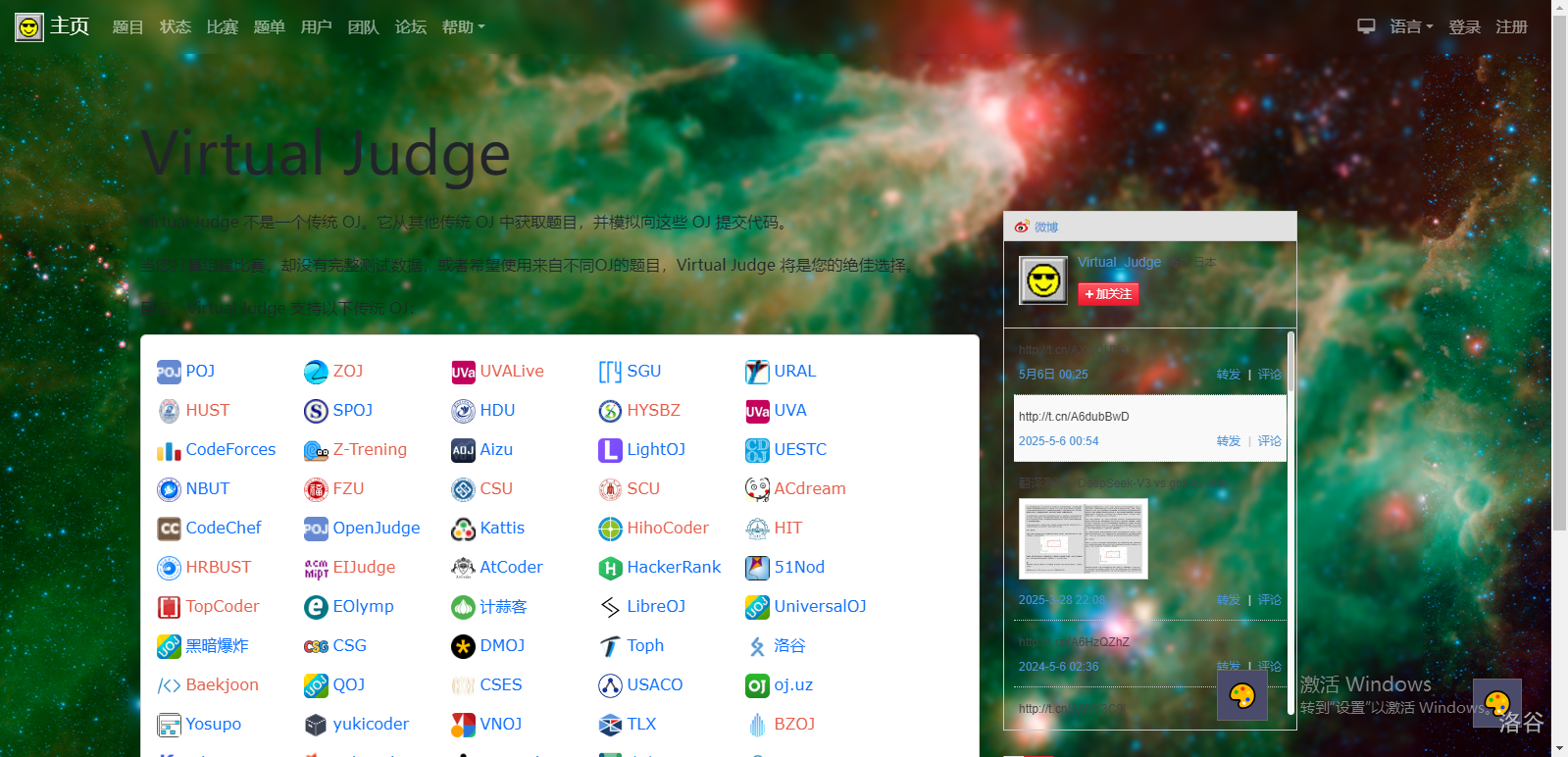### # 使用效果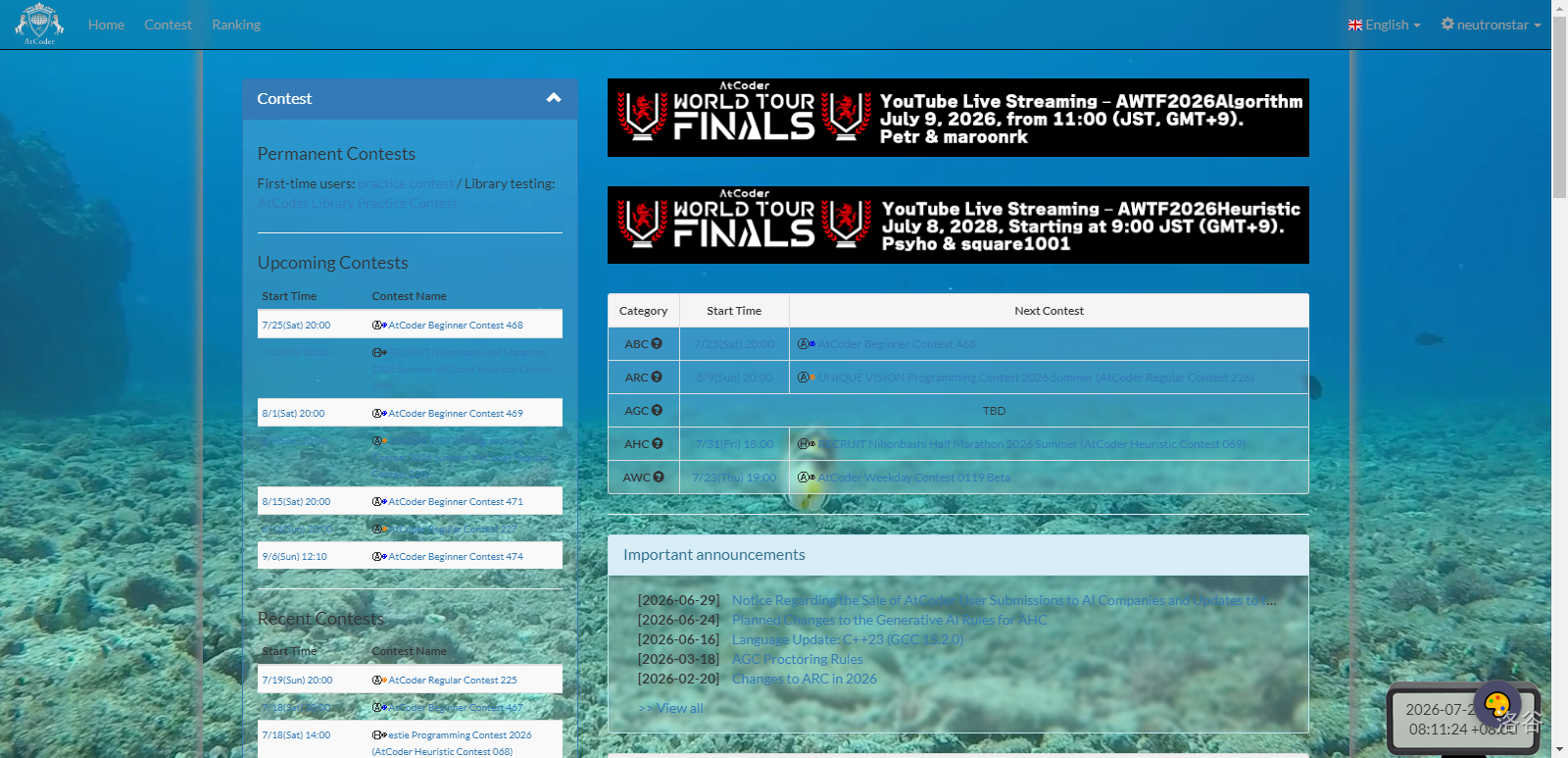
## 二、安装与启动
### 安装要求1,863 行未改动全部展开
})();```::::## 十.1.4体验版::::info[1.4体验版]## 十.1.3体验版::::info[1.3体验版]```js// ==UserScript==// @name 网页渲染修改// @namespace http://tampermonkey.net/// @version 1.4// @description 网页渲染修改// @version 1.3// @description 网页渲染修改 - IndexedDB 存储 + ZIP 导入导出// @author luogu fighting_man & Deepseek// @match *://*/*// @grant GM_addStyle// @grant GM_getValue6 行未改动
(function() { 'use strict';
console.log('🔍 ===== 网页渲染修改JS v1.4 (等待渲染版) 已加载 ====='); console.log('🔍 ===== 网页渲染修改JS v1.3 已加载 =====');
const PANEL_WIDTH_RATIO = 0.25; const HIGHLIGHT_CLASS = 'bg-magician-highlight'; const SELECTED_CLASS = 'bg-magician-selected'; const STORAGE_KEY = 'bg_magician_data'; const FULLPAGE_FLAG = '__fullpage_active__'; const PAGE_READY_TIMEOUT = 8000;
let isPanelVisible = false; let activeElement = null; let highlightElement = null;92 行未改动 }); }); }
// ===== JSZip 动态加载(绕过 CSP) ===== // ===== JSZip 动态加载 ===== let JSZipLoaded = false; let JSZipLoading = false; let JSZipCallbacks = [];
43 行未改动 if (result && typeof result === 'function') { unsafeWindow.JSZip = result; JSZipLoaded = true; JSZipLoading = false; console.log('✅ JSZip 加载成功 (GM_xmlhttpRequest)'); console.log('✅ JSZip 加载成功'); resolve(result); for (const cb of JSZipCallbacks) { cb.resolve(result); }6 行未改动 if (JSZip2 && typeof JSZip2 === 'function') { unsafeWindow.JSZip = JSZip2; JSZipLoaded = true; JSZipLoading = false; console.log('✅ JSZip 加载成功 (GM_xmlhttpRequest + Function)'); console.log('✅ JSZip 加载成功'); resolve(JSZip2); for (const cb of JSZipCallbacks) { cb.resolve(JSZip2); }22 行未改动 try { if (typeof unsafeWindow.JSZip !== 'undefined') { JSZipLoaded = true; JSZipLoading = false; console.log('✅ JSZip 加载成功 (script标签)'); console.log('✅ JSZip 加载成功'); resolve(unsafeWindow.JSZip); for (const cb of JSZipCallbacks) { cb.resolve(unsafeWindow.JSZip); }186 行未改动全部展开
return null; }
// ===== 等待页面完全渲染 ===== function waitForPageFullyRendered(callback, timeout = PAGE_READY_TIMEOUT) { const startTime = Date.now(); let resolved = false; // ===== 动态渲染器(永不停止,跟进所有新元素) ===== function startDynamicRenderer() { console.log('🚀 启动动态渲染器');
function isPageReady() { if (document.readyState !== 'complete') { return false; } const processedElements = new WeakSet();
const app = document.getElementById('app'); if (app) { if (app.children.length === 0) { return false; } if (app.querySelector('.loading, .spinner, .loader, .skeleton, .ant-skeleton, .el-skeleton')) { return false; } } function checkAndRender() { for (const [selector, params] of elementDataMap) { if (selector === 'body' && params.isFullPage) continue;
if (!document.body || document.body.children.length === 0) { return false; } try { const elements = document.querySelectorAll(selector); for (const el of elements) { if (processedElements.has(el)) continue;
const hasText = document.body.innerText && document.body.innerText.length > 20; if (!hasText && !app) { return false; } const hasBg = el.style.backgroundImage && el.style.backgroundImage !== 'none';
// 检查是否还有明显的加载状态 const loadingElements = document.querySelectorAll('.loading, .spinner, .loader, .skeleton, .ant-skeleton, .el-skeleton, [class*="loading"], [class*="spinner"]'); for (const el of loadingElements) { if (el.offsetParent !== null) { return false; } if (!hasBg) { render(el, params); processedElements.add(el); } else { processedElements.add(el); } } } catch (e) {} }
return true; }
function checkAndApply() { if (resolved) return true; checkAndRender();
const elapsed = Date.now() - startTime;
if (isPageReady() || elapsed > timeout) { resolved = true; const ready = isPageReady(); console.log(`✅ 页面就绪 (${elapsed}ms, ${ready ? '完全就绪' : '超时强制执行'})`); callback(); return true; const observer = new MutationObserver(() => { if (!window._renderPending) { window._renderPending = true; requestAnimationFrame(() => { window._renderPending = false; checkAndRender(); }); } });
return false; } observer.observe(document.body, { childList: true, subtree: true, attributes: true, attributeFilter: ['class', 'style', 'id'] });
if (checkAndApply()) return;
let checkCount = 0; function rafLoop() { checkCount++; if (checkAndApply()) return; if (checkCount > 100) { // 超过100次检查(约10秒),强制完成 resolved = true; console.warn('⏰ 检查次数过多,强制执行'); callback(); return; setInterval(() => { if (!window._renderPending) { window._renderPending = true; requestAnimationFrame(() => { window._renderPending = false; checkAndRender(); }); } requestAnimationFrame(rafLoop); } rafLoop(); }, 500);
window._dynamicRenderer = { observer: observer, checkAndRender: checkAndRender, processedElements: processedElements };
console.log('✅ 动态渲染器已启动'); }
// ===== 核心:渲染 ===== function render(el, params) {65 行未改动
let finalUrl = videoUrl; if (videoUrl && videoUrl.startsWith('data:video/')) { finalUrl = dataUrlToBlobUrl(videoUrl); console.log('🎬 data URL 已转为 Blob URL'); }
const { blur, opacity, color, positionX, positionY } = params; let bgColor;55 行未改动
el.appendChild(container);
video.addEventListener('loadeddata', function() { video.play().catch(e => console.log('视频自动播放失败:', e)); video.play().catch(e => {}); });
if (video.readyState >= 2) { video.play().catch(e => console.log('视频自动播放失败:', e)); video.play().catch(e => {}); }
return container; }72 行未改动 if (bgImage && bgImage.trim() !== '' && finalIsVideo) { let finalVideoUrl = bgImage; if (bgImage.startsWith('data:video/')) { finalVideoUrl = dataUrlToBlobUrl(bgImage); console.log('🎬 全网页 data URL 已转为 Blob URL'); }
const videoContainer = document.createElement('div'); videoContainer.className = 'bg-magician-fullpage-video';36 行未改动 videoContainer.appendChild(video); document.body.appendChild(videoContainer);
video.addEventListener('loadeddata', function() { video.play().catch(e => console.log('视频自动播放失败:', e)); video.play().catch(e => {}); });
if (video.readyState >= 2) { video.play().catch(e => console.log('视频自动播放失败:', e)); video.play().catch(e => {}); }
console.log('✅ 全网页视频背景已创建'); }
console.log('✅ 全网页背景已应用'); }
function removeFullPage() { const style = document.getElementById(fullPageStyleId);10 行未改动 } appliedElements.delete(document.body); isFullPageActive = false; saveToStorage(); console.log('✅ 已移除全网页背景样式'); }
// ===== 一次性应用所有存储的数据 ===== function applyAllStoredData() { console.log('🔄 应用所有存储的数据...');
if (isFullPageActive && elementDataMap.has('body')) { const bodyParams = elementDataMap.get('body'); if (bodyParams && bodyParams.isFullPage) { applyFullPage(bodyParams); } }
let applied = 0; let failedSelectors = [];
for (const [selector, params] of elementDataMap) { if (selector === 'body' && params.isFullPage) continue;
let elements = findElements(selector);
if (elements.length === 0) { const simplified = simplifySelector(selector); if (simplified && simplified !== selector) { elements = findElements(simplified); if (elements.length > 0) { console.log(`🔍 简化选择器匹配: ${simplified}`); elementDataMap.delete(selector); elementDataMap.set(simplified, params); saveToStorage(); } } }
if (elements.length > 0) { for (const el of elements) { render(el, params); applied++; } } else { failedSelectors.push(selector); } }
console.log(`✅ 成功应用 ${applied} 个元素`);
if (failedSelectors.length > 0) { console.warn(`⚠️ ${failedSelectors.length} 个元素未找到:`, failedSelectors.join(', ')); } }
// ===== 保存数据 ===== function saveData(el, params) { if (!el) return;
const selector = getSelector(el); console.log('💾 保存数据,选择器:', selector);
const saveParams = { bgImage: params.bgImage || '', blur: params.blur || 0,10 行未改动 dataUrl: params.bgImage, isVideo: params.isVideo || false }; saveParams.bgImage = '__LOCAL_FILE__'; console.log('📁 本地文件已存入 IndexedDB:', selector); }
if (selector) { elementDataMap.set(selector, saveParams); saveToStorage(); console.log('✅ 数据已保存到 IndexedDB'); } else { console.warn('⚠️ 无法生成选择器,数据未保存'); } }45 行未改动 function resetElement(el) { if (!el) return;
const selector = getSelector(el); console.log('🔄 还原元素:', selector || el.tagName);
appliedElements.delete(el);
if (localFiles[selector]) { delete localFiles[selector]; console.log('📁 已清除本地文件:', selector); }
if (selector === 'body' && isFullPageActive) { removeFullPage();7 行未改动 } removeVideo(document.body); elementDataMap.delete('body'); saveToStorage(); console.log('✅ 已还原全网页背景'); return; }
if (selector) {14 行未改动
if (el.getAttribute('style') === '') { el.removeAttribute('style'); }
console.log('✅ 已还原单元素背景'); }
// ===== 导出 ZIP ===== function exportData() { console.log('📦 开始导出数据...'); loadJSZip().then(function(JSZip) { try { const data = {}; data[FULLPAGE_FLAG] = isFullPageActive; data['_site'] = window.location.origin; data['_timestamp'] = new Date().toISOString(); data['_version'] = '1.4'; data['_version'] = '1.3';
const zip = new JSZip(); let mediaCounter = 0;
23 行未改动 document.body.appendChild(a); a.click(); document.body.removeChild(a); setTimeout(() => URL.revokeObjectURL(url), 3000); console.log('✅ ZIP 导出成功');
const statusEl = document.getElementById('bg-import-status'); if (statusEl) { statusEl.textContent = '✅ 导出成功!';78 行未改动 newLocalFiles[selector] = { dataUrl: dataUrl, isVideo: dataUrl.startsWith('data:video/') }; console.log('✅ 已加载媒体文件:', filename); } else { console.warn('⚠️ 未找到媒体文件:', filename); params.bgImage = ''; } } }6 行未改动 if (!elementDataMap.has(key)) { elementDataMap.set(key, value); } } console.log('✅ 已追加数据'); } else { elementDataMap = newMap; console.log('✅ 已覆盖数据'); } } else { elementDataMap = newMap; console.log('✅ 已导入数据'); }
if (data[FULLPAGE_FLAG] !== undefined) { isFullPageActive = data[FULLPAGE_FLAG]; }
saveToStorage(); console.log('✅ 数据导入成功,共', elementDataMap.size, '条'); resolve(elementDataMap.size); } catch (err) { reject('导入失败: ' + err.message); }88 行未改动 // ===== SPA路由变化检测 ===== function checkUrlChange() { const currentUrl = window.location.href; if (currentUrl !== lastUrl) { console.log('🔄 检测到URL变化:', currentUrl); lastUrl = currentUrl; appliedElements = new WeakSet(); setTimeout(() => { waitForPageFullyRendered(function() { console.log('🔄 SPA页面就绪,重新应用背景...'); applyAllStoredData(); }, 3000); }, 500);
if (window._dynamicRenderer) { window._dynamicRenderer.processedElements = new WeakSet(); setTimeout(() => { window._dynamicRenderer.checkAndRender(); }, 200); } } }
// ===== UI ===== function createFloatingBall() { if (floatingBall) return; floatingBall = document.createElement('div'); floatingBall.id = 'bg-magician-ball'; floatingBall.textContent = '🎨'; floatingBall.title = '打开网页渲染修改JS'; floatingBall.title = '打开网页渲染修改'; document.body.appendChild(floatingBall); floatingBall.addEventListener('click', function(e) { e.stopPropagation(); showPanel();306 行未改动全部展开 panelElement = document.createElement('div'); panelElement.id = 'bg-magician-panel'; panelElement.innerHTML = ` <div class="panel-header"> <h2>网页渲染修改JS <span style="font-size:11px;color:#666;">v1.4</span></h2> <h2>网页渲染修改 <span style="font-size:11px;color:#666;">v1.3</span></h2> <button class="panel-close" id="bg-panel-close">✕</button> </div> <div id="bg-panel-content"> <div class="param-group"> <label>背景媒体 URL <span style="color:#888;font-weight:normal;">(图片或视频)</span></label> <label>背景媒体 URL</label> <input type="text" id="bg-image-input" placeholder="输入图片URL 或 视频URL" /> <div style="font-size:10px;color:#666;margin-top:3px;"> 支持: 图片 (jpg/png/gif/svg/webp) 或 视频 (mp4/webm/ogg/mov) </div> </div>
<div class="param-group"> <label>或选择本地文件 <span style="color:#888;font-weight:normal;">(IndexedDB存储,刷新保留)</span></label> <label>或选择本地文件</label> <div class="file-upload-area" id="local-file-area"> <span class="file-label">📁 点击选择本地图片或视频</span> <input type="file" id="local-file-input" accept="image/*,video/*" /> <div class="file-name" id="local-file-name"></div>31 行未改动 <div class="range-labels"><span>0</span><span>30</span></div> <span class="range-value" id="bg-blur-value">0 px</span> </div> <div class="param-group"> <label>背景透明度 <span style="color:#888;font-weight:normal;">(仅背景)</span></label> <label>背景透明度</label> <input type="range" id="bg-opacity-range" min="0" max="1" step="0.05" value="1" /> <div class="range-labels"><span>0 (透明)</span><span>1 (不透明)</span></div> <span class="range-value" id="bg-opacity-value">1.00</span> </div>7 行未改动 <button class="reset-btn" id="bg-reset-btn">↩️ 还原当前元素</button> </div>
<div class="fp-section"> <span class="fp-label">🌐 全网页背景(底层)</span> <span class="fp-label">🌐 全网页背景</span> <div class="fp-row"> <input type="text" id="fp-url-input" placeholder="输入图片或视频URL" /> <button id="fp-apply-btn">应用</button> </div>5 行未改动 <div class="fp-status" id="fp-status-text">输入媒体URL或选择本地文件,点击应用为全网页背景</div> </div>
<div class="fp-section"> <span class="fp-label" style="color:#4a9eff;">📦 数据管理 (IndexedDB)</span> <span class="fp-label" style="color:#4a9eff;">📦 数据管理</span> <div class="fp-row"> <button id="bg-export-btn" style="flex:1;background:#3a5a4a;color:white;border:1px solid #666;padding:6px 12px;cursor:pointer;font-size:13px;border-radius:4px;">⬇️ 导出ZIP</button> <button id="bg-import-btn" style="flex:1;background:#3a4a6a;color:white;border:1px solid #666;padding:6px 12px;cursor:pointer;font-size:13px;border-radius:4px;">⬆️ 导入ZIP</button> </div> <input type="file" id="bg-import-file" accept=".zip" style="display:none;" /> <div class="fp-status" id="bg-import-status" style="margin-top:4px;font-size:11px;color:#888;">导出ZIP包,或导入ZIP备份恢复</div> </div>
<div class="status-text" id="bg-status-text">💡 v1.4: 等待页面完全渲染后应用,无闪烁</div> <div class="status-text" id="bg-status-text">💡 新元素出现时自动渲染</div> </div> `; document.body.appendChild(panelElement);
31 行未改动 render(activeElement, tempParams); } document.getElementById('bg-status-text').textContent = '✅ 本地文件已加载: ' + file.name; setTimeout(() => { document.getElementById('bg-status-text').textContent = '💡 v1.4: 等待页面完全渲染后应用,无闪烁'; document.getElementById('bg-status-text').textContent = '💡 新元素出现时自动渲染'; }, 2000); } catch (err) { alert('加载文件失败: ' + err); }66 行未改动 try { const count = await importZip(file); document.getElementById('bg-import-status').textContent = `✅ 成功导入 ${count} 条数据,刷新页面生效`; document.getElementById('bg-import-status').style.color = '#4a9eff'; applyAllStoredData(); if (window._dynamicRenderer) { window._dynamicRenderer.processedElements = new WeakSet(); window._dynamicRenderer.checkAndRender(); } setTimeout(() => { document.getElementById('bg-import-status').textContent = '导出ZIP包,或导入ZIP备份恢复'; document.getElementById('bg-import-status').style.color = '#888'; }, 5000);55 行未改动 saveData(activeElement, tempParams); render(activeElement, tempParams); document.getElementById('bg-status-text').textContent = '✅ 已保存到 IndexedDB!'; setTimeout(() => { document.getElementById('bg-status-text').textContent = '💡 v1.4: 等待页面完全渲染后应用,无闪烁'; document.getElementById('bg-status-text').textContent = '💡 新元素出现时自动渲染'; }, 2000); } else { alert('请先点击选择一个背景元素'); }45 行未改动 document.getElementById('bg-status-text').textContent = '🚫 已取消全网页背景'; clearSelected(); clearHighlights(); setTimeout(() => { document.getElementById('bg-status-text').textContent = '💡 v1.4: 等待页面完全渲染后应用,无闪烁'; document.getElementById('bg-status-text').textContent = '💡 新元素出现时自动渲染'; }, 2000); } } else { alert('当前没有全网页背景');150 行未改动全部展开 window.addEventListener('load', init); }
async function init() { console.log('📦 初始化...');
// 1. 加载存储数据 await loadFromStorage(); cleanupOldData();
// 2. 创建 UI(不阻塞页面渲染) createPanel(); createFloatingBall();
// 3. 准备 UI 显示状态 if (panelElement) { panelElement.classList.remove('visible'); isPanelVisible = false; } if (floatingBall) { floatingBall.style.display = 'flex'; } document.body.style.marginRight = '0';
// 4. 预加载 JSZip(不阻塞) loadJSZip().then(function() { console.log('✅ JSZip 已预加载'); }).catch(function(e) { console.warn('⚠️ JSZip 预加载失败:', e); });
// 5. 🔥 等待页面完全渲染后再应用背景 console.log('⏳ 等待页面完全渲染...'); if (isFullPageActive && elementDataMap.has('body')) { const bodyParams = elementDataMap.get('body'); if (bodyParams && bodyParams.isFullPage) { console.log('🌐 立即应用全网页背景'); applyFullPage(bodyParams); } }
waitForPageFullyRendered(function() { console.log('🔄 页面已就绪,开始应用背景...'); applyAllStoredData(); }); // 再启动动态渲染器(处理其他元素) startDynamicRenderer();
// 6. 监听 URL 变化(SPA 路由切换) setInterval(checkUrlChange, 500);
console.log('✅ 网页渲染修改JS v1.4 初始化完成!'); console.log('💡 等待页面完全渲染后自动应用背景,无闪烁'); console.log('✅ 网页渲染修改JS v1.3 初始化完成'); }
document.addEventListener('keydown', function(e) { if (e.ctrlKey && e.altKey && e.key === 'p') {19 行未改动 render: render, saveToStorage: saveToStorage, getSelector: getSelector, findElements: findElements, applyAllStoredData: applyAllStoredData, clearAll: function() { elementDataMap.clear(); localFiles = {}; removeFullPage();8 行未改动