
的代码及使用方式
本代码适用于调试程序(debug),尤其是面对数据的调试程序(doge。
请注意,本代码适用于调代码,而不是用于 Hack 老师!
① 生成数据
生成数据时请使用 ,而不是 !
#include <bits/stdc++.h>
using namespace std;

int main() {
    mt19937 rnd(chrono::duration_cast<chrono::milliseconds>(chrono::system_clock::now().time_since_epoch()).count());

    //例:A+B问题的是数据制造
	cout<<rnd()%10000+1<<" "<<rnd()%10000+1;

    return 0;
}
② 编写程序
将你的错误程序存入 ,将标程存入 。
③ 对拍程序
运行程序进行对拍即可。
#include <bits/stdc++.h>
#include <windows.h>

using namespace std;

#define color(x) SetConsoleTextAttribute(GetStdHandle(STD_OUTPUT_HANDLE), (x))

int main() {
    srand(time(nullptr));
    int test = 1, ac = 0, wa = 0, re = 0;
    int num;
    cout << "Test number: ";
    cin >> num;
    while (test <= num) {
        color(14);
        system(("echo " + to_string(rand()) + " > seed.txt").c_str());
        system("gen.exe < seed.txt > input.in");
        unsigned res = system("sol.exe < input.in > sol.out");
        system("bf.exe < input.in > bf.out");
        if (res != 0) {
            system("cls");
            color(13);
            cout << "Runtime Error on test " << test << endl;
            color(14);
            cout << endl;
            cout << "Input:" << endl;
            system("type input.in");
            cout << endl;
            cout << "Correct Output:" << endl;
            system("type bf.out");
            cout << endl;
            cout << "Your Output:" << endl;
            cout << "---" << endl;
            cout << endl;
            cout << "Exit Code:" << endl;
            cout << res << endl;
            re++;
            cout << endl;
        } else if (system("fc > nul sol.out bf.out")) {
            system("cls");
            color(12);
            cout << "Wrong Answer on test " << test << endl;
            color(14);
            cout << endl;
            cout << "Input:" << endl;
            system("type input.in");
            cout << endl;
            cout << "Correct Output:" << endl;
            system("type bf.out");
            cout << endl;
            cout << "Your Output:" << endl;
            system("type sol.out");
            wa++;
            cout << endl;
        } else {
            system("cls");
            color(10);
            cout << "Accepted on test " << test << endl;
            color(14);
            cout << endl;
            cout << "Input:" << endl;
            system("type input.in");
            cout << endl;
            cout << "Correct Output:" << endl;
            system("type bf.out");
            cout << endl;
            cout << "Your Output:" << endl;
            system("type sol.out");
            ac++;
            cout << endl;
        }
        color(14);
        cout << "Score: " << floor(100.0 * (double)ac / (double)test) << endl;
        test++;
    }
    test--;
    system("cls");
    color(15);
    cout << "Result" << endl;
    color(14);
    cout << "Test number: " << test << endl;
    if (ac) {
        color(10);
        cout << "Accepted: " << ac << endl;
    }
    if (wa) {
        color(12);
        cout << "Wrong Answer: " << wa << endl;
    }
    if (re) {
        color(13);
        cout << "Runtime Error: " << re << endl;
    }
    color(15);
    cout << "Score: " << floor(100.0 * (double)ac / (double)test) << endl;
    color(15);
    return 0;
}
④ 注意事项
① 四个文件要存在同一个文件夹里。
② 四个 文件需要先进行编译,然后才能对拍。 对拍前请确认您的文件夹里是这样的:
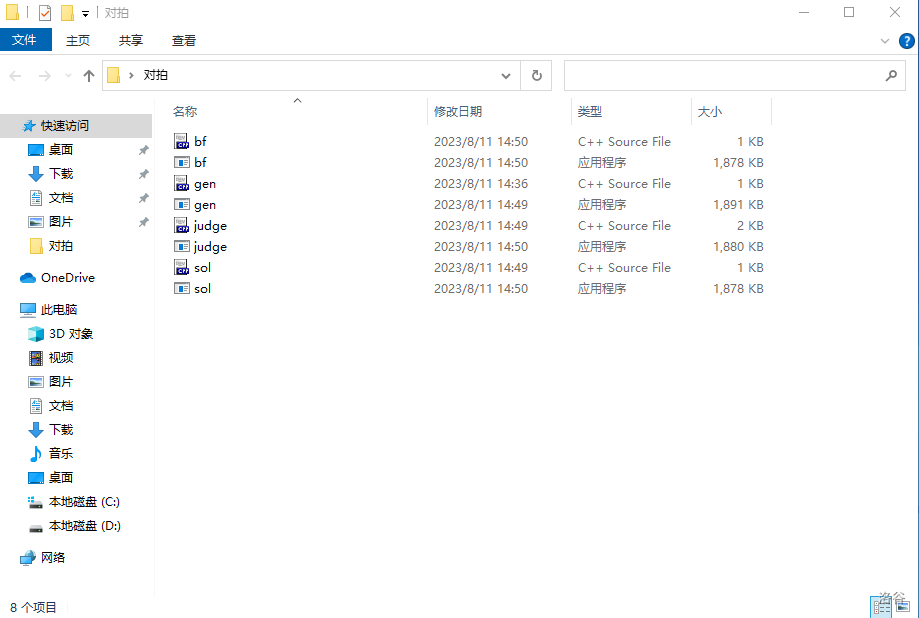
③ 本代码不适用于过大量的数据,否则打印测试点会很慢。
④ 两个程序的输出格式应当完全一样。由于技术原因,对拍程序无法判定末尾的空格或换行,如下面的三个程序会被认为有不同的答案。
程序一
cout<<ans;程序二
cout<<ans<<" ";程序三
cout<<ans<<endl;@joe_zxq
引用此剪贴板需标明原作者,否则属于侵权!