版本比较
点击特效plus(所有网站适用!)

标题
增加 1 行删除 1 行
11点击特效(所有网站适用!)点击特效plus(所有网站适用!)正文
增加 885 行删除 274 行
12345678910111271314915161718192021221323241525262728293031323334353637383940414243444546474823495025262751525354555630575859606162636436373839404165666768697071727374757677787980818283848586878889909192939495969798991001011021031041051061071081091101111121131141151161171181191201211221231241251261271281291301311321331341351361371381391401411421431441451461471481491501511521531541551561571581591601611621631641651661671681691701711721731741751761771781791801811821831841851861871881891901911921931941951961971981992002012022032042052062072082092102112122132142152162172182192202212222232242252262272282292302312322332342352362372382392402412422432442452462472482492502512522532542552562572582592602612622632642652662672682692702712722732742752762772782792802812822832842852862872882892902912922932942952962972982993003013023033043053063073083093103113123133143153163173183193203213223233243253263273283293303313323333343353363373383393403413423433443453463473483493503513523533543553563573583593603613623633643653663673683693703713723733743753763773783793803813823833843853863873883893903913923933943953963973983994004014024034044054064074084094104114124134144154164174184194204214224234244254264274284294304314324334344354364374384394404414424434444454464474484494504514524534544554564574584594604614624634644654664674684694704714724734744754764774784794804814824834844854864874884894904914924934944954964974984995005015025035045055065075085095105115124351345464751451551649505152535455565751751851952052152252352452559606162526527528529530531532533646566676869707172737475765345355365375385395405415425435445457879808154654754854955055155255383848586878855455555655755855956090919293949596979899100101102103561562563564565566567568569570571572573574105106575576577578579580581582583584109110111112113114115116117585586587588589120121122123590591592593594595596597598599600601602603604605606607125126608609610611612613128129614615616617618619620132133134135136137138621622623624140141142143625626627628629630631632633634635636637638639640641642643145146147148149150151152644645646647648649650651155156157158159160161652653654163164165166167655656657658659660661662663664665666667668669670671672673674675676677678679680172173174175176177178179180181182681682683684685686687688689690691692693694695696697698699700701702703704705706707708709710711712713714715716717718719720721722723724725726727728729730731732733734735736737738739740741742743744745746747748749750751752753754755756757758759760761762763764765766767768769770771772773774775184185776777778187188189779780781782783192193194195784785786787788789198199200790791792793794795203796205206207208209210211212797798799800801802803215216217218219220221222223224225804805806807808809810811812813814815816817818227228229819820821822823824233234825826827828237238239240241242243244245829830831832833834835836247248249250251252837838839840841842843844845846257258847848849850261262851852853264854855856857858859860271861273274275276277278279280281282283284285286862863864865866867868869870871872873874875876877878289290291292293294295296879880881882883884885886887888889890891892893894895896897898299300301899900901902903304305904905906307308309310907908909910911312313314315316317912913914915916917918319320321919920921324325922923924925926927928929930327931932933934935936937329330331332333334335336337338339340341342343344345938939940941942943944945946947948949349350351352353950951952356357358359360361362363364365953954955956957958959960961962963964369370371372373374375376377965966967968969970971972973974975976977978979980981982983984985986987988989990991992382383993994995996997998update 2.6:神秘大佬 [twyeottk](https://www.luogu.com.cn/user/1635665) 在 [原版](https://update.greasyfork.org/scripts/565081/Amazing%20click%20effect%21.user.js) 的基础上做了优化,主要是控制动画对象数量、在页面隐藏时暂停动画,长时间运行会稳定很多。
update 2.7:对所有方面进行了非常**彻底**的改动,增加了控制面板,**增加了碰撞模式**(按下键盘 ESC 下面的 `~` 开启,再按一下关闭)。
[这里](https://text.is/Amazing-click-effect) 是以往的所有版本。
# 前提条件
已经在浏览器上下载了 [Tampermonkey](https://microsoftedge.microsoft.com/addons/detail/%E7%AF%A1%E6%94%B9%E7%8C%B4/iikmkjmpaadaobahmlepeloendndfphd) 扩展(进不去就自己搜)。
# 安装方法
打开扩展,点击 `添加新脚本`,把下面的代码复制粘贴,最后按 `Ctrl+s` 保存,最后退出就行了。安装方法有两种:
安装完成之后**一定**记得刷新一下其他页面!1. [从 Greasyfork 下载](https://update.greasyfork.org/scripts/565342/Amazing%20click%20effect%21%20%EF%BC%88Better%EF%BC%89.user.js)。下载不了的话,可以试着使用和进入洛谷国际站一样的方法(目前不是最新版)。
2. [从 GitHub 下载](https://github.com/Pigeonw-Development/amazing-click-effect-plus)(目前不是最新版)。
3. 打开扩展,点击 `添加新脚本`,把下面的代码复制粘贴,最后按 `Ctrl+s` 保存,最后退出就行了。
# 提示
一定要记得在 `管理扩展` 中打开 `开发人员模式`!不然脚本运行不了。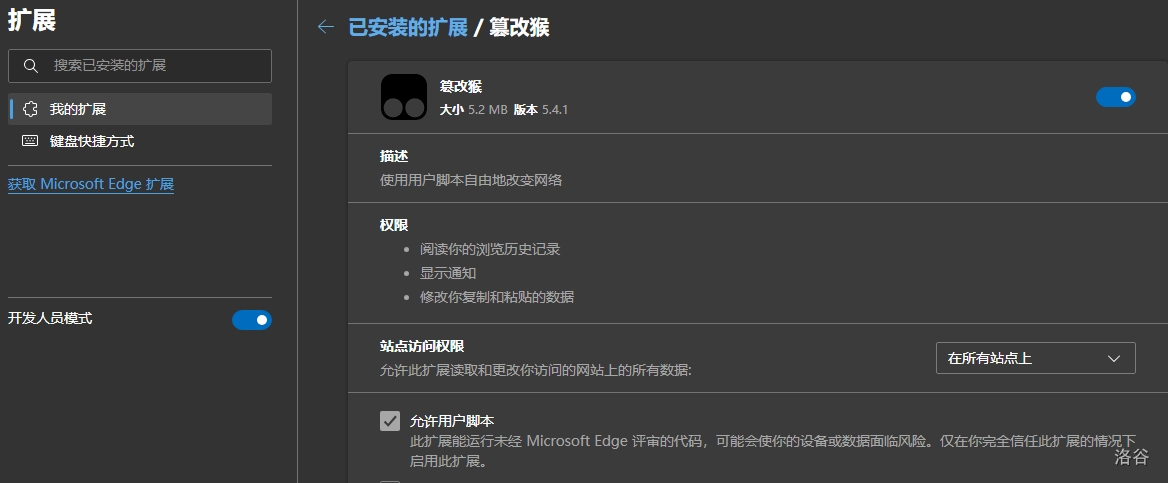
长按有惊喜哦(非恶意代码)。设置与上图保持一样。
可以长按(现在粒子可以跟随鼠标)。
---
**新增**:
点击 `扩展`,再点 `篡改猴`,这样能看到你安装了的所有脚本,也能在这里**打开设置**。
---
如果你完成上述步骤后,使用不了脚本,请私信我。
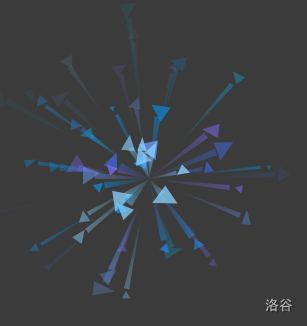
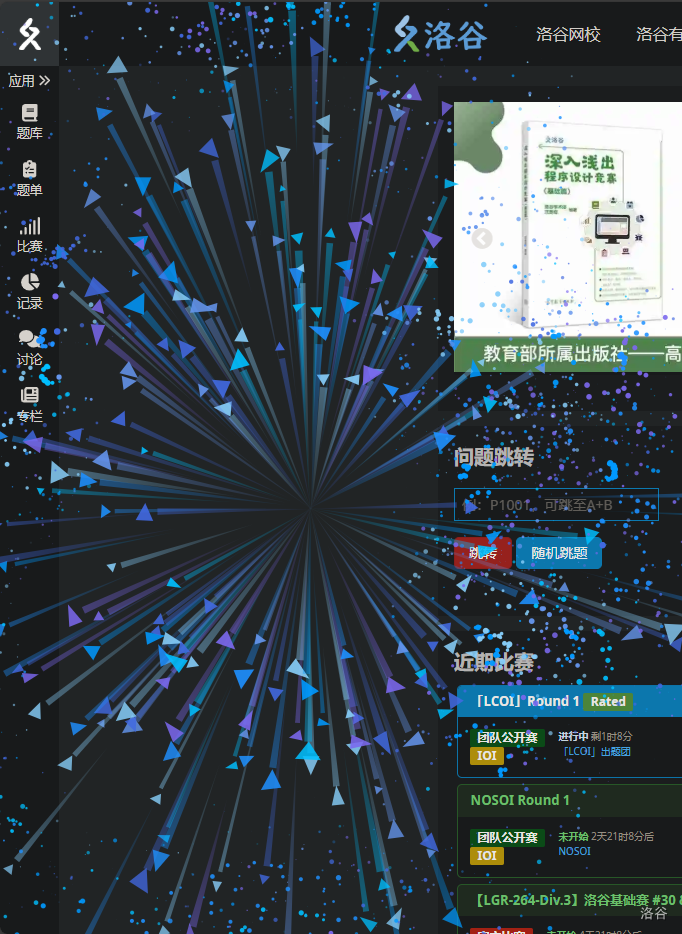
~~挺好看的对吧~~。
# Code
```javascript line-numbers// ==UserScript==// @name 点击特效(所有网站适用!)// @name Amazing click effect!// @namespace http://tampermonkey.net/// @version 7.8// @description 点击释放蓝色特效!长按有惊喜哦// @author Super_Diu// @version 1.14.0// @description Enjoy clicking time!// @author Super_Diu and twyeottk(1000ttank)// @contributors Pigeonw Development// @match *://*/*// @icon data:image/gif;base64,R0lGODlhAQABAAAAACH5BAEKAAEALAAAAAABAAEAAAICTAEAOw==// @grant none// @grant GM_registerMenuCommand// @grant GM_setValue// @grant GM_getValue// ==/UserScript==
(function() { 'use strict';
function clickTriangleEffect() { let triangles = []; // 存储三角形实例 let chargeDots = []; // 存储长按蓄力小圆点实例 let canvas, ctx; let width, height; // 画布宽高 // 纯蓝色系配色 const defCfg = { BASE_SPD: 3, BASE_SPD_MAX: 5, BASE_CNT: 12, MAX_SPD_LIMIT: 15, MIN_SPD_LIMIT: 8, MAX_CNT: 30, LONG_PRESS: 800, SCALE_DUR: 3000, MAX_SIZE: 20, MIN_ALPHA_SPD: 8, ALPHA_SPD_BASE: 25, ALPHA_DECAY_SCALE: 1.1, TRI_SPD_DECAY: 0.998, DOT_R_MIN: 1, DOT_R_MAX: 3, DOT_INIT_SPD: 1.2, DOT_ACCEL: 0.2, DOT_ALPHA_SPD: 0.02, DOT_FADE_BASE: 0.03, DOT_SPAWN_R_MIN: 120, DOT_SPAWN_R_MAX: 350, DOT_ANGLE_JITTER: 0.3, SPD_ALPHA_FACTOR: 0.0001, BASE_COLL_PART_CNT: 8, MAX_COLL_PART_CNT: 20, BASE_COLL_SPD: 2, MAX_COLL_SPD: 10, BASE_COLL_SIZE: 2, MAX_COLL_SIZE: 5, MAX_TRACK: 6, DOT_TRACK: 3, SPD_FADE_FACTOR: 0.002, CHARGE_ALPHA_SCALE: 0.3, NORMAL_ALPHA_SCALE: 1.0 };
const cfg = {}; Object.keys(defCfg).forEach(k => { cfg[k] = GM_getValue(k, defCfg[k]); });
const decimalParams = new Set(['NORMAL_ALPHA_SCALE', 'CHARGE_ALPHA_SCALE', 'MAX_COLL_SPD']);
function createCfgMenu() { GM_registerMenuCommand('⚙️ 点击特效配置', () => { const container = document.createElement('div'); container.style.cssText = ` position:fixed;top:50%;left:50%;transform:translate(-50%,-50%); background:#ffffff;border-radius:12px;box-shadow:0 8px 32px rgba(0,0,0,0.15); z-index:9999999;width:90%;max-width:900px;height:80vh;max-height:700px; display:flex;flex-direction:column;overflow:hidden; font-family:system-ui,-apple-system,BlinkMacSystemFont,Segoe UI,Roboto,Helvetica Neue,Arial,sans-serif; `;
const header = document.createElement('div'); header.style.cssText = ` display:flex;align-items:center;justify-content:space-between; padding:16px 20px;background:#f8fafc;border-bottom:1px solid #e2e8f0; `; container.appendChild(header);
const menuBar = document.createElement('div'); menuBar.style.cssText = `display:flex;gap:8px;`; header.appendChild(menuBar);
const menuItems = [ { id: 'cfg-panel', text: '配置面板' }, { id: 'guide-panel', text: '使用说明' } ];
menuItems.forEach(item => { const btn = document.createElement('button'); btn.textContent = item.text; btn.style.cssText = ` padding:8px 16px;border:none;border-radius:6px; background:${item.id === 'cfg-panel' ? '#3b82f6' : 'transparent'}; color:${item.id === 'cfg-panel' ? '#ffffff' : '#334155'}; cursor:pointer;transition:all 0.2s ease; font-size:14px;font-weight:500; `; btn.dataset.target = item.id; btn.addEventListener('click', (e) => { menuBar.querySelectorAll('button').forEach(b => { b.style.background = b.dataset.target === e.target.dataset.target ? '#3b82f6' : 'transparent'; b.style.color = b.dataset.target === e.target.dataset.target ? '#ffffff' : '#334155'; }); document.querySelectorAll('.content-panel').forEach(panel => { panel.style.display = panel.id === e.target.dataset.target ? 'block' : 'none'; }); }); menuBar.appendChild(btn); });
const closeBtn = document.createElement('button'); closeBtn.innerHTML = '×'; closeBtn.style.cssText = ` width:32px;height:32px;border:none;border-radius:50%; background:#fef2f2;color:#ef4444;cursor:pointer; font-size:20px;display:flex;align-items:center;justify-content:center; transition:all 0.2s ease;position:relative;z-index:1;outline:none; `; closeBtn.addEventListener('mouseenter', () => { closeBtn.style.background = '#ef4444'; closeBtn.style.color = '#ffffff'; }); closeBtn.addEventListener('mouseleave', () => { closeBtn.style.background = '#fef2f2'; closeBtn.style.color = '#ef4444'; }); closeBtn.addEventListener('click', () => { container.remove(); mask.remove(); }); header.appendChild(closeBtn);
const contentWrap = document.createElement('div'); contentWrap.style.cssText = ` flex:1;overflow-y:auto;padding:24px;max-height:100%;box-sizing:border-box;background:#fafafa; `; container.appendChild(contentWrap);
const cfgPanel = document.createElement('div'); cfgPanel.id = 'cfg-panel'; cfgPanel.className = 'content-panel'; cfgPanel.style.display = 'block'; cfgPanel.innerHTML = ` <h2 style="margin:0 0 24px 0;color:#1e293b;font-size:20px;font-weight:600;">点击特效配置</h2> <div style="margin-bottom:24px;padding:20px;background:#ffffff;border-radius:8px;box-shadow:0 1px 3px rgba(0,0,0,0.05);"> <h3 style="margin:0 0 16px 0;color:#334155;font-size:16px;font-weight:600;">📌 普通点击专属参数</h3> <div class="slider-group" data-param="BASE_SPD" style="margin:12px 0;display:flex;flex-direction:column;gap:8px;"> <label style="font-size:14px;color:#475569;font-weight:500;">普通点击基础速度</label> <div class="slider-container" style="position:relative;width:100%;height:8px;border-radius:4px;background:#e2e8f0;"> <div class="slider-progress" style="position:absolute;top:0;left:0;height:100%;border-radius:4px;background:#3b82f6;width:${((cfg.BASE_SPD-1)/(10-1))*100}%;"></div> <div class="slider-thumb" style="position:absolute;top:50%;transform:translate(-50%,-50%);width:20px;height:20px;border-radius:50%;background:#3b82f6;cursor:pointer;box-shadow:0 2px 6px rgba(59, 130, 246, 0.3);left:${((cfg.BASE_SPD-1)/(10-1))*100}%;"></div> <input type="range" class="slider-input" min="1" max="10" step="1" value="${cfg.BASE_SPD}" style="opacity:0;position:absolute;top:0;left:0;width:100%;height:100%;margin:0;padding:0;cursor:pointer;"> </div> <span class="slider-value" style="font-size:12px;color:#64748b;">当前值:${cfg.BASE_SPD}</span> </div> <div class="slider-group" data-param="BASE_SPD_MAX" style="margin:12px 0;display:flex;flex-direction:column;gap:8px;"> <label style="font-size:14px;color:#475569;font-weight:500;">普通点击最快速度</label> <div class="slider-container" style="position:relative;width:100%;height:8px;border-radius:4px;background:#e2e8f0;"> <div class="slider-progress" style="position:absolute;top:0;left:0;height:100%;border-radius:4px;background:#3b82f6;width:${((cfg.BASE_SPD_MAX-3)/(15-3))*100}%;"></div> <div class="slider-thumb" style="position:absolute;top:50%;transform:translate(-50%,-50%);width:20px;height:20px;border-radius:50%;background:#3b82f6;cursor:pointer;box-shadow:0 2px 6px rgba(59, 130, 246, 0.3);left:${((cfg.BASE_SPD_MAX-3)/(15-3))*100}%;"></div> <input type="range" class="slider-input" min="3" max="15" step="1" value="${cfg.BASE_SPD_MAX}" style="opacity:0;position:absolute;top:0;left:0;width:100%;height:100%;margin:0;padding:0;cursor:pointer;"> </div> <span class="slider-value" style="font-size:12px;color:#64748b;">当前值:${cfg.BASE_SPD_MAX}</span> </div> <div class="slider-group" data-param="BASE_CNT" style="margin:12px 0;display:flex;flex-direction:column;gap:8px;"> <label style="font-size:14px;color:#475569;font-weight:500;">普通点击生成数量</label> <div class="slider-container" style="position:relative;width:100%;height:8px;border-radius:4px;background:#e2e8f0;"> <div class="slider-progress" style="position:absolute;top:0;left:0;height:100%;border-radius:4px;background:#3b82f6;width:${((cfg.BASE_CNT-5)/(20-5))*100}%;"></div> <div class="slider-thumb" style="position:absolute;top:50%;transform:translate(-50%,-50%);width:20px;height:20px;border-radius:50%;background:#3b82f6;cursor:pointer;box-shadow:0 2px 6px rgba(59, 130, 246, 0.3);left:${((cfg.BASE_CNT-5)/(20-5))*100}%;"></div> <input type="range" class="slider-input" min="5" max="20" step="1" value="${cfg.BASE_CNT}" style="opacity:0;position:absolute;top:0;left:0;width:100%;height:100%;margin:0;padding:0;cursor:pointer;"> </div> <span class="slider-value" style="font-size:12px;color:#64748b;">当前值:${cfg.BASE_CNT}</span> </div> <div class="slider-group" data-param="NORMAL_ALPHA_SCALE" style="margin:12px 0;display:flex;flex-direction:column;gap:8px;"> <label style="font-size:14px;color:#475569;font-weight:500;">普通三角形消失速度倍率</label> <div class="slider-container" style="position:relative;width:100%;height:8px;border-radius:4px;background:#e2e8f0;"> <div class="slider-progress" style="position:absolute;top:0;left:0;height:100%;border-radius:4px;background:#3b82f6;width:${((cfg.NORMAL_ALPHA_SCALE-0.1)/(2-0.1))*100}%;"></div> <div class="slider-thumb" style="position:absolute;top:50%;transform:translate(-50%,-50%);width:20px;height:20px;border-radius:50%;background:#3b82f6;cursor:pointer;box-shadow:0 2px 6px rgba(59, 130, 246, 0.3);left:${((cfg.NORMAL_ALPHA_SCALE-0.1)/(2-0.1))*100}%;"></div> <input type="range" class="slider-input" min="0.1" max="2" step="0.1" value="${cfg.NORMAL_ALPHA_SCALE}" style="opacity:0;position:absolute;top:0;left:0;width:100%;height:100%;margin:0;padding:0;cursor:pointer;"> </div> <span class="slider-value" style="font-size:12px;color:#64748b;">当前值:${cfg.NORMAL_ALPHA_SCALE.toFixed(1)}</span> </div> </div> <div style="margin-bottom:24px;padding:20px;background:#ffffff;border-radius:8px;box-shadow:0 1px 3px rgba(0,0,0,0.05);"> <h3 style="margin:0 0 16px 0;color:#334155;font-size:16px;font-weight:600;">🚀 蓄力专属参数</h3> <div class="slider-group" data-param="MIN_SPD_LIMIT" style="margin:12px 0;display:flex;flex-direction:column;gap:8px;"> <label style="font-size:14px;color:#475569;font-weight:500;">蓄力最慢速度</label> <div class="slider-container" style="position:relative;width:100%;height:8px;border-radius:4px;background:#e2e8f0;"> <div class="slider-progress" style="position:absolute;top:0;left:0;height:100%;border-radius:4px;background:#3b82f6;width:${((cfg.MIN_SPD_LIMIT-5)/(15-5))*100}%;"></div> <div class="slider-thumb" style="position:absolute;top:50%;transform:translate(-50%,-50%);width:20px;height:20px;border-radius:50%;background:#3b82f6;cursor:pointer;box-shadow:0 2px 6px rgba(59, 130, 246, 0.3);left:${((cfg.MIN_SPD_LIMIT-5)/(15-5))*100}%;"></div> <input type="range" class="slider-input" min="5" max="15" step="1" value="${cfg.MIN_SPD_LIMIT}" style="opacity:0;position:absolute;top:0;left:0;width:100%;height:100%;margin:0;padding:0;cursor:pointer;"> </div> <span class="slider-value" style="font-size:12px;color:#64748b;">当前值:${cfg.MIN_SPD_LIMIT}</span> </div> <div class="slider-group" data-param="MAX_SPD_LIMIT" style="margin:12px 0;display:flex;flex-direction:column;gap:8px;"> <label style="font-size:14px;color:#475569;font-weight:500;">蓄力最大速度</label> <div class="slider-container" style="position:relative;width:100%;height:8px;border-radius:4px;background:#e2e8f0;"> <div class="slider-progress" style="position:absolute;top:0;left:0;height:100%;border-radius:4px;background:#3b82f6;width:${((cfg.MAX_SPD_LIMIT-10)/(30-10))*100}%;"></div> <div class="slider-thumb" style="position:absolute;top:50%;transform:translate(-50%,-50%);width:20px;height:20px;border-radius:50%;background:#3b82f6;cursor:pointer;box-shadow:0 2px 6px rgba(59, 130, 246, 0.3);left:${((cfg.MAX_SPD_LIMIT-10)/(30-10))*100}%;"></div> <input type="range" class="slider-input" min="10" max="30" step="1" value="${cfg.MAX_SPD_LIMIT}" style="opacity:0;position:absolute;top:0;left:0;width:100%;height:100%;margin:0;padding:0;cursor:pointer;"> </div> <span class="slider-value" style="font-size:12px;color:#64748b;">当前值:${cfg.MAX_SPD_LIMIT}</span> </div> <div class="slider-group" data-param="MAX_CNT" style="margin:12px 0;display:flex;flex-direction:column;gap:8px;"> <label style="font-size:14px;color:#475569;font-weight:500;">蓄力最大生成数量</label> <div class="slider-container" style="position:relative;width:100%;height:8px;border-radius:4px;background:#e2e8f0;"> <div class="slider-progress" style="position:absolute;top:0;left:0;height:100%;border-radius:4px;background:#3b82f6;width:${((cfg.MAX_CNT-20)/(50-20))*100}%;"></div> <div class="slider-thumb" style="position:absolute;top:50%;transform:translate(-50%,-50%);width:20px;height:20px;border-radius:50%;background:#3b82f6;cursor:pointer;box-shadow:0 2px 6px rgba(59, 130, 246, 0.3);left:${((cfg.MAX_CNT-20)/(50-20))*100}%;"></div> <input type="range" class="slider-input" min="20" max="50" step="1" value="${cfg.MAX_CNT}" style="opacity:0;position:absolute;top:0;left:0;width:100%;height:100%;margin:0;padding:0;cursor:pointer;"> </div> <span class="slider-value" style="font-size:12px;color:#64748b;">当前值:${cfg.MAX_CNT}</span> </div> <div class="slider-group" data-param="LONG_PRESS" style="margin:12px 0;display:flex;flex-direction:column;gap:8px;"> <label style="font-size:14px;color:#475569;font-weight:500;">蓄力触发时间(ms)</label> <div class="slider-container" style="position:relative;width:100%;height:8px;border-radius:4px;background:#e2e8f0;"> <div class="slider-progress" style="position:absolute;top:0;left:0;height:100%;border-radius:4px;background:#3b82f6;width:${((cfg.LONG_PRESS-500)/(2000-500))*100}%;"></div> <div class="slider-thumb" style="position:absolute;top:50%;transform:translate(-50%,-50%);width:20px;height:20px;border-radius:50%;background:#3b82f6;cursor:pointer;box-shadow:0 2px 6px rgba(59, 130, 246, 0.3);left:${((cfg.LONG_PRESS-500)/(2000-500))*100}%;"></div> <input type="range" class="slider-input" min="500" max="2000" step="100" value="${cfg.LONG_PRESS}" style="opacity:0;position:absolute;top:0;left:0;width:100%;height:100%;margin:0;padding:0;cursor:pointer;"> </div> <span class="slider-value" style="font-size:12px;color:#64748b;">当前值:${cfg.LONG_PRESS}</span> </div> <div class="slider-group" data-param="CHARGE_ALPHA_SCALE" style="margin:12px 0;display:flex;flex-direction:column;gap:8px;"> <label style="font-size:14px;color:#475569;font-weight:500;">蓄力消失速度倍率</label> <div class="slider-container" style="position:relative;width:100%;height:8px;border-radius:4px;background:#e2e8f0;"> <div class="slider-progress" style="position:absolute;top:0;left:0;height:100%;border-radius:4px;background:#3b82f6;width:${((cfg.CHARGE_ALPHA_SCALE-0.1)/(1-0.1))*100}%;"></div> <div class="slider-thumb" style="position:absolute;top:50%;transform:translate(-50%,-50%);width:20px;height:20px;border-radius:50%;background:#3b82f6;cursor:pointer;box-shadow:0 2px 6px rgba(59, 130, 246, 0.3);left:${((cfg.CHARGE_ALPHA_SCALE-0.1)/(1-0.1))*100}%;"></div> <input type="range" class="slider-input" min="0.1" max="1" step="0.1" value="${cfg.CHARGE_ALPHA_SCALE}" style="opacity:0;position:absolute;top:0;left:0;width:100%;height:100%;margin:0;padding:0;cursor:pointer;"> </div> <span class="slider-value" style="font-size:12px;color:#64748b;">当前值:${cfg.CHARGE_ALPHA_SCALE.toFixed(1)}</span> </div> </div> <div style="margin-bottom:24px;padding:20px;background:#ffffff;border-radius:8px;box-shadow:0 1px 3px rgba(0,0,0,0.05);"> <h3 style="margin:0 0 16px 0;color:#334155;font-size:16px;font-weight:600;">🔧 核心通用参数</h3> <div class="slider-group" data-param="MAX_SIZE" style="margin:12px 0;display:flex;flex-direction:column;gap:8px;"> <label style="font-size:14px;color:#475569;font-weight:500;">三角形最大尺寸</label> <div class="slider-container" style="position:relative;width:100%;height:8px;border-radius:4px;background:#e2e8f0;"> <div class="slider-progress" style="position:absolute;top:0;left:0;height:100%;border-radius:4px;background:#3b82f6;width:${((cfg.MAX_SIZE-10)/(30-10))*100}%;"></div> <div class="slider-thumb" style="position:absolute;top:50%;transform:translate(-50%,-50%);width:20px;height:20px;border-radius:50%;background:#3b82f6;cursor:pointer;box-shadow:0 2px 6px rgba(59, 130, 246, 0.3);left:${((cfg.MAX_SIZE-10)/(30-10))*100}%;"></div> <input type="range" class="slider-input" min="10" max="30" step="1" value="${cfg.MAX_SIZE}" style="opacity:0;position:absolute;top:0;left:0;width:100%;height:100%;margin:0;padding:0;cursor:pointer;"> </div> <span class="slider-value" style="font-size:12px;color:#64748b;">当前值:${cfg.MAX_SIZE}</span> </div> <div class="slider-group" data-param="MAX_COLL_SPD" style="margin:12px 0;display:flex;flex-direction:column;gap:8px;"> <label style="font-size:14px;color:#475569;font-weight:500;">碰撞粒子最大速度</label> <div class="slider-container" style="position:relative;width:100%;height:8px;border-radius:4px;background:#e2e8f0;"> <div class="slider-progress" style="position:absolute;top:0;left:0;height:100%;border-radius:4px;background:#3b82f6;width:${((cfg.MAX_COLL_SPD-5)/(20-5))*100}%;"></div> <div class="slider-thumb" style="position:absolute;top:50%;transform:translate(-50%,-50%);width:20px;height:20px;border-radius:50%;background:#3b82f6;cursor:pointer;box-shadow:0 2px 6px rgba(59, 130, 246, 0.3);left:${((cfg.MAX_COLL_SPD-5)/(20-5))*100}%;"></div> <input type="range" class="slider-input" min="5" max="20" step="0.5" value="${cfg.MAX_COLL_SPD}" style="opacity:0;position:absolute;top:0;left:0;width:100%;height:100%;margin:0;padding:0;cursor:pointer;"> </div> <span class="slider-value" style="font-size:12px;color:#64748b;">当前值:${cfg.MAX_COLL_SPD.toFixed(1)}</span> </div> <div class="slider-group" data-param="MAX_TRACK" style="margin:12px 0;display:flex;flex-direction:column;gap:8px;"> <label style="font-size:14px;color:#475569;font-weight:500;">三角形尾迹长度</label> <div class="slider-container" style="position:relative;width:100%;height:8px;border-radius:4px;background:#e2e8f0;"> <div class="slider-progress" style="position:absolute;top:0;left:0;height:100%;border-radius:4px;background:#3b82f6;width:${((cfg.MAX_TRACK-2)/(15-2))*100}%;"></div> <div class="slider-thumb" style="position:absolute;top:50%;transform:translate(-50%,-50%);width:20px;height:20px;border-radius:50%;background:#3b82f6;cursor:pointer;box-shadow:0 2px 6px rgba(59, 130, 246, 0.3);left:${((cfg.MAX_TRACK-2)/(15-2))*100}%;"></div> <input type="range" class="slider-input" min="2" max="15" step="1" value="${cfg.MAX_TRACK}" style="opacity:0;position:absolute;top:0;left:0;width:100%;height:100%;margin:0;padding:0;cursor:pointer;"> </div> <span class="slider-value" style="font-size:12px;color:#64748b;">当前值:${cfg.MAX_TRACK}</span> </div> <div class="slider-group" data-param="DOT_TRACK" style="margin:12px 0;display:flex;flex-direction:column;gap:8px;"> <label style="font-size:14px;color:#475569;font-weight:500;">圆点尾迹长度</label> <div class="slider-container" style="position:relative;width:100%;height:8px;border-radius:4px;background:#e2e8f0;"> <div class="slider-progress" style="position:absolute;top:0;left:0;height:100%;border-radius:4px;background:#3b82f6;width:${((cfg.DOT_TRACK-1)/(8-1))*100}%;"></div> <div class="slider-thumb" style="position:absolute;top:50%;transform:translate(-50%,-50%);width:20px;height:20px;border-radius:50%;background:#3b82f6;cursor:pointer;box-shadow:0 2px 6px rgba(59, 130, 246, 0.3);left:${((cfg.DOT_TRACK-1)/(8-1))*100}%;"></div> <input type="range" class="slider-input" min="1" max="8" step="1" value="${cfg.DOT_TRACK}" style="opacity:0;position:absolute;top:0;left:0;width:100%;height:100%;margin:0;padding:0;cursor:pointer;"> </div> <span class="slider-value" style="font-size:12px;color:#64748b;">当前值:${cfg.DOT_TRACK}</span> </div> </div> <div style="display:flex;gap:12px;margin-top:24px;"> <button id="saveBtn" style="padding:10px 20px;background:#10b981;color:white;border:none;border-radius:6px;cursor:pointer;font-weight:500;transition:all 0.2s;"> 保存配置 </button> <button id="resetBtn" style="padding:10px 20px;background:#f59e0b;color:white;border:none;border-radius:6px;cursor:pointer;font-weight:500;transition:all 0.2s;"> 重置默认值 </button> </div> `; contentWrap.appendChild(cfgPanel);
const guidePanel = document.createElement('div'); guidePanel.id = 'guide-panel'; guidePanel.className = 'content-panel'; guidePanel.style.display = 'none'; guidePanel.innerHTML = ` <h2 style="margin:0 0 24px 0;color:#1e293b;font-size:20px;font-weight:600;">使用说明</h2> <div style="font-size:14px;line-height:1.8;color:#475569;background:#ffffff;padding:20px;border-radius:8px;box-shadow:0 1px 3px rgba(0,0,0,0.05);"> <div style="margin-bottom:20px;"> <h4 style="margin:0 0 12px 0;color:#334155;font-size:16px;font-weight:600;">1. 基础操作</h4> <ul style="margin:0;padding-left:20px;"> <li>点击:释放蓝色三角</li> <li>长按:蓄力越久,威力越大</li> <li>开启碰撞模式:按下键盘左上角 "~"(ESC下面)开启,所有三角形都会爆炸!</li> </ul> </div> <div style="margin-bottom:20px;"> <h4 style="margin:0 0 12px 0;color:#334155;font-size:16px;font-weight:600;">2. 注意事项</h4> <ul style="margin:0;padding-left:20px;"> <li>配置修改后需点击「保存配置」才能生效</li> <li>最慢速度建议大于最快速度(不然到底是最大还是最小?)</li> <li>参数值过大可能导致卡顿哦~</li> </ul> </div> <div style="margin-bottom:0;"> <h4 style="margin:0 0 12px 0;color:#334155;font-size:16px;font-weight:600;">3. 开发人员</h4> <ul style="margin:0;padding-left:20px;"> <li>Super_Diu(uid:1057013)项目开创者</li> <li>twyeottk (uid:1635665)项目合作者(比楼上厉害)</li> <li>doubao(uid:?)项目开发者</li> </ul> </div> </div> `; contentWrap.appendChild(guidePanel);
const mask = document.createElement('div'); mask.style.cssText = ` position:fixed;top:0;left:0;width:100%;height:100%; background:rgba(0,0,0,0.5);z-index:9999998;backdrop-filter:blur(2px); `; document.body.appendChild(mask); document.body.appendChild(container);
function initSlider(sliderGroup) { const container = sliderGroup.querySelector('.slider-container'); const progress = sliderGroup.querySelector('.slider-progress'); const thumb = sliderGroup.querySelector('.slider-thumb'); const input = sliderGroup.querySelector('.slider-input'); const valueDisplay = sliderGroup.querySelector('.slider-value'); const paramName = sliderGroup.dataset.param;
const min = parseFloat(input.min); const max = parseFloat(input.max); const step = parseFloat(input.step);
const showDecimal = decimalParams.has(paramName);
const getPercent = (value) => { return Math.max(0, Math.min(100, ((value - min) / (max - min)) * 100)); };
const formatValue = (value) => { if (showDecimal) { return value.toFixed(1); } return Math.round(value).toString(); };
const updateSlider = (value, animate = false) => { const percent = getPercent(value);
if (animate) { progress.style.transition = 'width 0.2s ease'; thumb.style.transition = 'left 0.2s ease'; } else { progress.style.transition = 'none'; thumb.style.transition = 'none'; }
progress.style.width = `${percent}%`; thumb.style.left = `${percent}%`;
input.value = value;
valueDisplay.textContent = `当前值:${formatValue(value)}`; };
const getValueFromMouse = (clientX) => { const rect = container.getBoundingClientRect(); const mouseX = Math.max(0, Math.min(rect.width, clientX - rect.left)); const percent = (mouseX / rect.width); let value = min + percent * (max - min);
if (step !== 1) { value = Math.round(value / step) * step; } else { value = Math.round(value); }
return Math.max(min, Math.min(max, value)); };
updateSlider(parseFloat(input.value), false);
let isDragging = false;
const handleMouseDown = (e) => { e.preventDefault(); e.stopPropagation(); isDragging = true;
const value = getValueFromMouse(e.clientX); updateSlider(value, false);
const handleMouseMove = (e) => { if (!isDragging) return; const value = getValueFromMouse(e.clientX); updateSlider(value, false); };
const handleMouseUp = () => { if (!isDragging) return; isDragging = false;
document.removeEventListener('mousemove', handleMouseMove); document.removeEventListener('mouseup', handleMouseUp); document.removeEventListener('mouseleave', handleMouseUp); };
document.addEventListener('mousemove', handleMouseMove); document.addEventListener('mouseup', handleMouseUp); document.addEventListener('mouseleave', handleMouseUp); };
thumb.addEventListener('mousedown', handleMouseDown); container.addEventListener('mousedown', handleMouseDown);
input.addEventListener('input', () => { updateSlider(parseFloat(input.value), true); });
sliderGroup.getValue = () => { return parseFloat(input.value); }; }
document.querySelectorAll('.slider-group').forEach(initSlider);
document.getElementById('saveBtn').addEventListener('click', () => { document.querySelectorAll('.slider-group').forEach(group => { const paramName = group.dataset.param; const value = group.getValue(); GM_setValue(paramName, value); cfg[paramName] = value; });
alert('配置保存成功!立即生效'); container.remove(); mask.remove(); });
document.getElementById('resetBtn').addEventListener('click', () => { if (confirm('确定要重置所有配置为默认值吗?')) { Object.keys(defCfg).forEach(k => { GM_setValue(k, defCfg[k]); cfg[k] = defCfg[k]; }); alert('已重置为默认配置!'); container.remove(); mask.remove(); location.reload(); } }); }); }
function clickTriEffect() { let tris = []; let dots = []; let cvs, ctx; let w, h;
const blueColors = ["#1E90FF", "#4169E1", "#00BFFF", "#87CEFA", "#6495ED", "#0099FF", "#7B68EE"]; // 三角形类型 const triTypes = ["acute", "right", "obtuse", "isosceles", "equilateral"]; // 尾迹轨迹点(粗糙不卡顿) const MAX_TRACK_POINTS = 10; const DOT_TRACK_POINTS = 5; let MAX_TRACK = cfg.MAX_TRACK; let DOT_TRACK = cfg.DOT_TRACK;
// 长按核心参数 let pressStartTime = 0; let isPressing = false; let pressX = 0, pressY = 0; const LONG_PRESS_THRESHOLD = 1000; // 进阶特效上限 const MAX_SIZE = 20; const MAX_SPEED = 15; const MIN_ALPHA_SPEED = 8; let pressStart = 0; let isPress = false; let px = 0, py = 0; let lastDotSpawn = 0; const DOT_INTERVAL = 150; let collMode = false; const CONTENT_TAGS = new Set(['P', 'SPAN', 'H1', 'H2', 'H3', 'H4', 'H5', 'H6', 'A', 'LI', 'TD', 'IMG', 'CANVAS', 'SVG', 'VIDEO']); const INTERACTIVE_TAGS = new Set(['INPUT', 'TEXTAREA', 'BUTTON', 'SELECT', 'TEXTAREA', 'LABEL', 'FORM']);
// 三角形数量随长按递增 const BASE_CREATE_COUNT = 12; const MAX_CREATE_COUNT = 30; const COUNT_SCALE_DURATION = 3000; cvs = document.createElement("canvas"); document.body.appendChild(cvs); cvs.setAttribute("style", "width:100%;height:100%;top:0;left:0;z-index:99999;position:fixed;pointer-events:none;"); ctx = cvs.getContext("2d"); updateCvsSize(); window.addEventListener('resize', updateCvsSize, false); requestAnimationFrame(loop);
// 蓄力小圆点配置 const CHARGE_DOT_RADIUS_MIN = 1; const CHARGE_DOT_RADIUS_MAX = 3; const CHARGE_DOT_SPAWN_INTERVAL = 150; const CHARGE_DOT_INIT_SPEED = 0.6; const CHARGE_DOT_ACCEL = 0.1; const CHARGE_DOT_ALPHA_SPEED = 0.02; const CHARGE_DOT_FADE_SPEED_BASE = 0.03; // 圆点基础消失速度 const CHARGE_DOT_SPAWN_RADIUS_MIN = 120; const CHARGE_DOT_SPAWN_RADIUS_MAX = 200; // 新增:速度关联消失的系数(仅快一点,0.0001为宜,越大速度影响越明显) const SPEED_ALPHA_FACTOR = 0.0001; let lastDotSpawnTime = 0; window.addEventListener("keydown", function(e) { if (e.keyCode === 192) { const activeEl = document.activeElement; if (INTERACTIVE_TAGS.has(activeEl.tagName) || activeEl.isContentEditable) { return; } else { collMode = !collMode; e.preventDefault(); } } });
// 创建画布 canvas = document.createElement("canvas"); document.body.appendChild(canvas); canvas.setAttribute("style", "width: 100%; height: 100%; top: 0; left: 0; z-index: 99999; position: fixed; pointer-events: none;"); window.addEventListener("mousedown", function(e){ isPress = true; pressStart = Date.now(); px = e.clientX; py = e.clientY; lastDotSpawn = Date.now(); });
// 初始化画布 if (canvas.getContext && window.addEventListener) { ctx = canvas.getContext("2d"); updateCanvasSize(); window.addEventListener('resize', updateCanvasSize, false); requestAnimationFrame(loop); window.addEventListener("mouseup", createEffect); window.addEventListener("mouseout", function(){ isPress = false; pressStart = 0; dots.forEach(dot => dot.needFade = true); });
// 鼠标事件 window.addEventListener("mousedown", function(e) { isPressing = true; pressStartTime = Date.now(); pressX = e.clientX; pressY = e.clientY; lastDotSpawnTime = Date.now(); }, false); window.addEventListener("mouseup", createEffectByPress, false); window.addEventListener("mouseout", function() { isPressing = false; pressStartTime = 0; chargeDots.forEach(dot => dot.needFade = true); }, false); window.addEventListener("mousemove", function(e){ if(isPress){ px = e.clientX; py = e.clientY; dots.forEach(dot => { if(!dot.arrived && !dot.hasColl) { dot.tx = px; dot.ty = py; dot.angle = Math.atan2(dot.ty - dot.y, dot.tx - dot.x); } }); } });
} else { console.log("当前浏览器不支持Canvas或addEventListener!"); function updateCvsSize(){ cvs.width = window.innerWidth * 2; cvs.height = window.innerHeight * 2; cvs.style.width = window.innerWidth + 'px'; cvs.style.height = window.innerHeight + 'px'; ctx.scale(2,2); w = window.innerWidth; h = window.innerHeight; }
// 画布大小更新 function updateCanvasSize() { canvas.width = window.innerWidth * 2; canvas.height = window.innerHeight * 2; canvas.style.width = window.innerWidth + 'px'; canvas.style.height = window.innerHeight + 'px'; ctx.scale(2, 2); width = window.innerWidth; height = window.innerHeight; function alphaToHex(alpha){ const hex = Math.floor(Math.max(0, Math.min(255, alpha*255))).toString(16); return hex.length===1 ? '0'+hex : hex; }
// 工具方法 function alphaToHex(alpha) { const hex = Math.floor(Math.max(0, Math.min(255, alpha * 255))).toString(16); return hex.length === 1 ? '0' + hex : hex; function randInt(min,max){ return Math.floor(Math.random()*(max-min+1))+min; } function randFloat(min,max){ return Math.random()*(max-min)+min; }
function isRealContentEl(el) { if (!el) return false; if (INTERACTIVE_TAGS.has(el.tagName)) return false; if (['IMG', 'CANVAS', 'SVG', 'VIDEO'].includes(el.tagName)) return true; if (CONTENT_TAGS.has(el.tagName)) { const text = el.textContent?.trim() || ''; const rect = el.getBoundingClientRect(); const hasSize = rect.width > 0 && rect.height > 0; const isVisible = window.getComputedStyle(el).display !== 'none' && window.getComputedStyle(el).visibility !== 'hidden'; return text.length > 0 && hasSize && isVisible; } const parent = el.parentElement; return parent ? isRealContentEl(parent) : false; } function randBetween(min, max) { return Math.floor(Math.random() * (max - min + 1)) + min;
function isPointOnContent(x, y) { const el = document.elementFromPoint(x, y); if (!el || el === cvs) return false; return isRealContentEl(el); } function randFloat(min, max) { return Math.random() * (max - min) + min;
function checkColl(x, y) { if (!collMode) return false; if (x < 0 || x > w || y < 0 || y > h) return true; return isPointOnContent(x, y); }
// 生成三角形特效 function createEffectByPress() { if (!isPressing) return; const pressDuration = Date.now() - pressStartTime; isPressing = false; pressStartTime = 0; chargeDots.forEach(dot => dot.needFade = true); function getBounceRange(flyAngle) { flyAngle = flyAngle % (Math.PI * 2); if (flyAngle < 0) flyAngle += Math.PI * 2;
let baseSizeMin = 7, baseSizeMax = 13; let baseSpeedMin = 4, baseSpeedMax = 9; let baseAlphaSpeedMin = 25, baseAlphaSpeedMax = 35; let createCount = BASE_CREATE_COUNT; let minAngle, maxAngle; if (flyAngle >= Math.PI/2 && flyAngle <= Math.PI*3/2) { if (flyAngle >= Math.PI/2 && flyAngle <= Math.PI) { minAngle = -Math.PI; maxAngle = 0; } else { minAngle = -Math.PI/2; maxAngle = Math.PI/2; } } else { if (flyAngle < Math.PI/2) { minAngle = -Math.PI/2; maxAngle = Math.PI/2; } else { minAngle = Math.PI/2; maxAngle = Math.PI*3/2; } }
if (pressDuration >= LONG_PRESS_THRESHOLD) { const overThreshold = pressDuration - LONG_PRESS_THRESHOLD; const scale = Math.min(1, overThreshold / COUNT_SCALE_DURATION); createCount = Math.floor(BASE_CREATE_COUNT + scale * (MAX_CREATE_COUNT - BASE_CREATE_COUNT)); baseSizeMax = 13 + scale * (MAX_SIZE - 13); baseSpeedMax = 9 + scale * (MAX_SPEED - 9); baseAlphaSpeedMin = 25 - scale * (25 - MIN_ALPHA_SPEED); baseAlphaSpeedMax = 35 - scale * (35 - MIN_ALPHA_SPEED); if (flyAngle > Math.PI/4 && flyAngle < Math.PI*3/4) { minAngle = -Math.PI; maxAngle = 0; } else if (flyAngle > Math.PI*5/4 && flyAngle < Math.PI*7/4) { minAngle = -Math.PI/2; maxAngle = Math.PI/2; }
// 生成三角形时,根据随机速度调整透明衰减速度(速度越快消失稍快) for (let i = 0; i < createCount; i++) { const triSpeed = randBetween(baseSpeedMin, baseSpeedMax); // 基础衰减速度 + 速度关联的增量(仅快一点,不突兀) let triAlphaSpeed = randBetween(baseAlphaSpeedMin, baseAlphaSpeedMax); triAlphaSpeed = triAlphaSpeed + triSpeed * 2; // 系数2,速度越快增量越大,可微调 triAlphaSpeed = Math.min(triAlphaSpeed, 50); // 限制上限,防止消失过快 return { minAngle, maxAngle }; }
triangles.push(new Triangle( pressX, pressY, randBetween(baseSizeMin, baseSizeMax), triSpeed, triAlphaSpeed / 1000 function createCollEffect(x, y, color, size, flyAngle, spd) { const sizeRatio = Math.min(1, size / cfg.MAX_SIZE); const spdRatio = Math.min(1, spd / cfg.MAX_SPD_LIMIT); const partCnt = Math.floor(cfg.BASE_COLL_PART_CNT + sizeRatio * (cfg.MAX_COLL_PART_CNT - cfg.BASE_COLL_PART_CNT)); const maxSpd = cfg.BASE_COLL_SPD + spdRatio * (cfg.MAX_COLL_SPD - cfg.BASE_COLL_SPD); const maxSize = cfg.BASE_COLL_SIZE + sizeRatio * (cfg.MAX_COLL_SIZE - cfg.BASE_COLL_SIZE); const { minAngle, maxAngle } = getBounceRange(flyAngle);
for (let i = 0; i < partCnt; i++) { const angle = randFloat(minAngle, maxAngle); const centerAngle = (minAngle + maxAngle) / 2; const spdFactor = Math.cos(angle - centerAngle); const partSpd = randFloat(maxSpd * 0.7, maxSpd) * (0.9 + spdFactor * 0.3); const partSize = randFloat(maxSize * 0.5, maxSize);
tris.push(new CollPart( x, y, angle, partSpd, partSize, color, sizeRatio )); } }
// 蓄力小圆点类(彻底修复穿位 + 速度越快消失越快) class ChargeDot { constructor(targetX, targetY) { this.targetX = targetX; this.targetY = targetY; const radius = randFloat(CHARGE_DOT_SPAWN_RADIUS_MIN, CHARGE_DOT_SPAWN_RADIUS_MAX); const angle = randFloat(0, Math.PI * 2); this.x = targetX + Math.cos(angle) * radius; this.y = targetY + Math.sin(angle) * radius; this.r = randFloat(CHARGE_DOT_RADIUS_MIN, CHARGE_DOT_RADIUS_MAX); this.color = blueColors[Math.floor(Math.random() * blueColors.length)]; function createEffect(){ if(!isPress) return; const pressDur = Date.now() - pressStart; isPress = false; pressStart = 0; dots.forEach(dot => dot.needFade = true);
let sizeMin = 7, sizeMax = 13; let alphaSpdMin = cfg.ALPHA_SPD_BASE, alphaSpdMax = 35; let createCnt = cfg.BASE_CNT; let spdMin, spdMax; let isCharge = false;
if(pressDur < cfg.LONG_PRESS){ spdMin = cfg.BASE_SPD; spdMax = cfg.BASE_SPD_MAX; } else { isCharge = true; const over = pressDur - cfg.LONG_PRESS; const scale = Math.min(1, over/cfg.SCALE_DUR); createCnt = Math.floor(cfg.BASE_CNT + scale*(cfg.MAX_CNT - cfg.BASE_CNT)); sizeMax = 13 + scale*(cfg.MAX_SIZE - 13); spdMin = cfg.MIN_SPD_LIMIT; spdMax = cfg.MAX_SPD_LIMIT; alphaSpdMin = cfg.ALPHA_SPD_BASE - scale*(cfg.ALPHA_SPD_BASE - cfg.MIN_ALPHA_SPD); alphaSpdMax = 35 - scale*(35 - cfg.MIN_ALPHA_SPD); }
for(let i=0;i<createCnt;i++){ const triSpd = randFloat(spdMin, spdMax); let triAlphaSpd = randFloat(alphaSpdMin, alphaSpdMax); triAlphaSpd = (Math.min(triAlphaSpd + triSpd * (isCharge ? 0.5 : 2), 50) / (1000 * cfg.ALPHA_DECAY_SCALE)) + (triSpd * cfg.SPD_FADE_FACTOR); const triSize = randInt(sizeMin, sizeMax); tris.push(new Triangle(px, py, triSize, triSpd, triAlphaSpd, isCharge)); } }
class CollPart { constructor(x, y, angle, spd, size, color, sizeRatio) { this.x = x; this.y = y; this.angle = angle; this.spd = spd; this.size = size; this.color = color; this.alpha = 1; this.alphaSpd = randFloat(0.012, 0.025) * (1 - sizeRatio * 0.5); this.sizeSpd = randFloat(0.04, 0.08) * (1 - sizeRatio * 0.4); this.isCollPart = true; this.decel = 0.97; this.decelStep = 0.005; }
update() { if (this.alpha <= 0) return; this.x += Math.cos(this.angle) * this.spd; this.y += Math.sin(this.angle) * this.spd; this.spd *= this.decel; this.decel = Math.max(0.92, this.decel - this.decelStep); this.alpha = Math.max(0, this.alpha - this.alphaSpd); this.size = Math.max(0, this.size - this.sizeSpd); }
draw() { if (this.alpha <= 0 || this.size <= 0) return; ctx.save(); ctx.globalAlpha = this.alpha; ctx.fillStyle = this.color; ctx.beginPath(); ctx.arc(this.x, this.y, this.size, 0, Math.PI * 2); ctx.closePath(); ctx.fill(); ctx.restore(); } }
class Dot { constructor(tx,ty){ this.tx = tx; this.ty = ty; this.hasColl = false; let x, y, attempts = 0; do { const r = randFloat(cfg.DOT_SPAWN_R_MIN, cfg.DOT_SPAWN_R_MAX); let angle = randFloat(0, Math.PI*2); angle += randFloat(-cfg.DOT_ANGLE_JITTER, cfg.DOT_ANGLE_JITTER); x = tx + Math.cos(angle)*r; y = ty + Math.sin(angle)*r; attempts++; } while (isPointOnContent(x, y) && attempts < 30);
this.x = x; this.y = y; this.r = randFloat(cfg.DOT_R_MIN, cfg.DOT_R_MAX); this.color = blueColors[Math.floor(Math.random()*blueColors.length)]; this.alpha = 0; this.speed = CHARGE_DOT_INIT_SPEED; this.accel = CHARGE_DOT_ACCEL; this.spd = cfg.DOT_INIT_SPD + randFloat(-0.2, 0.2); this.accel = cfg.DOT_ACCEL + randFloat(-0.05, 0.05); this.needFade = false; this.angle = Math.atan2(targetY - this.y, targetX - this.x); this.trackPoints = []; this.isArrived = false; // 到达标记 this.angle = Math.atan2(ty - this.y, tx - this.x); this.track = []; this.arrived = false; }
addTrackPoint() { if (this.isArrived) return; this.trackPoints.push({ x: this.x, y: this.y, alpha: this.alpha, r: this.r }); if (this.trackPoints.length > DOT_TRACK_POINTS) this.trackPoints.shift(); addTrack(){ if(this.arrived || this.hasColl) return; this.track.push({x:this.x,y:this.y,alpha:this.alpha,r:this.r}); if(this.track.length>DOT_TRACK) this.track.shift(); }
update() { if (this.isArrived) { this.alpha = 0; update(){ if(this.arrived || this.hasColl){ this.alpha=0; this.track = []; return; } this.addTrackPoint();
// 核心:速度越快,消失/显隐的速度稍快(蓄力/松鼠标均生效) const speedFactor = 1 + this.speed * SPEED_ALPHA_FACTOR; if (this.needFade) { // 松鼠标:消失速度 = 基础速度 * 速度系数(仅快一点) this.alpha = Math.max(0, this.alpha - CHARGE_DOT_FADE_SPEED_BASE * speedFactor); } else { // 蓄力中:显隐速度 = 基础速度 * 速度系数(快一点变实) this.alpha = Math.min(1, this.alpha + CHARGE_DOT_ALPHA_SPEED * speedFactor); if (collMode && checkColl(this.x, this.y)) { this.hasColl = true; this.alpha = 0; this.track = []; return; }
// 彻底修复穿位:提前判定+强制停移(比原阈值更保守,杜绝加速冲过) const dx = this.targetX - this.x; const dy = this.targetY - this.y; const distance = Math.sqrt(dx * dx + dy * dy); // 判定阈值:圆点半径的1.5倍(更保守,适配加速度),触碰即停 if (distance > this.r * 1.5) { this.speed += this.accel; // 额外限制最大速度,防止速度过高冲过 this.speed = Math.min(this.speed, 5); // 最大速度5,可微调 this.x += Math.cos(this.angle) * this.speed; this.y += Math.sin(this.angle) * this.speed; this.addTrack(); const spdFactor = 1+this.spd*cfg.SPD_ALPHA_FACTOR; this.alpha = this.needFade ? Math.max(0,this.alpha-cfg.DOT_FADE_BASE*spdFactor) : Math.min(1,this.alpha+cfg.DOT_ALPHA_SPD*spdFactor); const dx = this.tx - this.x; const dy = this.ty - this.y; const dist = Math.sqrt(dx*dx+dy*dy); const nextStep = this.spd+this.accel; if(dist<=this.r*3 || nextStep>=dist){ this.arrived=true; this.alpha=0; this.track=[]; this.x=this.tx; this.y=this.ty; } else { this.isArrived = true; this.alpha = 0; this.trackPoints = []; this.spd = Math.min(this.spd+this.accel,8); this.x += Math.cos(this.angle)*this.spd; this.y += Math.sin(this.angle)*this.spd; } }
drawTrail() { if (this.trackPoints.length < 2 || this.alpha <= 0 || this.isArrived) return; drawTrail(){ if(this.track.length<2 || this.alpha<=0 || this.arrived || this.hasColl) return; ctx.save(); ctx.beginPath(); ctx.moveTo(this.trackPoints[0].x, this.trackPoints[0].y); for (let i = 1; i < this.trackPoints.length; i++) { ctx.lineTo(this.trackPoints[i].x, this.trackPoints[i].y); } const lineWidth = this.r * 0.3; if (lineWidth <= 0) return; const gradient = ctx.createLinearGradient( this.trackPoints[0].x, this.trackPoints[0].y, this.trackPoints[this.trackPoints.length-1].x, this.trackPoints[this.trackPoints.length-1].y ctx.moveTo(this.track[0].x,this.track[0].y); for(let i=1;i<this.track.length;i++) ctx.lineTo(this.track[i].x,this.track[i].y); const lineW = this.r*0.3; if(lineW<=0){ctx.restore();return;} const grad = ctx.createLinearGradient( this.track[0].x,this.track[0].y, this.track[this.track.length-1].x,this.track[this.track.length-1].y ); gradient.addColorStop(0, `${this.color}1A`); gradient.addColorStop(1, `${this.color}${alphaToHex(Math.min(0.6, this.alpha))}`); ctx.lineWidth = lineWidth; ctx.lineCap = "butt"; ctx.lineJoin = "miter"; ctx.strokeStyle = gradient; grad.addColorStop(0, `${this.color}1A`); grad.addColorStop(1, `${this.color}${alphaToHex(Math.min(0.6,this.alpha))}`); ctx.lineWidth = lineW; ctx.lineCap="butt"; ctx.lineJoin="miter"; ctx.strokeStyle = grad; ctx.stroke(); ctx.restore(); }
draw() { if (this.alpha <= 0 || this.isArrived) return; draw(){ if(this.alpha<=0||this.arrived||this.hasColl) return; this.drawTrail(); ctx.save(); ctx.globalAlpha = this.alpha; ctx.fillStyle = this.color; ctx.globalAlpha=this.alpha; ctx.fillStyle=this.color; ctx.beginPath(); ctx.arc(this.x, this.y, this.r, 0, Math.PI * 2); ctx.arc(this.x,this.y,this.r,0,Math.PI*2); ctx.closePath(); ctx.fill(); ctx.restore(); } }
// 三角形类(速度越快消失越快 + 原有尖角尾迹/顶端透明度匹配) class Triangle { constructor(x, y, size, speed, alphaSpeed) { this.x = x; this.y = y; this.angle = Math.random() * Math.PI * 2; this.speed = speed; // 保存当前速度,用于后续可能的扩展 this.rotateSpeed = (Math.random() - 0.5) * 18; this.currentRotate = 0; this.size = size; this.color = blueColors[Math.floor(Math.random() * blueColors.length)]; this.type = triTypes[Math.floor(Math.random() * triTypes.length)]; this.alpha = 1; this.alphaSpeed = alphaSpeed; // 已由外部根据速度调整,直接使用 this.sizeSpeed = randBetween(5, 12) / 100; this.trackPoints = []; constructor(x,y,size,spd,alphaSpd,isCharge){ this.x=x;this.y=y; this.angle=Math.random()*Math.PI*2; this.spd=spd; this.rotSpd=(Math.random()-0.5)*18; this.rot=0; this.size=size; this.color=blueColors[Math.floor(Math.random()*blueColors.length)]; this.type=triTypes[Math.floor(Math.random()*triTypes.length)]; this.alpha=1; this.alphaSpd=alphaSpd; this.sizeSpd=randInt(5,12)/2000; this.track=[]; this.hasColl = false; this.isCharge = isCharge || false; }
update() { this.addTrackPoint(); this.x += Math.cos(this.angle) * this.speed; this.y += Math.sin(this.angle) * this.speed; this.currentRotate += this.rotateSpeed; this.size = Math.max(1, this.size - this.sizeSpeed); // 直接使用调整后的衰减速度,速度越快alphaSpeed越大,消失越快 this.alpha = Math.max(0, this.alpha - this.alphaSpeed); update(){ if(this.alpha<=0) return;
if (collMode && !this.hasColl && checkColl(this.x, this.y)) { this.hasColl = true; createCollEffect(this.x, this.y, this.color, this.size, this.angle, this.spd); this.alpha = 0; return; } this.addTrack(); this.spd *= cfg.TRI_SPD_DECAY; this.x += Math.cos(this.angle) * this.spd; this.y += Math.sin(this.angle) * this.spd; this.rot += this.rotSpd; this.size = Math.max(1, this.size - this.sizeSpd);
const alphaScale = this.isCharge ? cfg.CHARGE_ALPHA_SCALE : cfg.NORMAL_ALPHA_SCALE; this.alpha = Math.max(0, this.alpha - this.alphaSpd * alphaScale); }
addTrackPoint() { this.trackPoints.push({ x: this.x, y: this.y, size: this.size, alpha: this.alpha }); if (this.trackPoints.length > MAX_TRACK_POINTS) this.trackPoints.shift(); addTrack(){ this.track.push({x:this.x,y:this.y,size:this.size,alpha:this.alpha}); if(this.track.length>MAX_TRACK) this.track.shift(); }
drawSingle(ctx, x, y, rotate, size, alpha) { if (alpha <= 0 || size <= 0) return; drawSingle(ctx,x,y,rot,size,alpha){ if(alpha<=0||size<=0) return; ctx.save(); ctx.globalAlpha = alpha; ctx.translate(x, y); ctx.rotate(rotate * Math.PI / 180); ctx.fillStyle = this.color; ctx.globalAlpha=alpha; ctx.translate(x,y); ctx.rotate(rot*Math.PI/180); ctx.fillStyle=this.color; ctx.beginPath(); switch (this.type) { case "acute": ctx.moveTo(0, -size); ctx.lineTo(size * 0.6, size * 0.8); ctx.lineTo(-size * 0.6, size * 0.8); break; case "right": ctx.moveTo(0, -size * 0.7); ctx.lineTo(size * 0.7, size * 0.7); ctx.lineTo(-size * 0.7, size * 0.7); break; case "obtuse": ctx.moveTo(0, -size); ctx.lineTo(size * 0.9, size * 0.5); ctx.lineTo(-size * 0.9, size * 0.5); break; case "isosceles": ctx.moveTo(0, -size); ctx.lineTo(size * 0.5, size * 0.9); ctx.lineTo(-size * 0.5, size * 0.9); break; case "equilateral": const h = size * Math.sqrt(3) / 2; ctx.moveTo(0, -h / 2); ctx.lineTo(size / 2, h / 2); ctx.lineTo(-size / 2, h / 2); break; switch(this.type){ case"acute":ctx.moveTo(0,-size);ctx.lineTo(size*0.7,size*0.6);ctx.lineTo(-size*0.7,size*0.6);break; case"right":ctx.moveTo(0,-size*0.8);ctx.lineTo(size*0.8,size*0.8);ctx.lineTo(-size*0.8,size*0.8);break; case"obtuse":ctx.moveTo(0,-size);ctx.lineTo(size*1.0,size*0.4);ctx.lineTo(-size*1.0,size*0.4);break; case"isosceles":ctx.moveTo(0,-size);ctx.lineTo(size*0.6,size*0.8);ctx.lineTo(-size*0.6,size*0.8);break; case"equilateral":const h=size*Math.sqrt(3)/2;ctx.moveTo(0,-h/2);ctx.lineTo(size/2,h/2);ctx.lineTo(-size/2,h/2);break; } ctx.closePath(); ctx.fill(); ctx.restore(); ctx.closePath();ctx.fill();ctx.restore(); }
drawTrail(ctx) { if (this.trackPoints.length < 2 || this.alpha <= 0) return; drawTrail(ctx){ if(this.track.length<2||this.alpha<=0) return; const trackCnt=this.track.length; const startP=this.track[0]; const endP=this.track[trackCnt-1]; const trailAngle=Math.atan2(endP.y-startP.y,endP.x-startP.x); const endW=endP.size*0.3; const startW=endW*0.05; ctx.save(); const trailCount = this.trackPoints.length; const endLX=endP.x+Math.cos(trailAngle+Math.PI/2)*endW; const endLY=endP.y+Math.sin(trailAngle+Math.PI/2)*endW; const endRX=endP.x+Math.cos(trailAngle-Math.PI/2)*endW; const endRY=endP.y+Math.sin(trailAngle-Math.PI/2)*endW; const startX=startP.x+Math.cos(trailAngle)*startW; const startY=startP.y+Math.sin(trailAngle)*startW; ctx.beginPath(); ctx.moveTo(this.trackPoints[0].x, this.trackPoints[0].y); for (let i = 1; i < trailCount; i++) { ctx.lineTo(this.trackPoints[i].x, this.trackPoints[i].y); } const maxLineWidth = this.trackPoints[trailCount-1].size * 0.6; const minLineWidth = this.trackPoints[0].size * 0.3; ctx.lineWidth = (maxLineWidth + minLineWidth) / 2; ctx.lineCap = "butt"; ctx.lineJoin = "miter"; const gradient = ctx.createLinearGradient( this.trackPoints[0].x, this.trackPoints[0].y, this.trackPoints[trailCount-1].x, this.trackPoints[trailCount-1].y ); gradient.addColorStop(0, `${this.color}26`); gradient.addColorStop(1, `${this.color}${alphaToHex(this.alpha)}`); ctx.strokeStyle = gradient; ctx.stroke(); ctx.moveTo(endLX,endLY); ctx.lineTo(endRX,endRY); ctx.lineTo(startX,startY); ctx.closePath(); const grad=ctx.createLinearGradient(endP.x,endP.y,startP.x,startP.y); grad.addColorStop(0,`${this.color}${alphaToHex(Math.min(0.4,this.alpha))}`); grad.addColorStop(1,`${this.color}10`); ctx.fillStyle=grad; ctx.fill(); ctx.restore(); }
draw() { if (this.alpha <= 0) return; this.drawTrail(ctx); this.drawSingle(ctx, this.x, this.y, this.currentRotate, this.size, this.alpha); } draw(){if(this.alpha<=0) return; this.drawTrail(ctx); this.drawSingle(ctx,this.x,this.y,this.rot,this.size,this.alpha);} }
// 动画循环 function loop() { ctx.clearRect(0, 0, width, height); if (isPressing) { const pressDuration = Date.now() - pressStartTime; if (pressDuration >= LONG_PRESS_THRESHOLD) { const now = Date.now(); if (now - lastDotSpawnTime >= CHARGE_DOT_SPAWN_INTERVAL) { chargeDots.push(new ChargeDot(pressX, pressY)); lastDotSpawnTime = now; function loop(){ ctx.clearRect(0,0,w,h); if(isPress){ const pressDur=Date.now()-pressStart; if(pressDur >= cfg.LONG_PRESS){ const now=Date.now(); if(now-lastDotSpawn>=DOT_INTERVAL){ dots.push(new Dot(px,py)); lastDotSpawn=now; } } } // 圆点更新绘制 chargeDots.forEach(dot => dot.update()); chargeDots.forEach(dot => dot.draw()); chargeDots = chargeDots.filter(dot => dot.alpha > 0 && !dot.isArrived); // 三角形更新绘制 triangles.forEach(tri => tri.update()); triangles.forEach(tri => tri.draw()); triangles = triangles.filter(tri => tri.alpha > 0);
dots.forEach(dot=>dot.update()); dots.forEach(dot=>dot.draw()); dots=dots.filter(dot=>dot.alpha>0&&!dot.arrived&&!dot.hasColl); tris.forEach(tri=>{ if (tri.isCollPart) { tri.update(); } else { tri.update(); } }); tris.forEach(tri=>{ if (tri.isCollPart) { tri.draw(); } else { tri.draw(); } }); tris=tris.filter(tri=>{ if (tri.isCollPart) { return tri.alpha > 0 && tri.size > 0; } else { return tri.alpha > 0 && !tri.hasColl; } }); requestAnimationFrame(loop); } }
// 调用特效 clickTriangleEffect(); createCfgMenu(); clickTriEffect();})();```
部分代码使用 AI 生成。