版本比较
Luogu Chat Better!

正文
增加 50 行删除 46 行
1123345567789910111112131314151617181519201721221923242125262327282529303132333435362728293031323738394034414236373839404143444345464748495051525354555657454647485859506061626352646554666756686958707160727362636465666768697074## 前言# Luogu-Chat-Better
在洛谷私信发一大段消息的时候,由于无法自动聚焦输入框,经常要点击,极大地影响了我们水谷的速度,所以做了这个插件(## Introduction
本插件简称 `lgcb`,来源于名称缩写。 Luogu Chat Better! is a userscript designed to improve the messaging experience.
## 效果图When sending messages, users may need to manually click the input box to focus it. This script solves this problem by automatically focusing the chat input box when appropriate, making conversations smoother and more convenient.
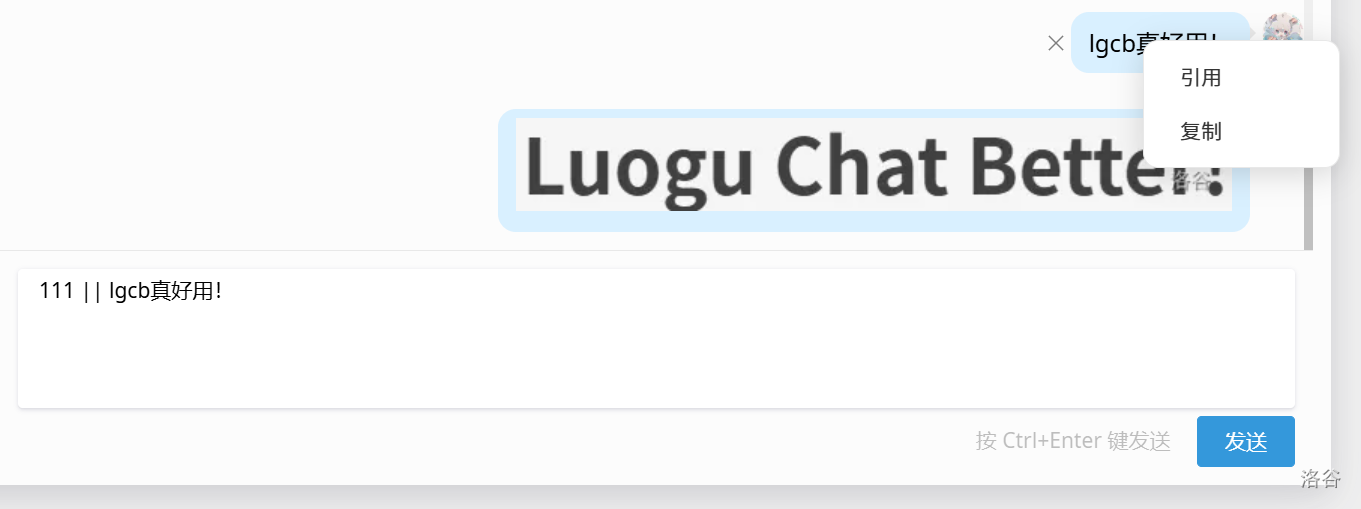The script is abbreviated as `LGCB`, derived from the initials of its name.
## 使用## Features
左键点击消息会弹出菜单,有复制和回复消息功能。- **Automatic Input Focus**:Automatically focuses the chat input box when the chat page loads, when a chat input box appears, and after sending a message.- **Quote Reply**: Left-clicking a message opens a menu with quote and copy options. Quoting converts the message content into MarkDown and inserts it into the chat input box.- **Message Copying**: Quickly copies the text content of a message.- **Image Display**: Supports displaying images in private chats when they are written using valid Markdown image syntax.- **Message Styling**: Customizes message bubble colors, text colors, and rounded corners.
给出正确的图片 `Markdown` 可以在私信中显示图片。## Screenshot
其他大部分为样式优化。
## 设置## Download
整个脚本最前端,有一块代码(已经标识出)。Go to [releases](https://github.com/Kevin20121107/Luogu-Chat-Better/releases) to download the newest version.
你可以修改参数的值来实现不同的效果。## Usage
### 自己消息1. Open the Luogu private chat page.2. Select a conversation and start messaging.3. The input box will automatically receive focus when appropriate.4. Left-click a message to open the action menu: - **Quote**: Inserts the message as a Markdown quote into the input box. - **Copy**: Copies the message's text content.5. To display images, use Markdown image syntax:
| 配置项 | 类型 | 默认值 | 作用 ||--------|------|--------|------|| `enableOwnColor` | 布尔值 | `true` | 是否启用自己消息的颜色修改 || `ownBgColor` | 字符串 | `"#d9f0ff"` | 自己消息气泡的背景色 || `ownTextColor` | 字符串 | `"#000000"` | 自己消息的文字颜色 || `enableOwnRadius` | 布尔值 | `true` | 是否为自己消息应用圆角化 | ```markdown  ```
### 对方消息## Settings
| 配置项 | 类型 | 默认值 | 作用 ||--------|------|--------|------|| `enableOtherColor` | 布尔值 | `false` | 是否启用对方消息的颜色修改 || `otherBgColor` | 字符串 | `""`(洛谷默认) | 对方消息气泡的背景色 || `otherTextColor` | 字符串 | `""`(洛谷默认) | 对方消息的文字颜色 || `enableOtherRadius` | 布尔值 | `true` | 是否为对方消息应用圆角 |At the beginning of the script, you can find the `CONFIG` object. Modify its values to customize the plugin's behavior.
### 引用回复| Configuration Item | Type | Default Value | Description || --- | --- | --- | --- || `enableOwnColor` | `boolean` | `true` | Whether to customize the background and text colors of your own messages || `ownBgColor` | `string` | `"#d9f0ff"` | Background color of your message bubbles || `ownTextColor` | `string` | `"#000000"` | Text color of your messages || `enableOwnRadius` | `boolean` | `true` | Whether to enable rounded corners for your messages || `enableOtherColor` | `boolean` | `false` | Whether to customize the other person's message colors || `otherBgColor` | `string` | `""` | Background color of the other person's message bubbles || `otherTextColor` | `string` | `""` | Text color of the other person's messages || `enableOtherRadius` | `boolean` | `true` | Whether to enable rounded corners for the other person's messages || `enableQuoteReply` | `boolean` | `true` | Whether to enable the message action menu, including quote and copy || `quoteSeparator` | `string` | `" \|\|"` | Separator inserted before quoted content |
| 配置项 | 类型 | 默认值 | 作用 ||--------|------|--------|------|| `enableQuoteReply` | 布尔值 | `true` | 是否启用消息点击弹出菜单功能 || `quoteSeparator` | 字符串 | `" \|\|"` | 引用时插入到输入框前的分隔符 |### Notes
## 安装- Color values must use the hexadecimal format `#RRGGBB`.- Setting `enableQuoteReply` to `false` disables the message action menu.- Automatic input focus works independently of the quote and reply settings.
你可以通过下面的方法安装:## Feedback
1. https://mine.xo.je/Forever_Rain/lgcb.user.jsThanks for using **Luogu Chat Better!**
2. https://www.luogu.com.cn/paste/nm978jz9If you encounter a bug or have a feature request, please create an [Issue](https://github.com/Kevin20121107/Luogu-Chat-Better/issues) on GitHub.
请尽可能使用第一个网址。Contributions and suggestions are welcome!
:::info[声明]{open}---
- 若您通过除[本剪贴板](https://www.luogu.com.cn/paste/nm978jz9)和[官方网址](https://mine.xo.je/Forever_Rain/lgcb.user.js)外的途径获得并安装该插件,或您对该插件代码进行修改,本插件对您个人或所属集体造成的任何损失不负责。
- 本插件源码可以通过 Tampermonkey 的管理面板查看源码,即认为已经开源。
- 使用问题或相关 Bug 可以通过私信向作者反馈。
- 集成该脚本在您的项目中请提前征得作者同意。
:::Translated to English by ChatGPT.