版本比较
Luogu Chat Better!
正文
增加 50 行删除 257 行
1123345567789910111112131415161718191314151617182119202321222523242725262927283132333435363738394041293031323334353643444546474849373839405152535455565758596061626364656667686970717273747576777879808182838485868788899091929394959697989910010110210310410510610710810911011111211311411511611711811912012112212312412512612712812913013113213313413513613713813914014114214314414514614714814915015115215315415515615715815916016141421631641651661674344169170171172173174175176177178179180181182183454647484950515253545556571851861871881891901911921931941951961971981992002012022032042052062072082092102112122132142152162172182192202212222232242252262272282292302312322332342352362372382392402412422432442452462472482492505859252606162632546465256666725868692607071262727326426526626726826927027127227327427527627727827928028174## 前言# Luogu-Chat-Better
在洛谷私信发一大段消息的时候,由于无法自动聚焦输入框,经常要点击,极大地影响了我们水谷的速度,所以做了这个插件(## Introduction
目前有自动聚焦输入框、更改自己的消息颜色和私信图片显示功能。Luogu Chat Better! is a userscript designed to improve the messaging experience.
## 源码When sending messages, users may need to manually click the input box to focus it. This script solves this problem by automatically focusing the chat input box when appropriate, making conversations smoother and more convenient.
将代码放到油猴里就行了。The script is abbreviated as `LGCB`, derived from the initials of its name.
整个脚本最前端,有一块代码:## Features
```javascriptconst COLOR_CONFIG = { enableOwnMessageColor: true,// 是否启用自定义颜色 ownMessageBgColor: "#d9f0ff",// 自己消息框的背景色 ownMessageTextColor: "#000000" // 自己消息的文字颜色};```- **Automatic Input Focus**:Automatically focuses the chat input box when the chat page loads, when a chat input box appears, and after sending a message.- **Quote Reply**: Left-clicking a message opens a menu with quote and copy options. Quoting converts the message content into MarkDown and inserts it into the chat input box.- **Message Copying**: Quickly copies the text content of a message.- **Image Display**: Supports displaying images in private chats when they are written using valid Markdown image syntax.- **Message Styling**: Customizes message bubble colors, text colors, and rounded corners.
你可以修改参数的值来实现不同的效果。## Screenshot
- `enableOwnMessageColor`:是否启用颜色修改功能,`true` 则启用;`false` 则不启用。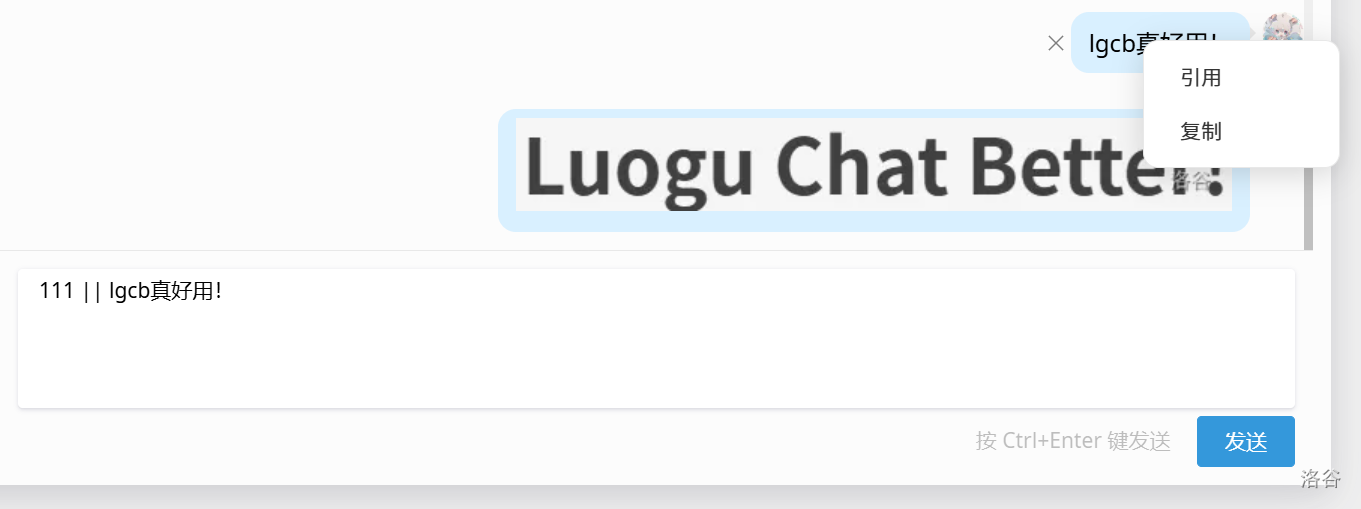
- `ownMessageBgColor`:自己消息框的背景色,十六进制格式。## Download
- `ownMessageTextColor`:自己消息的文字颜色,十六进制格式。Go to [releases](https://github.com/Kevin20121107/Luogu-Chat-Better/releases) to download the newest version.
:::info[Luogu Chat Better!]{open}## Usage
```javascript// ==UserScript==// @name Luogu Chat Better!// @namespace http://tampermonkey.net/// @version 3.1// @description 洛谷私信 自动聚焦输入框 + 图片显示 + 颜色修改// @author Forever_Rain// @match https://www.luogu.com.cn/chat// @match https://www.luogu.com.cn/chat/*// @grant none// ==/UserScript==1. Open the Luogu private chat page.2. Select a conversation and start messaging.3. The input box will automatically receive focus when appropriate.4. Left-click a message to open the action menu: - **Quote**: Inserts the message as a Markdown quote into the input box. - **Copy**: Copies the message's text content.5. To display images, use Markdown image syntax:
/* 用户自定义颜色配置 */const COLOR_CONFIG = { enableOwnMessageColor: true,// 是否启用自定义颜色 ownMessageBgColor: "#d9f0ff",// 自己消息框的背景色 ownMessageTextColor: "#000000" // 自己消息的文字颜色};/* 用户自设部分 */ ```markdown  ```
// 自动聚焦输入框(function() { 'use strict'; const inputSelectors = [ 'textarea.lg-message-input', 'textarea[name="content"]', '.chat-input textarea', '.message-editor textarea', 'div[contenteditable="true"]', 'textarea[placeholder*="私信"]', 'textarea[placeholder*="消息"]', 'textarea.lfe-form-sz-middle', '.input-wrap textarea', '#chat-input textarea' ]; const sendButtonSelectors = [ 'button[type="submit"]', 'button.send-btn', 'button:has(span:contains("发送"))', '.send-button', '.chat-send-btn' ]; function getInputElement() { for (const selector of inputSelectors) { const element = document.querySelector(selector); if (element && element.offsetParent !== null) { // 确保可见 return element; } } const allTextareas = document.querySelectorAll('textarea'); for (const ta of allTextareas) { if (ta.offsetParent !== null && (ta.placeholder?.includes('私信') || ta.placeholder?.includes('消息') || ta.closest('.chat-area'))) { return ta; } } const editableDivs = document.querySelectorAll('[contenteditable="true"]'); for (const div of editableDivs) { if (div.offsetParent !== null && div.closest('.chat-area')) { return div; } } return null; } function focusInput(retries = 3) {// 重试:3次 const input = getInputElement(); if (input) { input.focus(); if (input.isContentEditable) { const range = document.createRange(); const sel = window.getSelection(); range.selectNodeContents(input); range.collapse(false); // 折叠到末尾 sel.removeAllRanges(); sel.addRange(range); } } else if (retries > 0) { setTimeout(() => focusInput(retries - 1), 100);// 间隔0.1s } } function isSendButton(el) { if (!el) return false; const tag = el.tagName.toLowerCase(); if (tag === 'button' || tag === 'input' && (el.type === 'submit' || el.type === 'button')) { const text = el.innerText || el.value || ''; if (text.includes('发送') || text.includes('Send')) return true; if (el.classList && (el.classList.contains('send-btn') || el.classList.contains('chat-send-btn'))) return true; if (el.getAttribute('aria-label') === '发送') return true; } if (el.querySelector && el.querySelector('svg[data-icon="paper-plane"], svg[data-icon="send"]')) return true; return false; } function onDocumentClick(e) { let target = e.target; while (target && target !== document.body) { if (isSendButton(target)) { setTimeout(focusInput, 120); break; } target = target.parentElement; } } function onKeyDown(e) { // 检测 Ctrl+Enter if (e.ctrlKey && e.key === 'Enter') { const activeEl = document.activeElement; if (activeEl && (activeEl.tagName === 'TEXTAREA' || activeEl.isContentEditable)) { setTimeout(focusInput, 100); } } } document.addEventListener('click', onDocumentClick, true); document.addEventListener('keydown', onKeyDown); const observer = new MutationObserver((mutations) => { for (const mutation of mutations) { if (mutation.type === 'childList' && mutation.addedNodes.length) { const activeTag = document.activeElement?.tagName; if (activeTag !== 'TEXTAREA' && !document.activeElement?.isContentEditable) { const input = getInputElement(); if (input && document.hasFocus()) { setTimeout(() => { if (document.activeElement !== input) { input.focus(); } }, 200); } } break; } } }); observer.observe(document.body, { childList: true, subtree: true });## Settings
// 页面初始加载后,如果已有输入框且未聚焦,尝试聚焦一次(可选) window.addEventListener('load', () => { setTimeout(focusInput, 500); });})();At the beginning of the script, you can find the `CONFIG` object. Modify its values to customize the plugin's behavior.
// 图片显示(function() { 'use strict'; // 要搜索的 class 列表 const searchClasses = ['message']; function replacePics(element) { if (!element) return; const walker = document.createTreeWalker(element, NodeFilter.SHOW_ELEMENT, { acceptNode: function(node) { if (node.classList && searchClasses.some(className => node.classList == className)) { return NodeFilter.FILTER_ACCEPT; } return NodeFilter.FILTER_SKIP; } }, false);| Configuration Item | Type | Default Value | Description || --- | --- | --- | --- || `enableOwnColor` | `boolean` | `true` | Whether to customize the background and text colors of your own messages || `ownBgColor` | `string` | `"#d9f0ff"` | Background color of your message bubbles || `ownTextColor` | `string` | `"#000000"` | Text color of your messages || `enableOwnRadius` | `boolean` | `true` | Whether to enable rounded corners for your messages || `enableOtherColor` | `boolean` | `false` | Whether to customize the other person's message colors || `otherBgColor` | `string` | `""` | Background color of the other person's message bubbles || `otherTextColor` | `string` | `""` | Text color of the other person's messages || `enableOtherRadius` | `boolean` | `true` | Whether to enable rounded corners for the other person's messages || `enableQuoteReply` | `boolean` | `true` | Whether to enable the message action menu, including quote and copy || `quoteSeparator` | `string` | `" \|\|"` | Separator inserted before quoted content |
let node; while (node = walker.nextNode()) { var a = node.innerHTML.indexOf("; if(b == -1) break; var c = node.innerHTML.indexOf(")", b); if(c == -1) break; var link = node.innerHTML.substr(b + 2, c - b - 2); var text = node.innerHTML.substr(a + 2, b - a - 2); if(text == '') text = link; var regex = node.innerHTML.substr(a, c - a + 1); node.innerHTML = node.innerHTML.replace(regex, `<img style = "max-width: 516px;" src="${link}" alt="${text}">`); a = node.innerHTML.indexOf(" on GitHub.
基本把常见的输入框都涵盖了,所以把 `@match` 的值改一下也可以当其他网站的插件用。Contributions and suggestions are welcome!
1. 匹配常见的 `textarea` 类名、`contenteditable` 区域、占位符等。---
2. 遍历页面上所有 `<textarea>`,筛选出可见且占位符包含“私信”/“消息”或在聊天区域内的元素。
3. 查找 `[contenteditable="true"]` 且位于聊天区域的元素。
可见性通过 `offsetParent !== null` 判断,确保输入框未被隐藏。
### 聚焦输入框
1. 调用 `getInputElement()` 获取输入框元素。2. 若找到,则执行 `input.focus()`。- 对于可编辑的 `contenteditable` 元素,将光标折叠到末尾。- 若未找到,则在 $100$ ms 后重试,最多重试 $3$ 次。
### 流程图

:::Translated to English by ChatGPT.