版本比较
插件 & 主题

正文
增加 113 行删除 16 行
123456567821 行未改动3031323336343536373839404144424344454647484950515452535455585657585962606162656364656667686970717273747576777879808182838485868788899091929394959697989910010110210310410510610710810911011111211311411511611711811912012112212312412512612712812913013113213313413513613713813914014114214314414514614714814915015115215315415515615715815916016116216316416516616716868169170171711721731741757517617717817918018118282831831841851868 行未改动1951961971981001992002012021041052032042052068 行未改动# 一些好用的落咕插件
许多内容来源于网络,侵删。
greasyfork 这里用的是镜像,因为有时候 DNS 问题上不去。
exlg 倒了,官网死了(可能是没续费),有一些插件要更新。
## 前置:油猴、Stylus安装### [安装指导](https://www.luogu.com.cn/problem/U333110)21 行未改动下载链接:[安装oiso++](https://oiso.luogu.link/index.min.user.js),装好滑到页面顶图标上单击设置### 3. Luogu Search AnyWhere ~~luogu5.0~~官方在愚人节玩笑中退出的搜人、搜题工具,这是真实的!
下载连接:[安装Luogu Search AnyWhere,进链接点击安装](https://greasyforks.org/zh-CN/scripts/442416-luogu-search-anywhere),装好就可以在右下角找到搜索图标。下载连接:[安装Luogu Search AnyWhere,进链接点击安装](https://greasyfork.org/zh-CN/scripts/442416-luogu-search-anywhere),装好就可以在右下角找到搜索图标。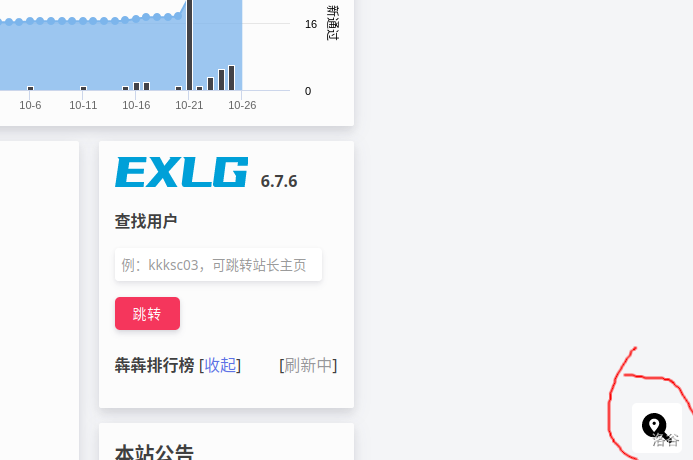
### 4. Luogu Task小工具,针对提单的优化,~~挺方便内卷的~~。

下载连接:[安装Luogu Task,进链接点击安装](https://greasyforks.org/zh-CN/scripts/424363-luogu-tasks)下载连接:[安装Luogu Task,进链接点击安装](https://greasyfork.org/zh-CN/scripts/424363-luogu-tasks)### 5. 洛谷自动签到
下载连接:[安装洛谷自动签到,进链接点击安装](https://greasyfork.org/zh-CN/scripts/393551-洛谷自动签到)
### 6. 洛谷通过题目比较器卷王专属,看看跟别人有多少差距
下载链接:[安装洛谷通过题目比较器,进链接点击安装](https://greasyforks.org/zh-CN/scripts/392308-%E6%B4%9B%E8%B0%B7%E9%80%9A%E8%BF%87%E9%A2%98%E7%9B%AE%E6%AF%94%E8%BE%83%E5%99%A8-for-fe)下载链接:[安装洛谷通过题目比较器,进链接点击安装](https://greasyfork.org/zh-CN/scripts/392308-%E6%B4%9B%E8%B0%B7%E9%80%9A%E8%BF%87%E9%A2%98%E7%9B%AE%E6%AF%94%E8%BE%83%E5%99%A8-for-fe)
### 7. 获取洛谷部分页面源代码
下载链接:[link](https://greasyforks.org/zh-CN/scripts/469489-luogu-copymarkdown)下载链接:[link](https://greasyfork.org/zh-CN/scripts/469489-luogu-copymarkdown)
### 8. 洛谷显示他人咕值
下载链接:[安装洛谷显示他人咕值,进链接点击安装](https://greasyforks.org/scripts/390180)下载链接:[安装洛谷显示他人咕值,进链接点击安装](https://greasyfork.org/scripts/390180)
### 9. 卷王监视器代码复制到油猴,记得修改监视名单,[link](9d2lqu16)代码复制到油猴,记得修改监视名单:::info[code]```js// ==UserScript==// @name m// @namespace https://www.luogu.com.cn/m// @description try to take over the world!// @match https://www.luogu.com.cn/m// @require https://unpkg.com/sweetalert2/dist/sweetalert2.all.min.js// ==/UserScript==var team =["fzh3876","syh110213","chenbs","hzh17","cbh_bbh","OvO_CYX","Hcy114514","wsdyz2010","__pyx__","cyThing","Anthony2011sfh"];var userlist = team;var First = 1;var cnt = 0;var lst;var pages = 1;<!-- 初始检查做题记录页数,建议设置为 1-2 -->var cd = 10000; <!-- 自动检查每个人时间间隔,建议保持为 10000,以免 GG-->var str,id;var colors=['rgb(191, 191, 191)','rgb(254, 76, 97)','rgb(243, 156, 17)','rgb(255, 193, 22)','rgb(82, 196, 26)','rgb(52, 152, 219)','rgb(157, 61, 207)','rgb(14, 29, 105)'];var name="灰红橙黄绿蓝紫黑";var res = "";async function PARSE(){ document.title = "getting"; if(First && cnt == userlist.length - 1){ First = 0;cnt = 0;clearInterval(id);setInterval(await PARSE(),cd)} cnt=(cnt+1)%userlist.length; var user=userlist[cnt]; var Pagenum=1;if(First)Pagenum=pages; for(;Pagenum>0;Pagenum--) { var httpRequest=new XMLHttpRequest(); httpRequest.open('GET','https://www.luogu.com.cn/record/list?user='+user+'&status=12&page='+Pagenum,false); await httpRequest.send(); if(httpRequest.readyState==4&&httpRequest.status==200) { var content=httpRequest.responseText; var patten=/decodeURIComponent\(".*?"\)/; content=patten.exec(content)[0]; content=content.substr(20,content.length-22); content=JSON.parse(decodeURIComponent(content)); var prob,col,pid,title,rid; for(var i=Math.min(content.currentData.records.result.length-1,19);i>=0;i--) if(content.currentData.records.result[i].status==12&&content.currentData.records.result[i].id>lst[cnt]) { prob=content.currentData.records.result[i].problem; rid = content.currentData.records.result[i].id; col=colors[prob.difficulty]; pid=prob.pid; title=prob.title; document.getElementById('store').childNodes[0].innerHTML +='<tr><td>'+user+'</td><td>'+pid+'</td><td>'+ "<a style='color:"+col+"' href='https://www.luogu.com.cn/problem/"+pid+"' target='_blank'>" +title+"</a></td><td>"+ "<a style='color:"+col+"' href='https://www.luogu.com.cn/record/"+rid+"' target='_blank'>link</a></td></tr>"; if(!First) { res += user+" 刚刚卷了"+name[prob.difficulty]+"题 "+pid+" "+title+"\n\n"; if(res!= ""){ Swal.fire({ title: "Get result", text: res, icon: "success", confirmButtonColor: "#3498db", confirmButtonText: "关闭" }).then((result) => {if (result.isConfirmed){ res = "";}}); } } lst[cnt]=content.currentData.records.result[i].id; } } } document.title = "ok";}function onSearch(obj){ var storeId=document.getElementById('store'); var rowsLength=storeId.rows.length; var key=document.getElementById('key').value; for(var i=1;i < rowsLength;i++) { var searchText=storeId.rows[i].cells[0].innerHTML; if(key=="*"||searchText.match(key)) storeId.rows[i].style.display=''; else storeId.rows[i].style.display='none'; }};(async function() { 'use strict'; <!-- 观察成员列表 --> str='<div><select onchange="onSearch()" name="key" id="key"><option value="*">*</option>'; for(var i=0;i < userlist.length;i++) str+='<option value="'+userlist[i]+'">'+userlist[i]+'</option>'; str+='</select></div><table id="store" style="white-space: nowrap;"><tr><th>用户</th><th>题号</th><th>标题</th><th>记录</th></tr></table>'; document.body.innerHTML = str; document.title = "m"; lst = Array(); for(i=0;i < userlist.length;i++)lst[i]=0; //for(i=0;i < userlist.length;i++) await PARSE(true); id = setInterval(await PARSE,1000);})();```:::
### 10. 洛谷主页显示[link](https://greasyforks.org/zh-CN/scripts/486636-%E6%B4%9B%E8%B0%B7%E4%B8%BB%E9%A1%B5%E6%98%BE%E7%A4%BA)[link](https://greasyfork.org/zh-CN/scripts/486636-%E6%B4%9B%E8%B0%B7%E4%B8%BB%E9%A1%B5%E6%98%BE%E7%A4%BA)
### 11. 洛谷“问题跳转”样式优化[link](https://greasyforks.org/zh-CN/scripts/512913-%E6%B4%9B%E8%B0%B7-%E9%97%AE%E9%A2%98%E8%B7%B3%E8%BD%AC-%E6%A0%B7%E5%BC%8F%E4%BC%98%E5%8C%96)[link](https://greasyfork.org/zh-CN/scripts/512913-%E6%B4%9B%E8%B0%B7-%E9%97%AE%E9%A2%98%E8%B7%B3%E8%BD%AC-%E6%A0%B7%E5%BC%8F%E4%BC%98%E5%8C%96)
### 12.洛谷讨论区显示时间改成具体时间@cff_0102 的杰作。[link](https://greasyforks.org/zh-CN/scripts/474901-%E6%B4%9B%E8%B0%B7%E8%AE%A8%E8%AE%BA%E5%8C%BA%E6%98%BE%E7%A4%BA%E6%97%B6%E9%97%B4%E6%94%B9%E6%88%90%E5%85%B7%E4%BD%93%E6%97%B6%E9%97%B4)[link](https://greasyfork.org/zh-CN/scripts/474901-%E6%B4%9B%E8%B0%B7%E8%AE%A8%E8%AE%BA%E5%8C%BA%E6%98%BE%E7%A4%BA%E6%97%B6%E9%97%B4%E6%94%B9%E6%88%90%E5%85%B7%E4%BD%93%E6%97%B6%E9%97%B4)
### 13. luogu usercard[link](https://www.luogu.me/paste/up34j8z0)
### 14. 洛谷新前端左侧导航栏自定义[link](https://greasyfork.org/zh-CN/scripts/536659-洛谷新前端左侧导航栏自定义)### 15. 名字菜单[link](https://www.luogu.com/paste/up34j8z0)## 主题:装完Stylus再安装!更多的去 userstyles 上找。### 1. Simple - Luogu和Smart - Luogu
8 行未改动### 氩洛谷由于userstyles.org进不去,因此推荐手动安装
进入链接->,[源码](https://www.luogu.com.cn/paste/kwct7tlp)进入链接->,[源码](https://www.luogu.com.cn/article/dm3czp4u)

点击复制,不要管上面的乱码
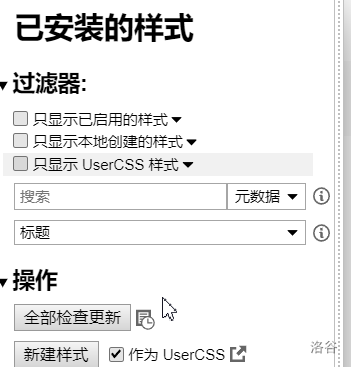
打开Stylus,**勾起新建样式后的UserCSS,然后新建,输入源码保存**
8 行未改动